
The Salesforce Platform Integration Architect Exam tests more than knowledge of APIs. It measures whether a candidate can study a business requirement, identify the correct integration pattern, and defend the architecture under real constraints. Salesforce describes this credential as focused on assessing architecture environments and designing scalable technical solutions that meet end-to-end integration requirements on the Salesforce Platform. That means the exam is not asking, “Do you know REST?” It is asking, “Can you choose the right integration approach when latency, data ownership, volume, security, and failure handling all matter?”

How to Think Like an Integration Architect?
Before choosing any tool, read the scenario for five decision signals: latency, data ownership, data volume, transaction dependency, and failure tolerance. These signals usually reveal the correct pattern.
If the user must wait for an answer, the solution may be synchronous. If downstream processing can happen later, asynchronous messaging may be safer. If millions of records must move on a schedule, batch processing is usually better. If Salesforce should show external data without owning it, virtualization may be the cleaner design.
Salesforce’s official integration patterns include Remote Process Invocation, Request and Reply; Remote Process Invocation, Fire and Forget; Batch Data Synchronization; Remote Call-In; UI Update Based on Data Changes; and Data Virtualization. These patterns provide the foundation for many scenario-based questions in the exam.

1. Remote Process Invocation: Request and Reply
This scenario appears when Salesforce calls an external system and waits for a response. Salesforce defines Request and Reply as a pattern where Salesforce invokes a process on a remote system, waits for completion, and tracks state based on the remote response.
This fits real-time use cases such as tax calculation, payment authorization, credit validation, shipping-rate lookup, or inventory confirmation. The exam signal is simple: the user or process cannot continue without the answer.
The common trap is choosing an asynchronous option when the business requirement needs an immediate response. Platform Events or batch jobs may be technically possible, but they do not satisfy a user-facing decision that must happen now. A stronger answer also considers timeout behavior, error messaging, fallback logic, and whether the external system is reliable enough to participate in a user transaction.
2. Remote Process Invocation: Fire and Forget
Fire and Forget is used when Salesforce sends a request to another system but does not need to wait for the full process to finish. Salesforce describes this pattern as invoking a remote process without waiting for completion; the remote system acknowledges the request and control returns to Salesforce.
This pattern is common when Salesforce must notify ERP, billing, fulfillment, onboarding, or warehouse systems after a business event. For example, when an opportunity is closed, Salesforce can send order details to an ERP system for later processing.
The exam signal is that Salesforce must start a downstream process, but the user does not need the result immediately. The risky answer is a tightly coupled synchronous call that makes the Salesforce save operation depend on a slower external process. A better architecture uses durable messaging, retry handling, correlation IDs, logging, and monitoring.

3. Batch Data Synchronization
Batch Data Synchronization is tested when large volumes of data must move between Salesforce and another system on a schedule. Salesforce defines this pattern as creating or refreshing Salesforce data from an external system, or sending Salesforce changes to an external system, with updates performed in batch.
This fits nightly customer updates, product catalog loads, data warehouse extracts, historical imports, and periodic reconciliation jobs. The exam signal is high volume with acceptable delay.
The wrong answer is often a real-time design that creates unnecessary load and complexity. If the business only needs updated data once per night, synchronous APIs are usually overkill. A strong answer considers external IDs, upsert strategy, duplicate handling, partial failures, retry files, data quality rules, and reconciliation reporting.
4. Remote Call-In to Salesforce
Remote Call-In occurs when an external system creates, reads, updates, or deletes Salesforce data. Salesforce lists this as a pattern where a remote system interacts with data stored in Salesforce.
This appears in scenarios involving ecommerce platforms, mobile apps, partner portals, middleware, legacy systems, or external service applications that need access to Salesforce records.
The exam signal is direction. If the external system initiates the interaction and Salesforce is the target, think Remote Call-In. However, the correct answer should not stop at “use REST API.” It should consider OAuth, connected apps, integration users, object permissions, field-level security, API limits, transaction size, and monitoring. A technically working integration can still be a poor architecture if it ignores security and governance.
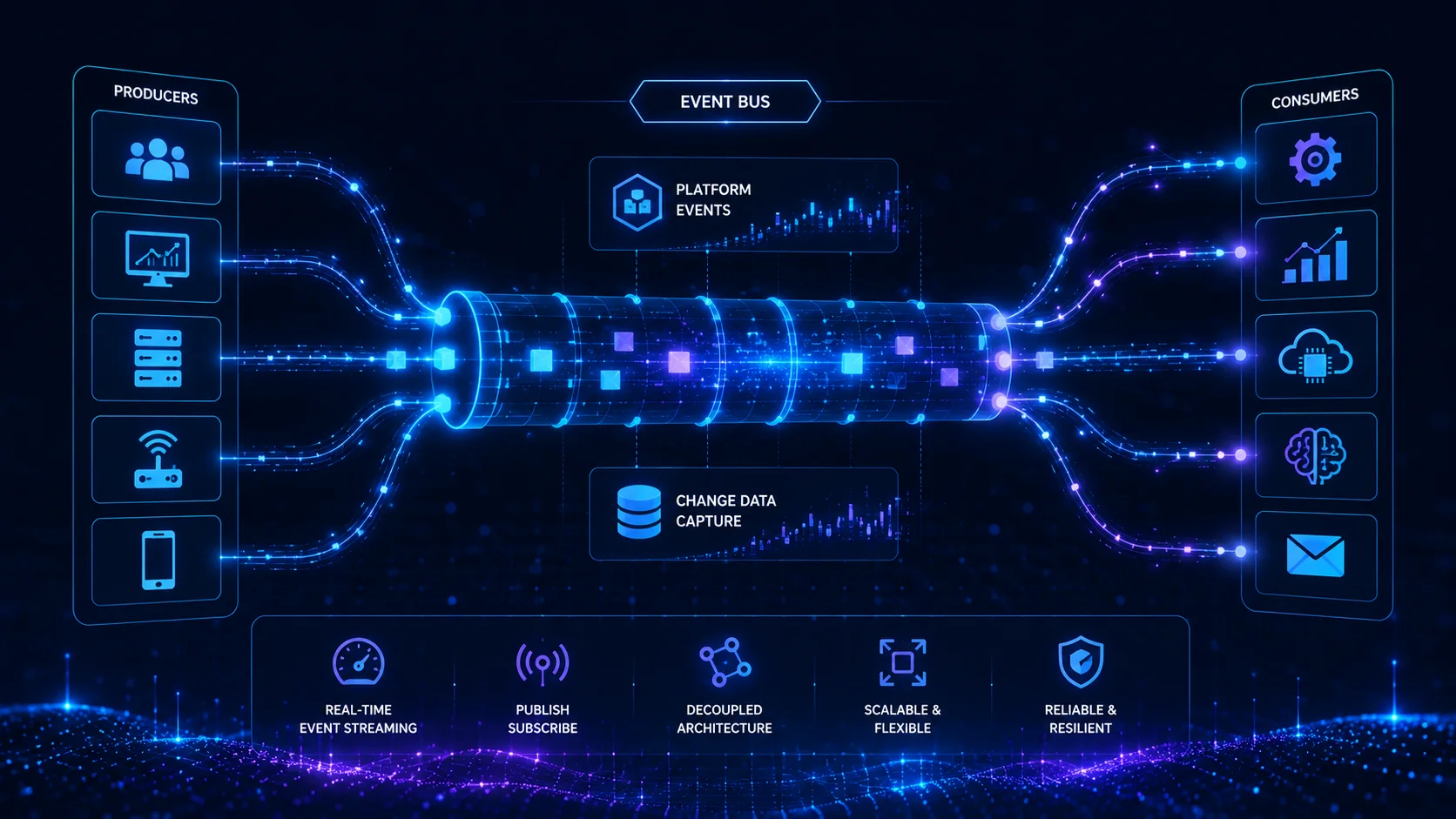
5. Event-Driven Architecture for Near Real-Time Integration
Event-driven architecture is important for near real-time communication without tight coupling. Salesforce’s event-driven architecture guidance identifies tools such as Platform Events, Change Data Capture, Pub/Sub API, Outbound Messages, and Event Relays. These tools allow systems to communicate through events rather than direct one-to-one dependencies.
Salesforce’s developer documentation explains event-driven architecture using producers, consumers, and channels, and states that it is suitable for large distributed systems because it decouples event producers from event consumers.
This fits scenarios such as Account Updated, Order Submitted, Case Escalated, Payment Received, or Subscription Cancelled, where multiple systems may need to react independently.
The exam trap is treating events as a universal answer. Event-driven design is not ideal when a human is waiting for an immediate response. It is also not always needed for data that changes infrequently and can be handled by batch synchronization. Choose events when decoupling, scalability, and near real-time notification matter.
6. UI Update Based on Data Changes
This pattern is sometimes ignored by candidates, but it is part of Salesforce’s official integration pattern family. It applies when the Salesforce user interface must reflect data changes in a timely way.
A practical example is a service console where an agent needs to see that a case was escalated, an entitlement changed, or a back-office update affected the current record. The purpose is not simply to copy data. The purpose is to keep the user experience aligned with meaningful data changes.
The exam signal is user awareness. If the question emphasizes real-time or near real-time visibility inside Salesforce, avoid jumping immediately to batch processing. Also avoid treating this as the same as Remote Call-In. Remote Call-In is about an external system acting on Salesforce data. UI Update Based on Data Changes is about keeping the interface responsive to important data changes.
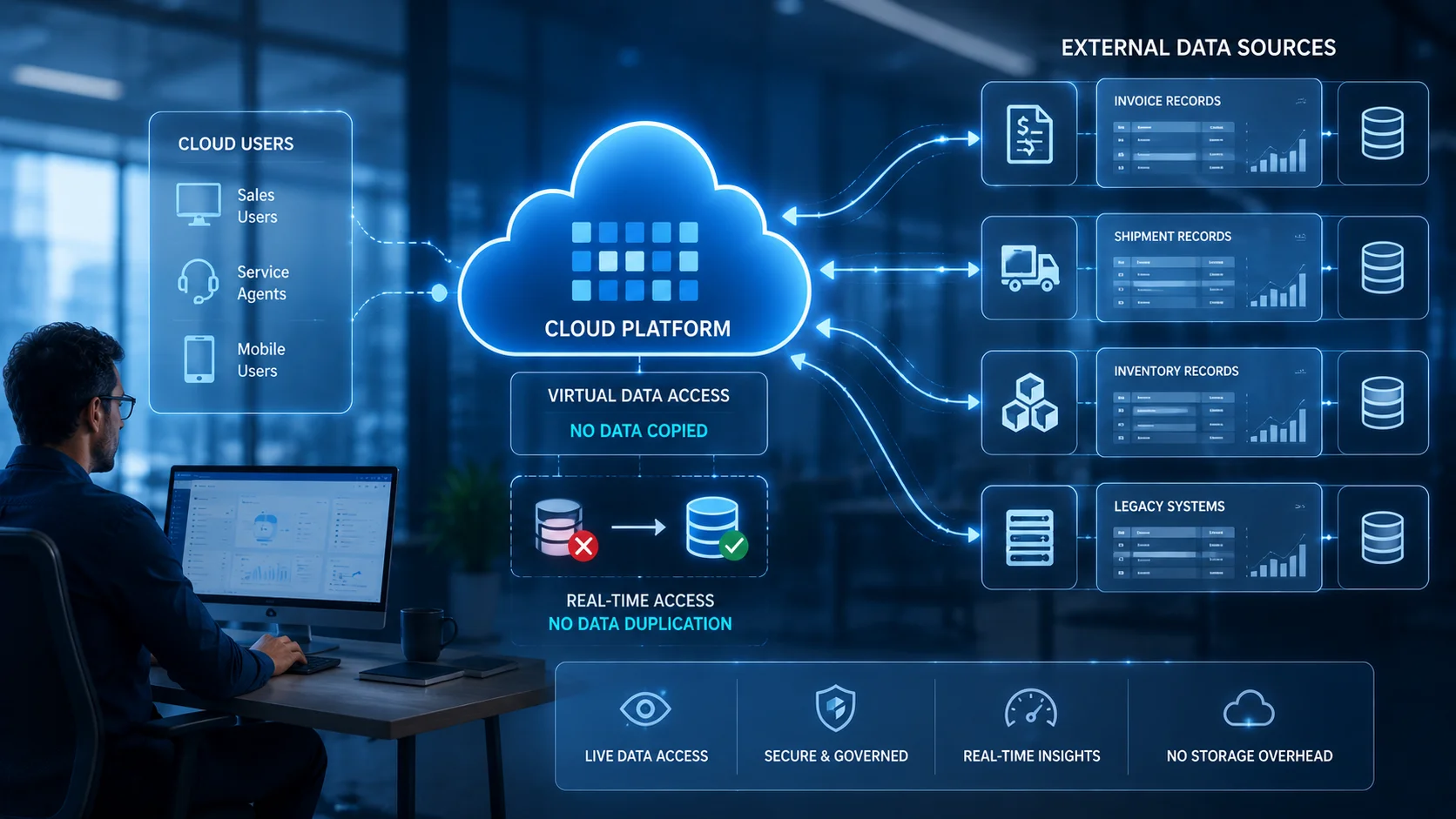
7. Data Virtualization with Salesforce Connect
Data virtualization is one of the most important architectural scenarios because it tests whether a candidate knows when not to replicate data. Salesforce Connect uses external data sources to access data stored outside Salesforce, and external objects allow Salesforce users to interact with that external data in a Salesforce-like way.
This fits invoices, claims, shipments, policy records, inventory, transaction history, or legacy data that should remain in the original system of record. The advantage is reduced duplication, cleaner ownership, and access to current external data. The trade-off is dependency on external system availability and performance.
The exam signal is that users need visibility, but Salesforce does not need to own the data. Choose virtualization when external data must stay external. Choose replication when Salesforce needs reporting, automation, sharing, search performance, or offline reliability.
8. Middleware and API-Led Integration
Middleware is often the right choice when point-to-point integration becomes difficult to govern. It can help with routing, transformation, orchestration, protocol conversion, security mediation, monitoring, and reuse.
The exam signal is complexity across multiple systems. If Salesforce must integrate with ERP, billing, ecommerce, data warehouse, and support platforms, middleware can reduce duplication and centralize control. However, middleware should not be selected automatically. If the requirement is simple, low volume, and point-to-point, direct integration may be easier to maintain.
The trap is overengineering. A good architect does not add middleware just because it sounds enterprise-grade. A good architect adds middleware when reuse, governance, transformation, monitoring, or multi-system orchestration justifies the added layer.

How to Answer Salesforce Platform Integration Architect Practice Questions?
Good Salesforce Platform Integration Architect Practice Test Questions should not only ask which API to use. They should force you to identify the pattern first.
Use this elimination method:
- Decide whether the process is synchronous or asynchronous.
- Identify the system of record.
- Check whether the data must be copied or only viewed.
- Estimate volume and timing.
- Evaluate what happens when one system fails.
This approach is more useful than memorizing feature names. A strong Platform Integration Architect Exam Preparation Course should train candidates to read scenario clues, reject attractive but risky answers, and choose the pattern that best satisfies the business requirement.
The Core Insight
The Salesforce Platform Integration Architect Exam is a test of architectural reasoning. Request and Reply support immediate dependency. Fire and Forget supports decoupled downstream processing. Batch Data Synchronization handles volume and scheduled consistency. Remote Call-In allows external systems to work with Salesforce data. Event-driven architecture supports scalable near real-time communication. UI Update Based on Data Changes keeps the user experience aligned with important record changes. Data virtualization prevents unnecessary replication. Middleware adds value when integration complexity requires governance and reuse. The most important rule is simple: patterns come before products. Candidates who learn to identify latency, ownership, volume, transaction dependency, and failure tolerance will be better prepared than candidates who only memorize APIs.
Also Read:
How to Create a 30-Day Study Plan for Your Salesforce Exam?
The Future of Salesforce Certifications: Trends and Predictions