
Candidates preparing for the Public Sector Solutions Exam frequently underestimate the technical depth required around Salesforce OmniStudio. The exam does not simply test familiarity with these tools. It tests whether a candidate understands how FlexCards, OmniScripts, and DataRaptors function as an integrated system within government and public agency contexts. This article addresses that distinction directly, moving beyond surface-level definitions to explain the architectural logic, the configuration trade-offs, and the exam-relevant nuances that standard study guides tend to skip.
OmniStudio, originally developed by Vlocity and acquired by Salesforce in 2020, was purpose-built for industries requiring complex, guided user interactions and high-volume data aggregation. Public sector deployments commonly involve:
- Multi-agency data environments with inconsistent record formats
- Layered eligibility rules that change with legislative cycles
- Stringent compliance requirements governing data access and auditability
- Self-service portals for constituents with varying levels of digital literacy
Understanding why each component was designed the way it was helps candidates’ reason through unfamiliar Salesforce Public Sector Solutions practice test questions rather than relying on memorization alone.

FlexCards: Contextual Data Display at the Point of Service
FlexCards are the presentation layer of OmniStudio. They render summarized, contextual information drawn from multiple data sources directly on a Lightning record page, community portal, or console view. In public sector implementations, this typically means surfacing constituent profile data, case statuses, benefit enrollment summaries, or service request histories without requiring a caseworker to navigate across multiple objects or tabs.
Key Characteristics of FlexCards
- Declarative configuration: Built without Apex, using a visual designer that maps data sources to display elements
- Conditional visibility: Fields, sections, and actions can show or hide based on field values or data conditions
- Action triggers: Cards can launch OmniScripts, open URLs, invoke Integration Procedures, or display child FlexCards
- Nested architecture: Child FlexCards can be embedded within parent cards to represent related data hierarchically
- LWC publication: FlexCards can be published as Lightning Web Components for deployment on Experience Cloud sites
FlexCard vs. Lightning Web Component: When to Use Which
| Criteria | FlexCard | Custom LWC |
| Build approach | Declarative, no-code | Apex + JavaScript required |
| Best for | Read-oriented, aggregated display | Complex transactional logic |
| Maintainability | Low-code, admin-friendly | Requires developer resources |
| Data sources | DataRaptor, SOQL, REST, Integration Procedure | Any |
| Public sector fit | Caseworker dashboards, constituent summaries | Real-time processing, custom UI logic |
From an exam standpoint, FlexCards are optimal for read-oriented, aggregated displays that need low-code maintainability. The Public Sector Solutions exam sample questions in this area often test whether a candidate can match a described business need to the correct OmniStudio component.
One architectural detail that exam candidates frequently overlook: FlexCards published as standalone LWCs can be deployed across Experience Cloud sites used for constituent self-service portals. This is directly relevant to government digital service modernization initiatives where agencies must provide accessible, authenticated, web-based access to benefits and case information.
OmniScripts: Guided Processes for Complex Public Interactions
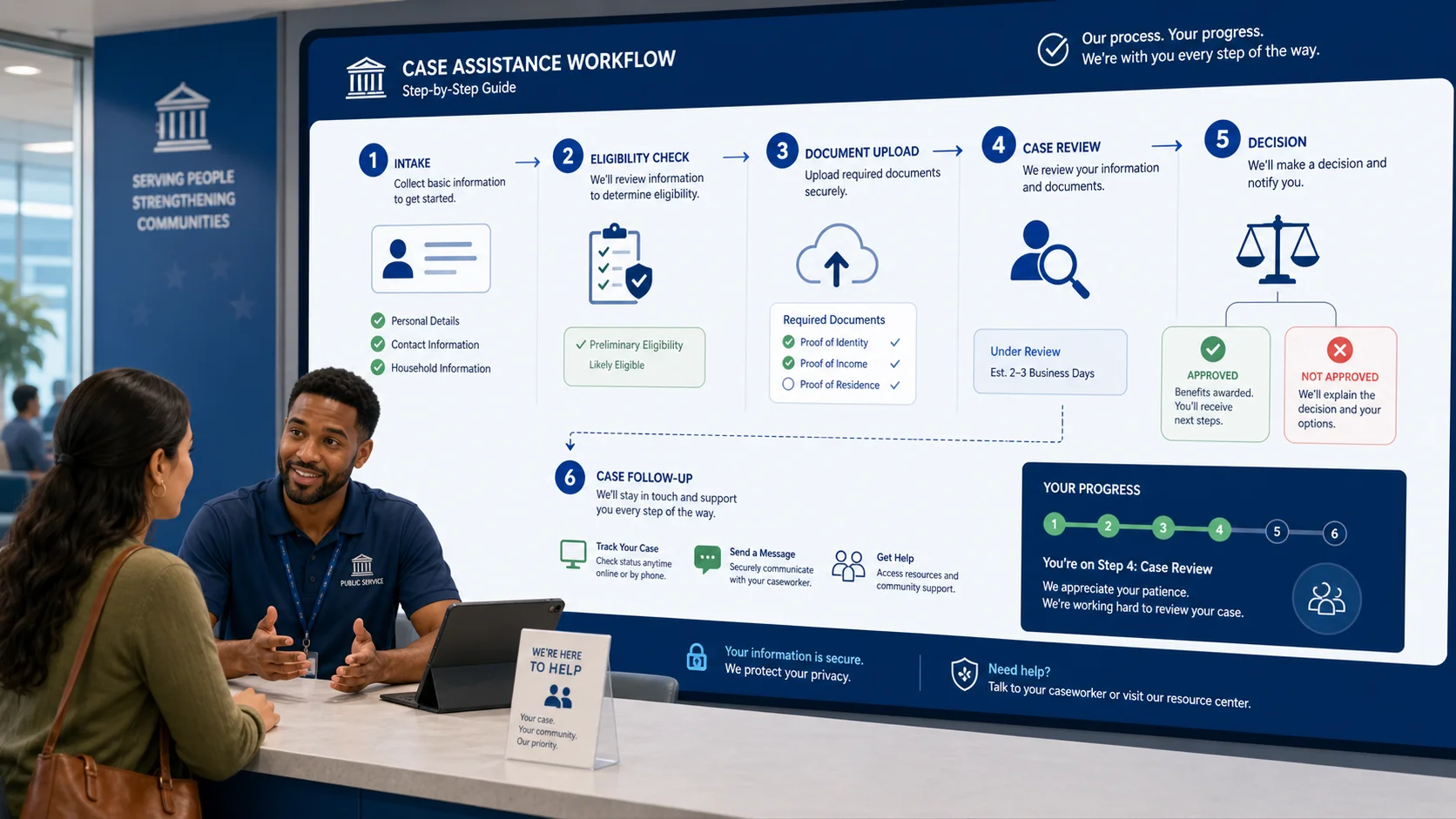
OmniScripts are the process execution layer. They provide a configurable, step-based interface for guiding users through complex workflows, whether a caseworker completing an intake assessment, a benefits officer processing an eligibility determination, or a constituent submitting a service request through a self-service portal.
Common OmniScript Elements in Public Sector Deployments
- Step elements: Organize the script into discrete, navigable pages
- Input fields: Capture caseworker or constituent data with validation rules
- Set value actions: Assign computed or default values to script properties
- Decision elements: Control branching logic based on input or retrieved data
- DataRaptor actions: Read from or write to Salesforce objects at defined script stages
- Integration Procedure actions: Orchestrate multi-system operations server-side
- HTTP actions: Make direct callouts to external APIs where Integration Procedures are not warranted
- Child OmniScripts: Embed reusable sub-processes within a parent script
DataRaptor Action vs. Integration Procedure Action: A Critical Exam Distinction
| Feature | DataRaptor Action | Integration Procedure Action |
| Primary function | Direct Salesforce read/write | Orchestrates multiple operations server-side |
| External callouts | Not supported natively | Supported via HTTP Action elements |
| Round trips | One per action | Single server-side execution for multiple steps |
| Multi-system aggregation | Not suitable | Designed for this use case |
| Exam signal | Single-object Salesforce operations | Complex, multi-source data scenarios |
Public sector scenarios involving multi-system data aggregation, such as verifying income data from an external state system while simultaneously reading Salesforce case records, require Integration Procedures rather than standalone DataRaptor calls. This distinction appears consistently in Public Sector Solutions Exam Questions.
OmniScripts also support reusability through embedded child scripts. A common government implementation pattern involves:
- A parent intake OmniScript managing the overall workflow structure
- A child address verification script reused across multiple program types
- A child identity confirmation script enforcing consistent identity checks
- A child document upload script maintained independently from intake logic
Each child script can be updated without modifying the parent, reducing regression risk in environments where policy changes are frequent.

DataRaptors: The Data Transformation Engine
DataRaptors operate below the visible interface, handling the extraction, transformation, and loading of data between Salesforce objects and OmniStudio components. There are four DataRaptor types, and the distinction between them is a consistent focus in Public Sector Solutions Exam preparation.
The Four DataRaptor Types Compared
| DataRaptor Type | Operation | Salesforce Read | Salesforce Write | Use Case |
| Extract | Reads Salesforce data | Yes | No | Populating FlexCards and OmniScripts |
| Load | Writes to Salesforce records | No | Yes | Saving OmniScript output |
| Transform | Reshapes JSON payloads | No | No | Normalizing external system data |
| Turbo Extract | High-performance read | Yes (optimized) | No | High-volume, speed-critical queries |
When to Use Each DataRaptor Type
- Extract: When a FlexCard needs to display related object data or a script needs to pre-populate fields from existing records
- Load: At the terminal step of an OmniScript after a caseworker or constituent completes data entry
- Transform: When external agency systems return data in a non-standard format that must be reshaped before display or processing
- Turbo Extract: In high-volume public sector environments where query latency affects caseworker productivity
In public sector contexts, DataRaptor Transforms appear frequently in integration scenarios. When a state agency system returns constituent data in a format that does not match Salesforce’s expected structure, a Transform DataRaptor bridges the gap without requiring custom Apex code. This preserves the low-code integrity of the implementation and reduces the long-term maintenance burden on agency IT teams that may lack dedicated Salesforce development resources.
DataRaptors also support several advanced capabilities worth noting for the exam:
- Formula functions for field-level calculations and string manipulation
- Conditional mapping to control which fields are populated based on data conditions
- List-based operations for looping over collections of related records
- JSON path expressions for navigating nested data structures returned from external APIs
The Integration Architecture: How the Three Components Work Together
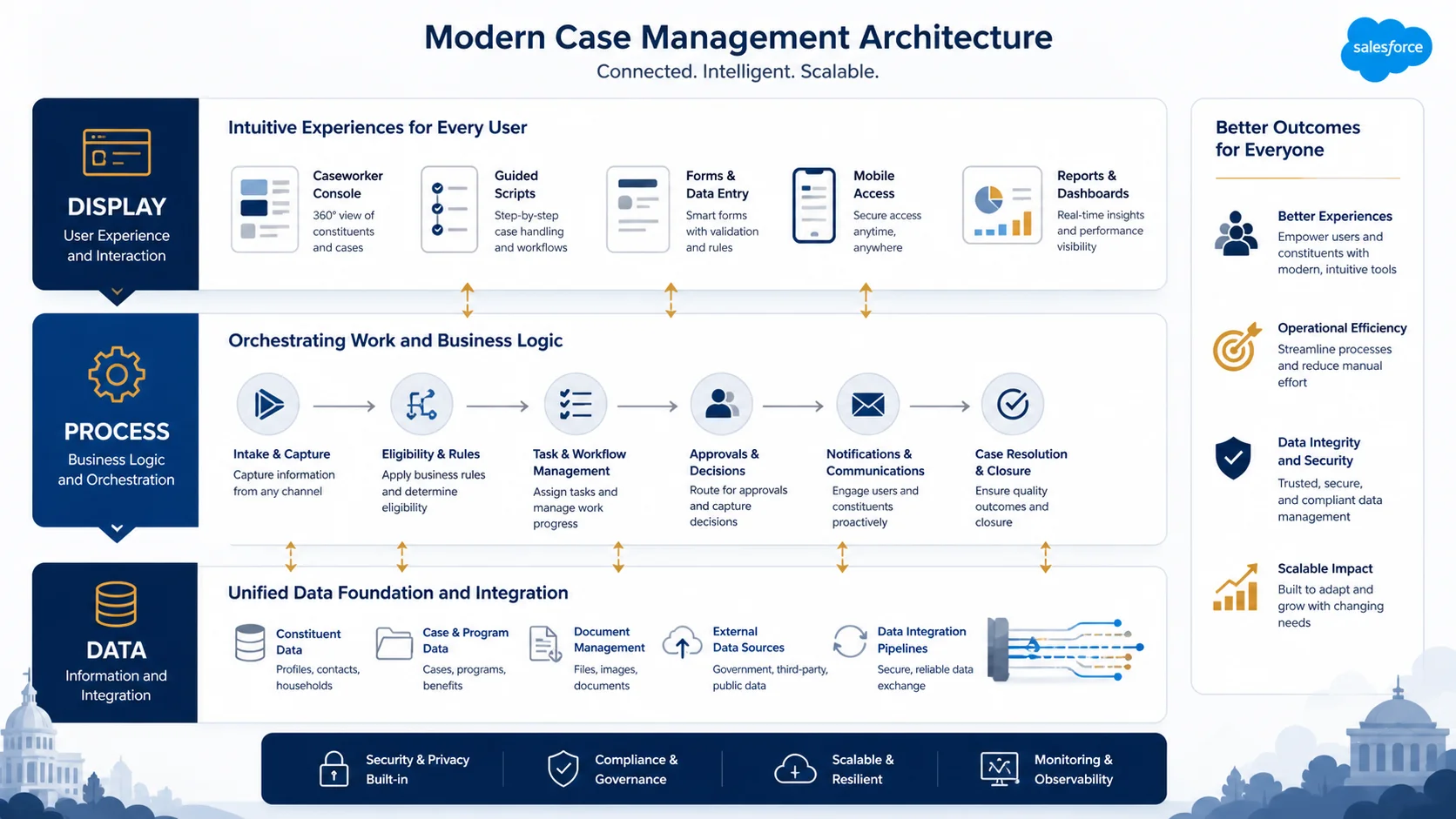
The examination tests not only individual component knowledge but also how FlexCards, OmniScripts, and DataRaptors compose into functional solutions. The three-layer architecture maps clearly to a separation of concerns:
| Layer | Component | Responsibility |
| Display | FlexCard | Aggregated, contextual data presentation |
| Process | OmniScript | Conditional, guided user workflow execution |
| Data | DataRaptor | Read, write, and transformation of data |
A typical public sector implementation pattern works as follows:
- A FlexCard surfaces a constituent’s current benefit status on a caseworker’s console, pulling data via a DataRaptor Extract
- The FlexCard includes an action button that launches an OmniScript for updating the benefit record
- Within the OmniScript, conditional decision elements branch the workflow based on benefit type or eligibility status
- At the terminal step, a DataRaptor Load writes the caseworker’s input back to the relevant Salesforce objects
- The FlexCard refreshes automatically, reflecting the updated benefit status without page reload
This pattern reflects the modularity built into OmniStudio’s design. Modifications to the display layer do not require changes to the process layer, and data transformation logic is encapsulated in DataRaptors that can be reused across multiple scripts and cards. For government agencies that face frequent policy changes, this architectural modularity is a primary reason OmniStudio was selected as the foundation for Salesforce’s Public Sector Solutions offering.

Reasoning Through the Public Sector Solutions Exam
Candidates who perform well on the Salesforce Public Sector Solutions Exam approach OmniStudio not as three separate tools to memorize but as an integrated system with a coherent design logic. To summarize the core distinctions:
- FlexCards present aggregated, contextual data without transactional complexity, and are optimal for caseworker consoles and constituent self-service portals
- OmniScripts guide conditional, multi-step processes that support regulatory compliance and data accuracy, with child script patterns enabling maintainability at scale
- DataRaptors handle data movement and transformation with enough flexibility to bridge Salesforce’s data model and external agency systems, with four distinct types serving distinct operational purposes
The exam rewards candidates who can reason from a described public sector scenario to the correct component configuration, including recognizing when DataRaptor Transforms are preferable to Integration Procedures, when nested FlexCards are more appropriate than a single complex card, and when an OmniScript’s embedded child script pattern supports maintainability at scale. Developing that reasoning capacity, grounded in the architectural logic described above, is the most reliable path to exam success.
Also Read:
OmniStudio for Consultants: Designing End-to-End Digital Experiences
I Failed My Salesforce Exam – Here’s What I Learned and What to Do Next