
In our previous article, How Agentforce Actually Performs: Real Numbers, we covered the productivity gains companies are seeing with Agentforce: 42% of routine tickets resolved autonomously, 70 minutes saved per sales rep daily, and 25-35% capacity increases across support teams.
But those results don’t come automatically. Every deployment hits obstacles. Some are predictable. Some only show up after you’re in production. Here’s what actually goes wrong and what you can do about it.
The Order Status Problem: When Simple Isn’t Simple
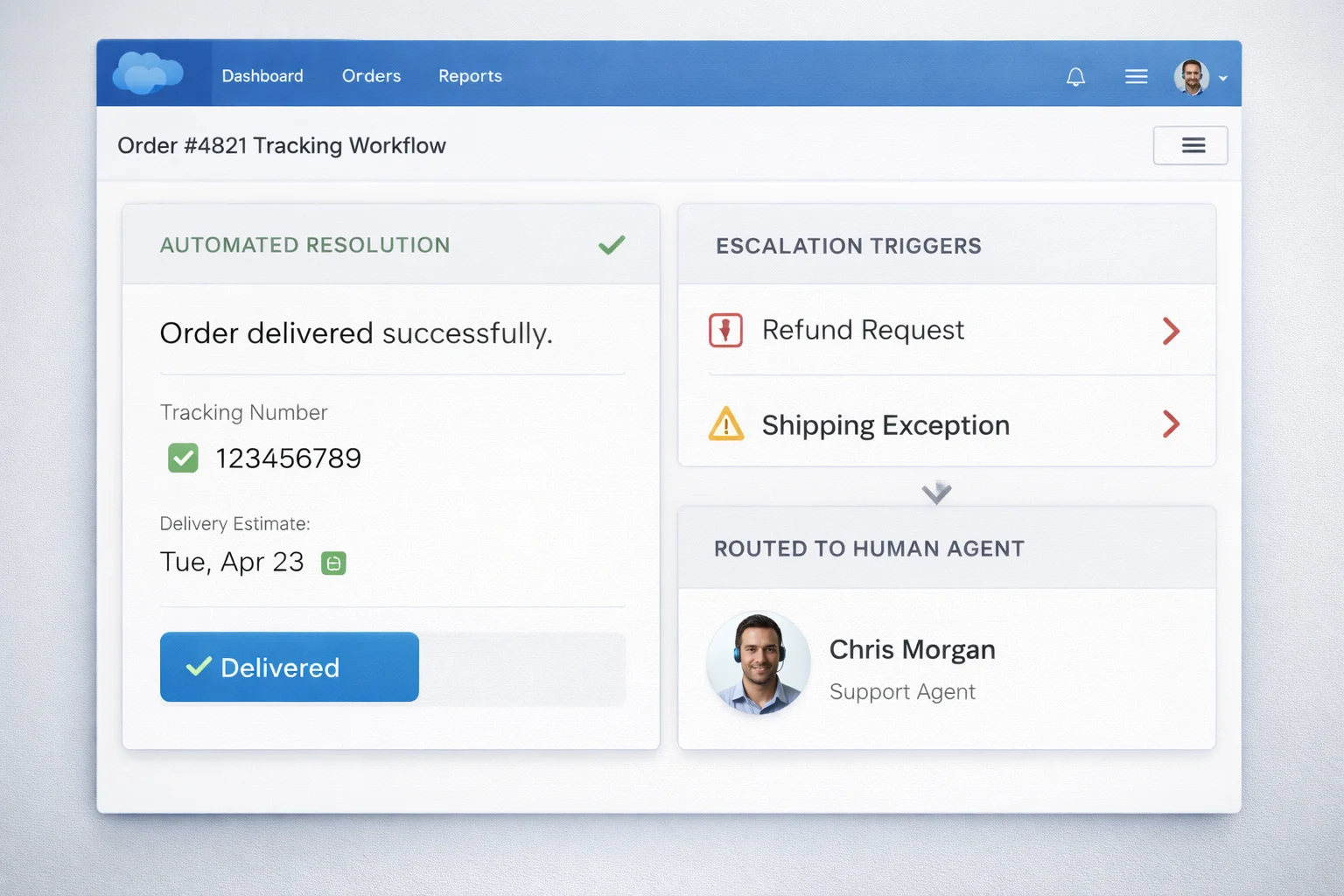
Here’s what looks like a perfect use case for full automation: customer emails asking “Where’s my order?”
What Agentforce handles completely (about 73% of cases):
- Pulls order number from customer record
- Checks shipping status in real time
- Provides tracking link and estimated delivery
- Updates customer via their preferred channel
- Logs interaction in Salesforce
Total resolution time: 45 seconds. Zero human involvement.
What triggers human escalation (27% of cases):
- Tracking shows “exception” or “returned to sender”
- Customer ordered multiple items and is asking about a specific one
- Order was placed more than 30 days ago (outside standard tracking window)
- Customer’s message includes words like “refund,” “cancel,” or “wrong item”
- Shipping address doesn’t match what customer expects
The agent correctly escalates these because the policy trees get too complex. A human needs to interpret intent, check inventory, potentially override refund policies, or coordinate with warehouse operations.
This is the pattern across every deployment: Agentforce handles the straight path really well. Anything with branches or judgment still needs people.
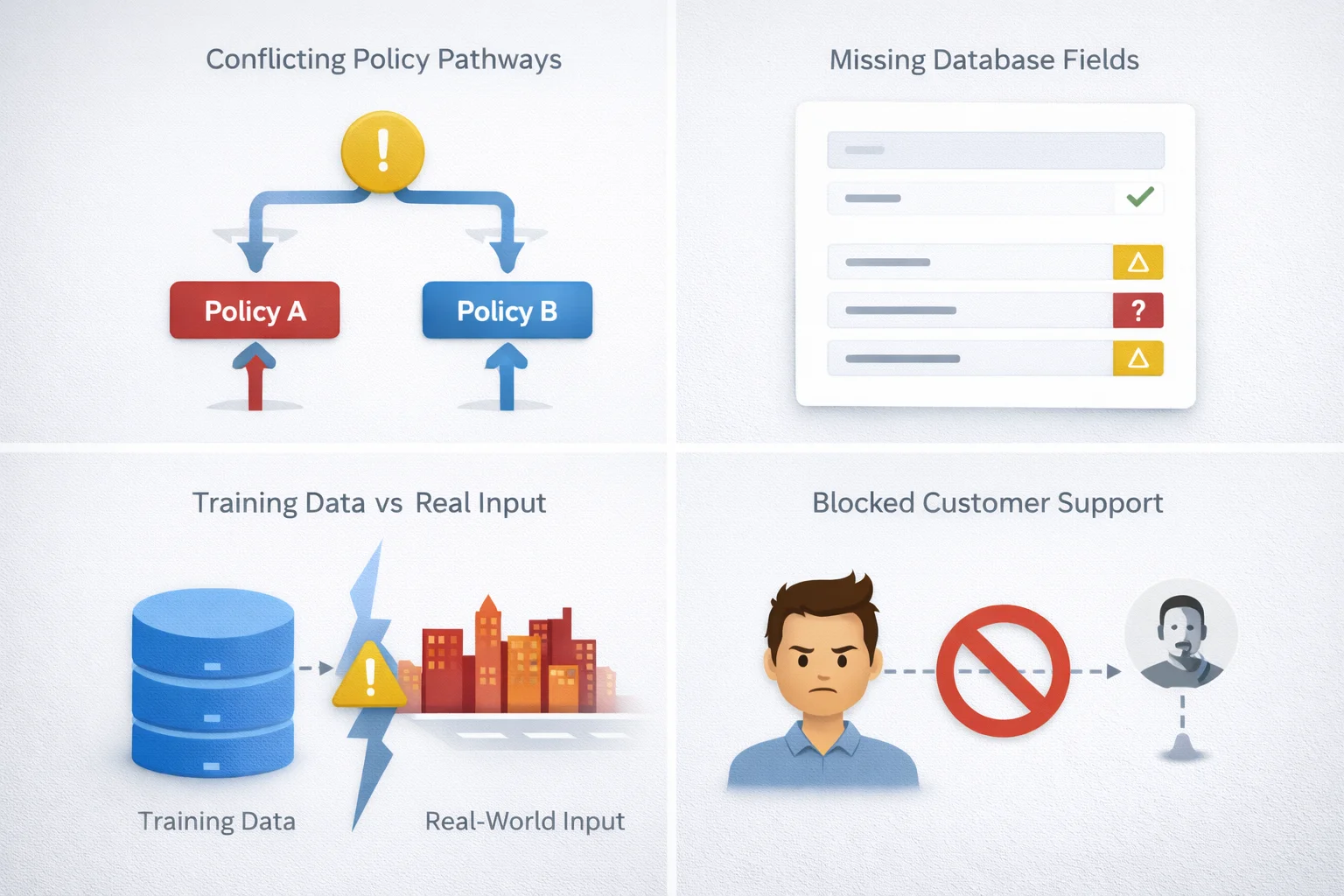
Four Failure Modes That Show Up In Production
1. Policy conflicts: Customer qualifies for a refund under one policy but not another. The agent picks the wrong one or gets stuck in a loop. This happens most often when your policies weren’t written with automation in mind. Humans naturally resolve ambiguity. Agents can’t.
Fix: Map your policies before deployment. Find the contradictions. Decide which rule takes precedence. Build explicit priority hierarchies into the agent’s decision logic.
2. Missing data: If Salesforce records are incomplete, the agent can’t make decisions. A customer calls about their account, but their contact record doesn’t have an email on file. The agent needs it to send a confirmation. It escalates to a human, who then has to collect basic information that should have been captured at signup.
Fix: Run data quality audits before you deploy. Fix the gaps. Build validation into your intake processes so missing fields get flagged early, not when an agent needs them.
3. Overfitting to training cases: The agent works perfectly on the 50 scenarios you trained it on. Then customers ask things in new ways and it doesn’t recognize the pattern. “Where’s my package?” gets resolved. “I never got my delivery” triggers an escalation even though it’s the same question.
Fix: Use real customer language from your ticket history, not sanitized examples. Test with actual customers during pilot phases. Monitor for patterns where escalation rates are higher than expected and retrain based on those gaps.
4. Trust erosion: Some customers don’t want to interact with an agent, period. If they can’t easily reach a human, satisfaction drops. This shows up most in complex or high-value accounts where relationships matter.
Fix: Make escalation easy and obvious. Don’t hide the “talk to a person” option. Train your human agents to take over smoothly when customers request it, not treat it like a failure.
The Data Quality Tax
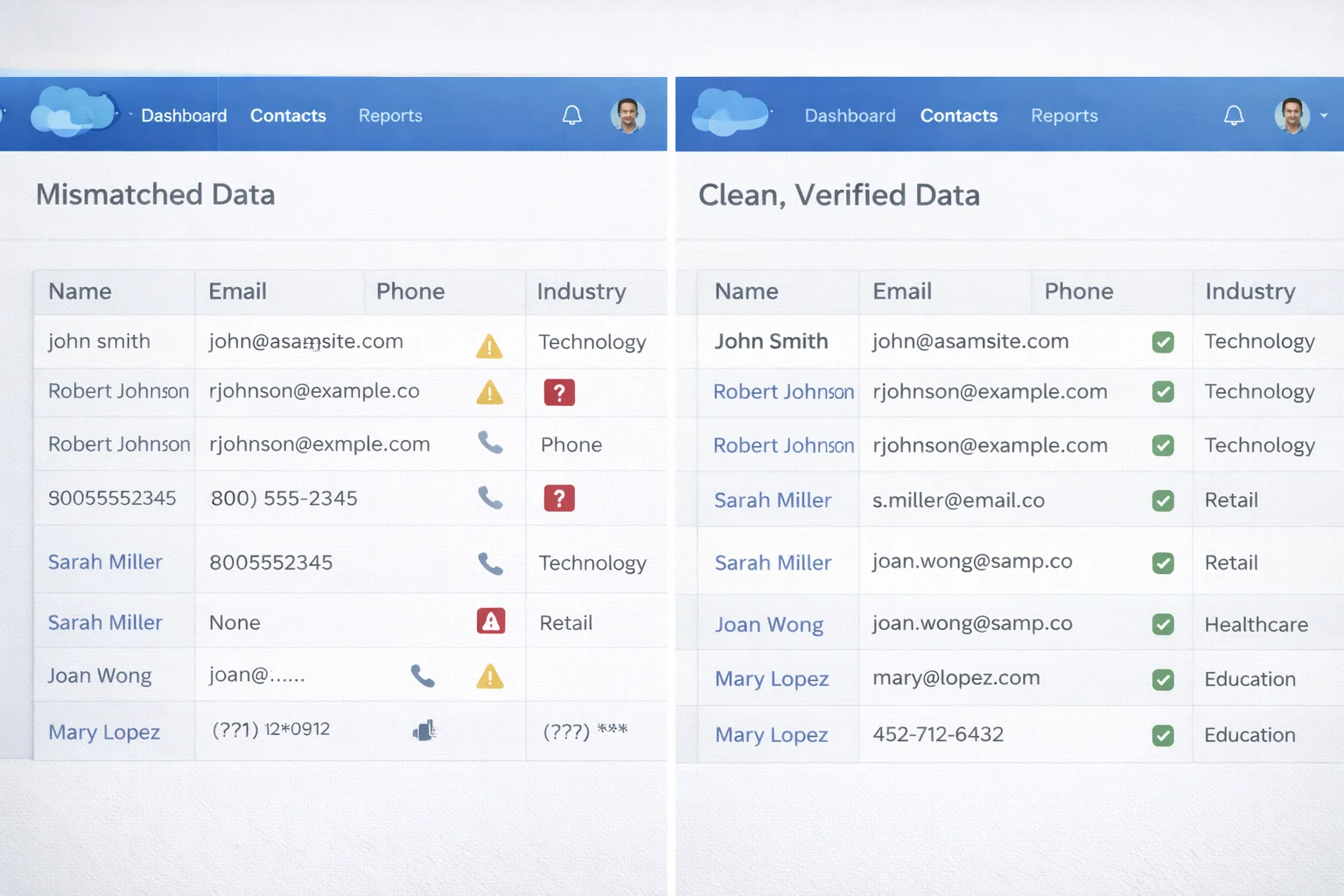
Every company underestimates how much their success depends on clean Salesforce data. Agentforce exposes every gap, inconsistency, and workaround that humans have been compensating for.
A support team might have informal knowledge that “customers in the Northwest region always need extended warranties manually added.” That’s not documented anywhere. An agent won’t know it. It’ll process those orders wrong until someone notices the pattern and updates the logic.
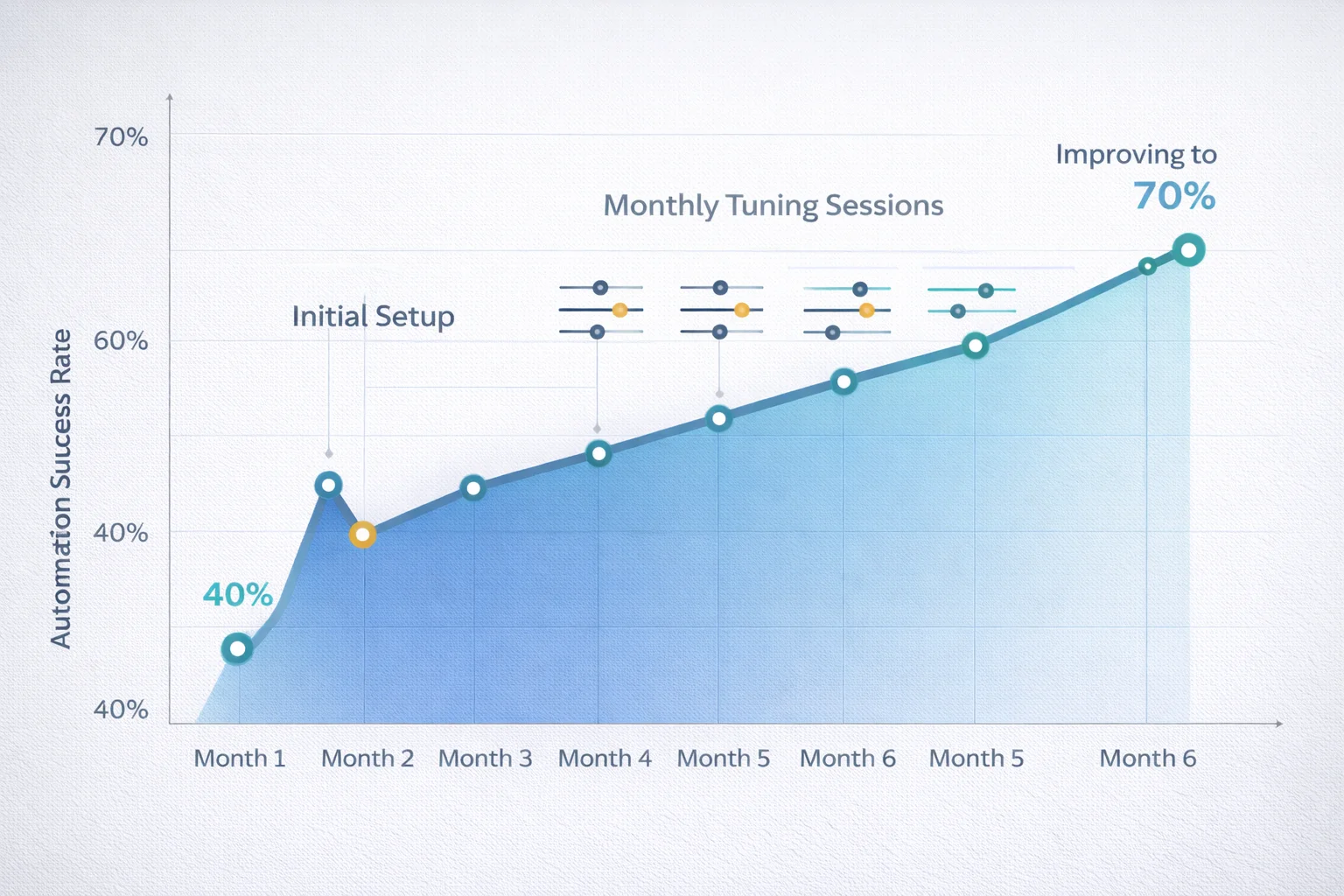
The companies getting the best results spent as much time cleaning their data as they did configuring the agent. That’s not exciting work, but it’s the difference between 40% automation and 70% automation.
The Ongoing Tuning Reality
Setup isn’t a one-time project. One company reported spending 15-20 hours per month in the first six months just monitoring agent decisions, identifying edge cases, and refining policies.
That drops over time as you catch the most common issues. But it never goes to zero. Customer behavior changes. Policies evolve. New products launch. Each change needs to be reflected in the agent’s logic.
Budget for this. Either assign someone part-time to agent governance or accept that your automation rates will plateau.
When You Should Actually Stop?
Not everything should be automated. Some work is genuinely better done by humans, even if an agent could technically handle it.
High-value accounts where relationship continuity matters. Complex technical issues where troubleshooting requires creativity. Situations where the customer is clearly frustrated and needs empathy, not efficiency.
The best deployments define clear boundaries: “Agent handles X, humans handle Y.” The worst try to automate everything and end up with customers feeling like they’re stuck in an automated phone tree.
The Real Success Pattern
Teams getting ROI from Agentforce share a few traits:
They treat it like an automation project, not magic. They measure failure rates and tune continuously. They’re honest about what needs human judgment. They invest in data quality upfront. And they don’t expect setup to ever be “done.”
If you’re preparing to deploy Agentforce, the certification path can help. The Salesforce Certified Agentforce Specialist exam covers implementation methodology, governance frameworks, and troubleshooting common issues. SalesforceKing offers Agentforce Specialist practice tests and study materials if you’re going that route.
But the real learning comes from production. You’ll discover edge cases no training materials cover. You’ll find policy conflicts you didn’t know existed. You’ll see exactly where your data quality problems are hiding.
That’s not a failure. That’s the process. The companies that accept it and build ongoing refinement into their operations get results. The ones expecting plug-and-play get frustrated. Agentforce works. But only if you treat it like a tool that needs maintenance, not a replacement that runs itself.