Last Updated On : 28-Sep-2026
Salesforce Certified MuleSoft Developer - Mule-Dev-201 Practice Test
Prepare with our free Salesforce Certified MuleSoft Developer - Mule-Dev-201 sample questions and pass with confidence. Our Salesforce-MuleSoft-Developer practice test is designed to help you succeed on exam day.
Salesforce 2026
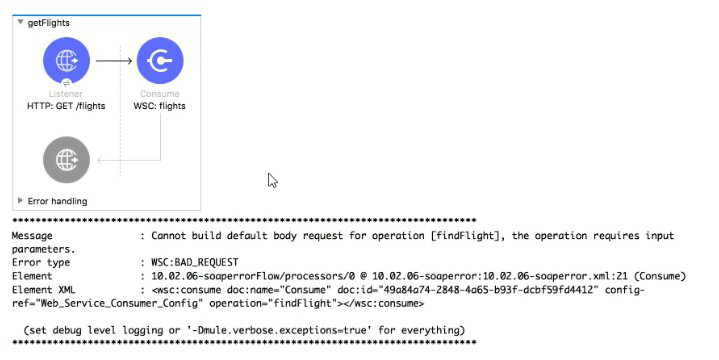
Refer to the exhibits. A web client submits a request to http://localhost:8081/fliqhts?destination=SFO and the Web Service Consumer throws a WSC:BAD_REQUEST error.
What is the next step to fix this error?
A. Set a header In the Consume operation equal to the destination query parameter
B. set a SOAP payload before the Consume operation that contains the destination query parameter
C. set a property m the Consume operation equal to the destination query parameter
D. set a JSON payload before the Consume operation that contains the destination query parameter
Explanation:
The error message clearly states: “Cannot build default body request for operation [findFlight], the operation requires input parameters.” This tells us exactly what the problem is. The Web Service Consumer is invoking a SOAP operation (findFlight) that requires input parameters in the SOAP body, but Mule is unable to automatically construct that body because no payload has been set before the Consume operation.
In Mule 4, the Web Service Consumer works very differently from REST-based HTTP connectors. SOAP services do not read query parameters, headers, or JSON payloads by default. Instead, they expect a SOAP XML request body that matches the WSDL-defined input structure. Even though the incoming HTTP request includes a query parameter (destination=SFO), Mule does not automatically map that value into a SOAP request body.
When the Consume operation executes, it looks at the current payload to determine whether it can use it as the SOAP body. If the payload is missing, empty, or incompatible, Mule tries to build a default request. In this case, it fails because the findFlight operation requires at least one input parameter, and Mule has no payload to work with. That is why the WSC:BAD_REQUEST error occurs.
The correct fix is to explicitly set a SOAP XML payload before the Consume operation, using the query parameter value from attributes.queryParams.destination. This is typically done with a Transform Message or Set Payload component that constructs the proper SOAP body structure expected by the WSDL. Once the payload is correctly set, the Web Service Consumer can successfully invoke the operation.
Why the other options are not correct
A — Set a header in the Consume operation equal to the destination query parameter (Incorrect)
SOAP services do not read business input parameters from HTTP headers. The WSDL defines input parameters in the SOAP body, not headers. Setting a header will not satisfy the required input.
C — Set a property in the Consume operation equal to the destination query parameter (Incorrect)
Mule 4 no longer uses “properties” the way Mule 3 did, and even if it did, SOAP operations do not map input parameters from properties. The input must be in the SOAP body.
D — Set a JSON payload before the Consume operation (Incorrect)
SOAP services require XML payloads, not JSON. Sending JSON would result in a request that does not match the WSDL contract and would fail at runtime.
References
Web Service Consumer requires a SOAP body matching the WSDL-defined input
Mule 4 event structure and payload usage
Transform Message for building SOAP request payloads
Refer to the exhibits.
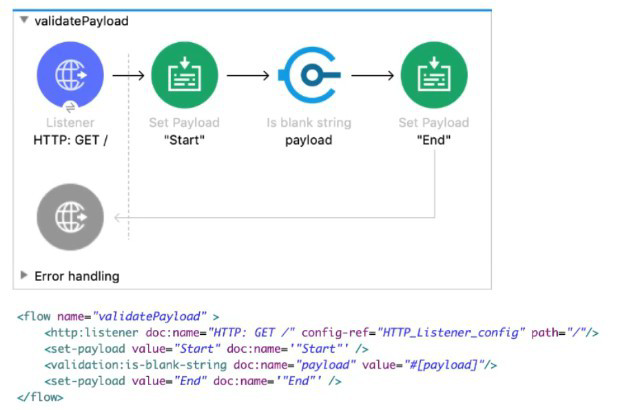 A web client sends a GET request to the HTTP Listener. What response message is returned to the web client?
A. ""
B. "End"
C. "Start"
D. "String is not blank"
Explanation:
When a web client sends a GET request to the HTTP Listener, the MuleSoft flow executes step by step:
- HTTP Listener: The flow is triggered by the incoming GET request. At this point, the payload is empty until explicitly set.
- Set Payload ("Start"): The payload is immediately set to the string "Start". This becomes the current message payload.
- Validation: is-blank-string: This component checks whether the payload is blank. Since the payload is "Start", the condition evaluates to false. Importantly, the validation module does not modify the payload when the condition passes. It only throws an error if the condition fails. Because "Start" is not blank, no error is thrown, and the flow continues normally.
- Set Payload ("End"): The payload is overwritten with the string "End". This is the final processor in the flow, so the last payload value is what gets returned to the client.
Thus, the response message returned to the web client is "End".
Why the Other Options Are Incorrect
A. "" (Empty String): This would only be returned if the payload were blank and the validation failed, causing an error handler to return an empty response. Since the payload is "Start", this does not happen.
C. "Start": Although the payload is set to "Start" initially, it is later overwritten by "End". MuleSoft always returns the last payload unless an error occurs or a custom response is configured.
D. "String is not blank": The validation module does not generate descriptive success messages. It only throws an error when validation fails. On success, it simply allows the flow to continue without changing the payload.
Key Takeaway:
The MuleSoft exam often tests your understanding of payload mutability and validation behavior. The payload can be overwritten multiple times, and the last value is what gets returned. Validators do not alter payloads unless they fail, in which case they throw errors. In this flow, the final payload is "End", making Option B the correct answer.
Refer to the exhibits.
How many private flows does APIKIt generate from RAML specification?
A. 1
B. 2
C. 3
D. 4
Explanation:
APIkit generates one private flow per RAML resource + HTTP method combination. From the RAML in the exhibit, there are four methods defined: GET /flights, GET /airline (the presence of a query parameter like code does not create extra flows; it’s still the same method), GET /accounts, and POST /accounts. That totals 4 method entries, so APIkit generates 4 private flows for the implementation points that the APIkit Router dispatches to. The Router itself is typically a separate (non-private) “main” flow, and APIkit may also create error-handling structures, but the question is specifically about the private flows generated from the RAML methods, which map 1:1 to each resource+verb.
Why the other options are not correct (and what they’re implicitly assuming)
A — 1 (Incorrect)
This option would only make sense if APIkit generated a single catch-all implementation flow for the whole API and then used logic inside that one flow to branch by path and method. That is not how APIkit scaffolding works. APIkit’s design goal is to give you separate implementation entry points per endpoint so that each RAML method can be implemented, tested, and governed independently. So “1” reflects a misunderstanding of APIkit’s per-method flow generation.
B — 2 (Incorrect)
Choosing “2” usually comes from mistakenly counting only top-level resources (e.g., /flights and /accounts) or thinking only “main paths” become flows. But APIkit doesn’t generate flows per resource alone; it generates flows per resource + method. Also, the RAML includes /airline as an additional resource, and /accounts has two methods, so “2” undercounts in multiple ways.
C — 3 (Incorrect)
“3” is a very common wrong answer because it often results from counting each resource path once: /flights, /airline, and /accounts = 3. The mistake is ignoring that /accounts defines both GET and POST, and APIkit treats those as two distinct endpoints, therefore two private flows. Query parameters also don’t create extra flows, so /airline?code=... is still just GET /airline—but /accounts having two verbs does increase the count.
| Page 1 out of 47 Pages |