Last Updated On : 28-Sep-2026
Salesforce Certified MuleSoft Developer - Mule-Dev-201 Practice Test
Prepare with our free Salesforce Certified MuleSoft Developer - Mule-Dev-201 sample questions and pass with confidence. Our Salesforce-MuleSoft-Developer practice test is designed to help you succeed on exam day.
Salesforce 2026
Refer to the exhibits.
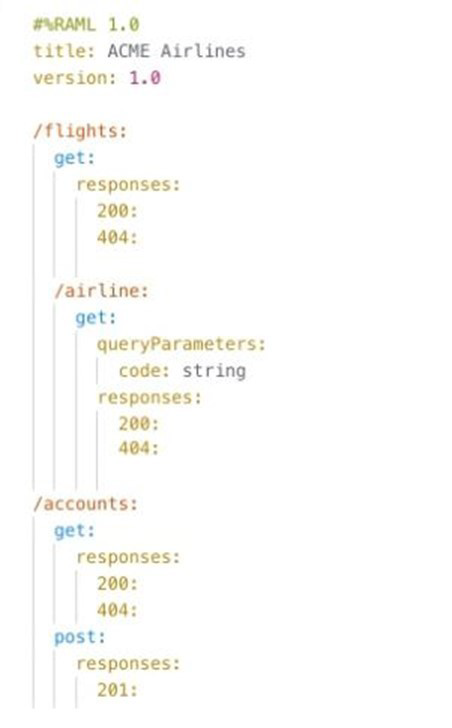
What is valid text to set the field in the Database connector configuration to the username value specified in the config.yaml file?
A. ${db.username>
B. #[db.username]
C. #[db:username]
D. ${db:username>
Explanation:
In Mule 4, values defined in external configuration files such as config.yaml are accessed in connector configuration fields (like the Database connector username) using property placeholders, not expressions.
The correct syntax for referencing a property is:
${propertyName}
So, if config.yaml contains:
db:
username: myuser
Then the Database connector Username field must be set using a property placeholder:
${db.username}
Among the given options, Option A is the only one that represents the correct type of syntax (property placeholder), even though the closing brace appears visually distorted in the image.
❌ Why the Other Options Are Incorrect
B. #[db.username]
❌ This is a DataWeave expression.
Connector configuration fields (like username/password) do not evaluate DataWeave.
Expressions are used in message processors, not global config fields.
C. #[db:username]
❌ Incorrect expression syntax.
Also uses an expression instead of a property placeholder.
D. ${db:username}
❌ Uses : instead of ..
Mule property resolution uses dot notation, not colon notation.
References:
Configuring Properties in Mule 4
“Use ${propertyName} syntax to reference properties in configuration fields.”
YAML Property Files
Refer to the exhibits.
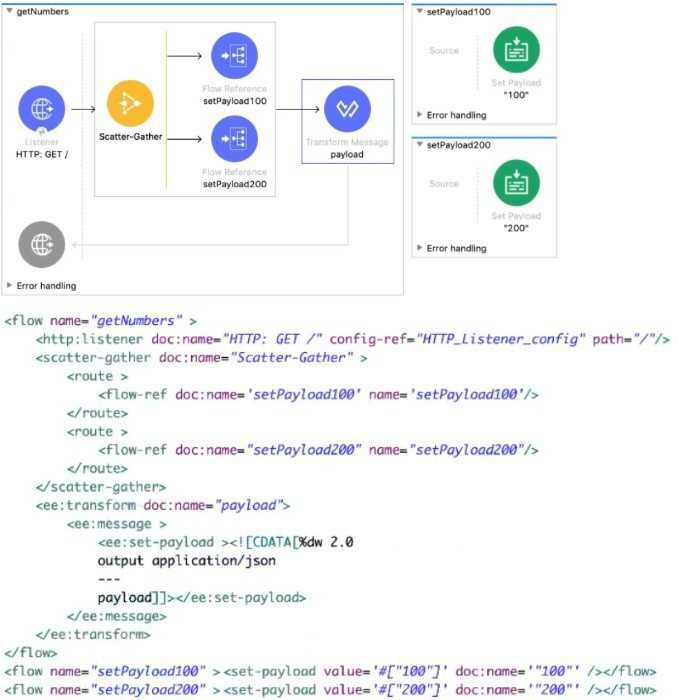
Each route in the Scatter-Gather sets the payload to the number shown in the label. What response is returned to a web client request to the HTTP Listener?
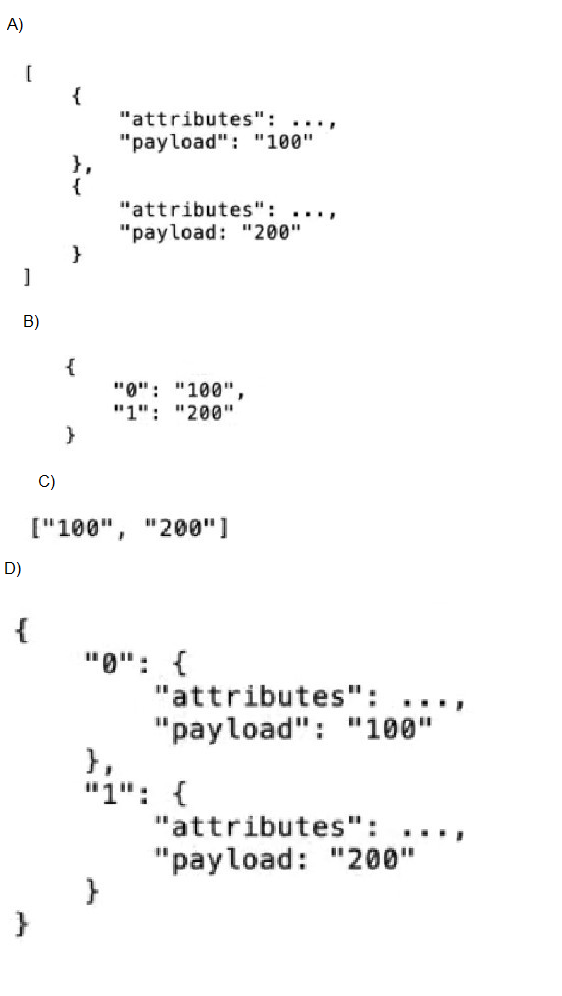
A. Option A
B. Option B
C. Option C
D. Option D
Explanation:
In Mule 4, the Scatter-Gather component executes each route in parallel and aggregates the results into an array, preserving the order of the routes as defined in the configuration.
Let’s break down what happens step by step:
HTTP Listener receives a GET request.
Scatter-Gather has two routes:
Route 1 calls setPayload100 → sets payload to "100"
Route 2 calls setPayload200 → sets payload to "200"
Each route only sets the payload (no attributes manipulation).
After Scatter-Gather completes, the resulting payload is an array containing the payloads returned by each route, in order:
["100", "200"]
The Transform Message component does:
%dw 2.0
output application/json
---
payload
This simply outputs the payload as-is.
Therefore, the HTTP response sent back to the client is:
["100", "200"]
❌ Why the Other Options Are Incorrect
A. Option A
❌ This would be the structure inside Scatter-Gather internals, but the payload after Scatter-Gather is flattened to just the payload values, not full Mule event objects.
B. Option B
❌ Scatter-Gather does not return a map keyed by indexes.
It always returns an array, not an object.
D. Option D
❌ Again, this assumes event-level objects and a map structure, neither of which is returned by Scatter-Gather in Mule 4.
📚 References
Scatter-Gather Component (Mule 4)
“The Scatter-Gather component collects the responses from each route and returns them as a list.”
Mule Event and Payload Behavior
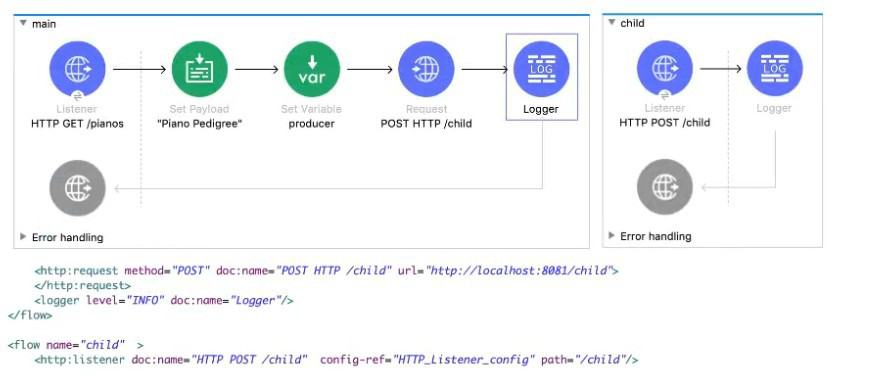
Refer to the exhibits. The main flow contains an HTTP Request in the middle of the flow. The HTTP Listeners and HTTP Request use default configurations.
A web client submits a request to the main flow's HTTP Listener that includes query parameters for the pedigree of the piano.
What values are accessible to the Logger component at the end of the main flow?
A. payload
B. payload pedigree query params
C. payload producer var
D. payload pedigree query params producer var
Explanation:
Step-by-Step Explanation
1️⃣ What enters the main flow
A web client calls the main flow’s HTTP Listener and includes query parameters (for example, pedigree information). In Mule 4:
Query parameters are stored in attributes.queryParams
They remain available for the entire lifetime of the Mule event unless explicitly changed
2️⃣ Payload and variable setup
In the main flow:
The payload is set to "Piano Pedigree"
A flow variable named producer is set
At this point, the Mule event contains:
Payload = "Piano Pedigree"
Attributes = HTTP attributes (including query params)
Variables = producer
3️⃣ What the HTTP Request does
The HTTP Request sends a request to the /child endpoint using default configuration.
Key Mule 4 behavior:
HTTP Request creates a new Mule event for the child flow
Variables are NOT propagated to the called HTTP Listener
Attributes in the main flow are preserved
The payload of the main flow is replaced with the HTTP response from the child flow
So after the HTTP Request completes:
Payload → response returned from /child
Query parameters → still available in attributes.queryParams
Variable producer → still available in vars.producer
4️⃣ What the Logger can access
At the end of the main flow, the Logger has access to:
Payload (returned from the HTTP Request)
Query parameters (from the original request)
Flow variable producer
Why the Other Options Are Incorrect
A. payload
Incomplete — variables and query params are still available.
B. payload pedigree query params
Incomplete — ignores the flow variable.
C. payload producer var
Incomplete — ignores the query parameters.
Final Conclusion
Since payload, query parameters, and flow variables are all accessible after the HTTP Request completes, the correct answer is:
👉 D. payload pedigree query params producer var
| Salesforce-MuleSoft-Developer Exam Questions - Home |
| Page 2 out of 47 Pages |