Salesforce-Platform-Foundations Practice Test
Updated On 1-Jan-2026
126 Questions
Which Salesforce role should help companies increase campaign effectiveness, reengage inactive customers, and grow their customer base?
A. Consultant
B. Marketer
C. Designer
Explanation:
The Marketer role in Salesforce should help companies increase campaign effectiveness, reengage inactive customers, and grow their customer base. This role leverages tools like Marketing Cloud, Campaigns, and Journey Builder to design, execute, and analyze marketing campaigns, target inactive customers with personalized reengagement strategies, and attract new customers through lead generation and nurturing.
Key Salesforce Concept: Marketing Role
The Marketer uses Salesforce features like Campaign Management to track campaign performance, Einstein AI for insights, and automation tools to reengage customers.
Growing the customer base involves lead scoring, segmentation, and multi-channel campaigns (e.g., email, social).
Why It Matters: Effective marketing drives revenue by optimizing campaigns and customer relationships.
Why Other Options Are Incorrect
A. Consultant:
Why Wrong: A Consultant advises on Salesforce implementation and best practices but doesn’t focus on executing marketing campaigns or reengagement. Their role is strategic, not operational.
Key Point: Consultants guide setup, not campaign execution.
C. Designer:
Why Wrong: A Designer focuses on creating user interfaces (e.g., Lightning components) or email templates but doesn’t manage campaigns, reengagement, or customer growth. Their role is technical and visual, not strategic marketing.
Key Point: Designers enhance aesthetics, not marketing outcomes.
Related Concepts & Best Practices
Marketing Cloud: Use for personalized journeys to reengage inactive customers.
Best Practice: Segment audiences and use A/B testing to improve campaign effectiveness.
Use Case: A Marketer runs a campaign to reengage lapsed customers with a discount offer, tracked via Salesforce Campaigns.
Reference:
Salesforce Help: Marketing Cloud Overview
Highlights how Marketers use Marketing Cloud to boost campaign effectiveness and grow customer bases.
A Salesforce associate is creating new user accounts for a new project management team. What will be the role of each new team member?
A. End User
B. Developer
C. Builder
Explanation:
Core Concept & What It’s Testing
This question is about understanding user roles in Salesforce from a functional perspective, not security “Roles” in the Role Hierarchy.
In Salesforce terminology for certifications and Trailhead:
End Users are the people who use Salesforce to do their daily work — entering, updating, and viewing data, running reports, and collaborating.
Developers create and maintain programmatic customizations (Apex, Lightning Web Components).
Builders (often “Admins” or “App Builders”) configure Salesforce using clicks, not code.
How It Works in Salesforce
End User role:
Uses the Salesforce interface to manage their tasks, opportunities, cases, etc.
No configuration or development responsibility.
Permissions are granted via Profiles and possibly Permission Sets.
The functional role of a Salesforce user is different from the security role in the org’s Role Hierarchy. This question is about their job responsibility, not data visibility.
Why This Is Correct
The new project management team will use Salesforce to manage projects and related data.
They’re not building apps or writing code — they’re just using the system to do their work.
That’s the definition of End User in Salesforce learning content.
Why the Other Options Are Incorrect
B. Developer ❌
Why it seems right: Developers also use Salesforce, but their primary task is building programmatic solutions (Apex, Visualforce, LWC).
Why it’s wrong: The project managers aren’t writing code or doing technical customizations.
C. Builder ❌
Why it seems right: Builders configure Salesforce with clicks (fields, objects, automation).
Why it’s wrong: There’s no mention that the project management team will be responsible for configuring the system — they’ll only use what’s already set up.
Real-World Scenario
A consulting firm sets up Salesforce for its project management office (PMO).
Admin configures custom Project and Milestone objects.
Developers create a custom project status dashboard component.
Project managers log in daily to update milestones, assign tasks, and track deadlines — they are End Users.
Reference:
Trailhead — Salesforce Platform Basics: Salesforce User Types
Salesforce Help — User Management Overview
A Salesforce associate wants to refresh a report and email it to an executive team each week. Which functionality of Salesforce Reports should the associate use?
A. Refresh
B. Notifications
C. Subscriptions
Explanation:
🧠 Why This Is Correct
Subscriptions allow users to:
Automatically refresh a report on a schedule (daily, weekly, monthly)
Email the updated report to themselves or other users, roles, and groups
Set conditions to trigger notifications when metrics meet thresholds
This is the ideal solution for sending weekly reports to an executive team without manual effort.
📘 References:
Schedule and Subscribe to Reports – Salesforce Help
Managing Report Subscriptions – CloudMyBiz
❌ Why the Other Choices Are Wrong
A. Refresh
Refreshing a report updates the data on demand, but it does not schedule or email the report.
B. Notifications
Notifications can alert users when conditions are met, but they are part of the subscription setup. On their own, they don’t handle scheduling or emailing reports.
🎯 Exam Tip
This question tests your understanding of report automation.
Use Subscriptions for scheduled delivery
Use Notifications for conditional alerts
Use Refresh for manual updates
When a sales rep needs to give an additional discount for an opportunity, a manager needs to review and authorize the discount request.
What should be used to lockthe recordbefore a decision is made?
A. validation rule
B. Approval process
C. Page layout
Explanation:
An Approval process is a powerful automation tool in Salesforce that should be used to lock a record and route it for review. This process automates the steps required for a record to be approved by a designated person or group. When a sales rep submits an opportunity for approval, the approval process locks the record, preventing any further changes until a manager makes a decision.
Explanation of Incorrect Answers
A. Validation rule
Why it's wrong: A validation rule enforces data integrity by preventing a user from saving a record with invalid data. It can't be used to lock a record for review. For example, a validation rule might prevent a user from saving an opportunity with a discount greater than 20%, but it wouldn't send the request to a manager for approval.
C. Page layout
Why it's wrong: A page layout controls the fields, sections, and related lists that users see on a record. It can be used to make a field read-only, but it can't dynamically lock an entire record based on a specific action, like submitting a discount request for approval.
Real-World Scenario
A sales rep, Sarah, is working on a high-stakes opportunity and wants to offer a 25% discount to close the deal. The company policy requires manager approval for any discount over 20%. Sarah clicks a "Submit for Approval" button on the opportunity record. This action triggers an Approval process. The process automatically locks the opportunity record, preventing Sarah from making further changes, and sends a notification to her manager, John. John reviews the request and either approves or rejects it. If he approves, the record is unlocked, and the sales rep can proceed. If he rejects, a notification is sent back to Sarah with his comments, and the record remains locked or is sent back for further editing, depending on the process configuration.
Official Documentation
Trailhead Module: Approval Processes
Salesforce Help: What Is an Approval Process?
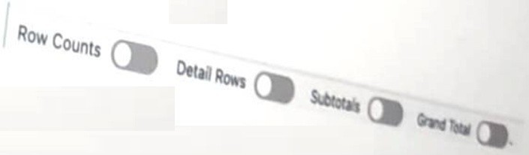
Refer to the image below:

A Salesforce associate reviews a report that showsmore informationthan they need. The associated see individual records but only wants to see the Record Count.
Which switches should the associated toggle to only show the Record Count?
A. Row Counts and Grand Total
B. Subtotals and Detail Rows
C. GrandTotal andSubtotals
Explanation:
A. Row Counts and Grand Total – To display only the Record Count in a Salesforce report:
Enable "Row Counts" – Shows the total number of records.
Enable "Grand Total" – Displays the aggregate count at the bottom.
Disable "Detail Rows" and "Subtotals" – Hides individual records and intermediate groupings, leaving only the count visible.
This combination ensures a clean view of the total record count without unnecessary details.
Why the Other Options Are Incorrect:
B. Subtotals and Detail Rows – These settings would show grouped breakdowns and individual records, cluttering the report instead of simplifying it.
C. Grand Total and Subtotals – While the Grand Total is correct, Subtotals add grouped counts, which are unnecessary if only the overall record count is needed.
Reference:
Customize Report Summaries in Salesforce – Explains how to toggle Row Counts, Subtotals, and Grand Totals.
| Salesforce-Platform-Foundations Exam Questions - Home | Previous |
| Page 4 out of 26 Pages |