Salesforce-Platform-Developer-II Practice Test

Salesforce Spring 25 Release -
Updated On 1-Jan-2026

202 Questions

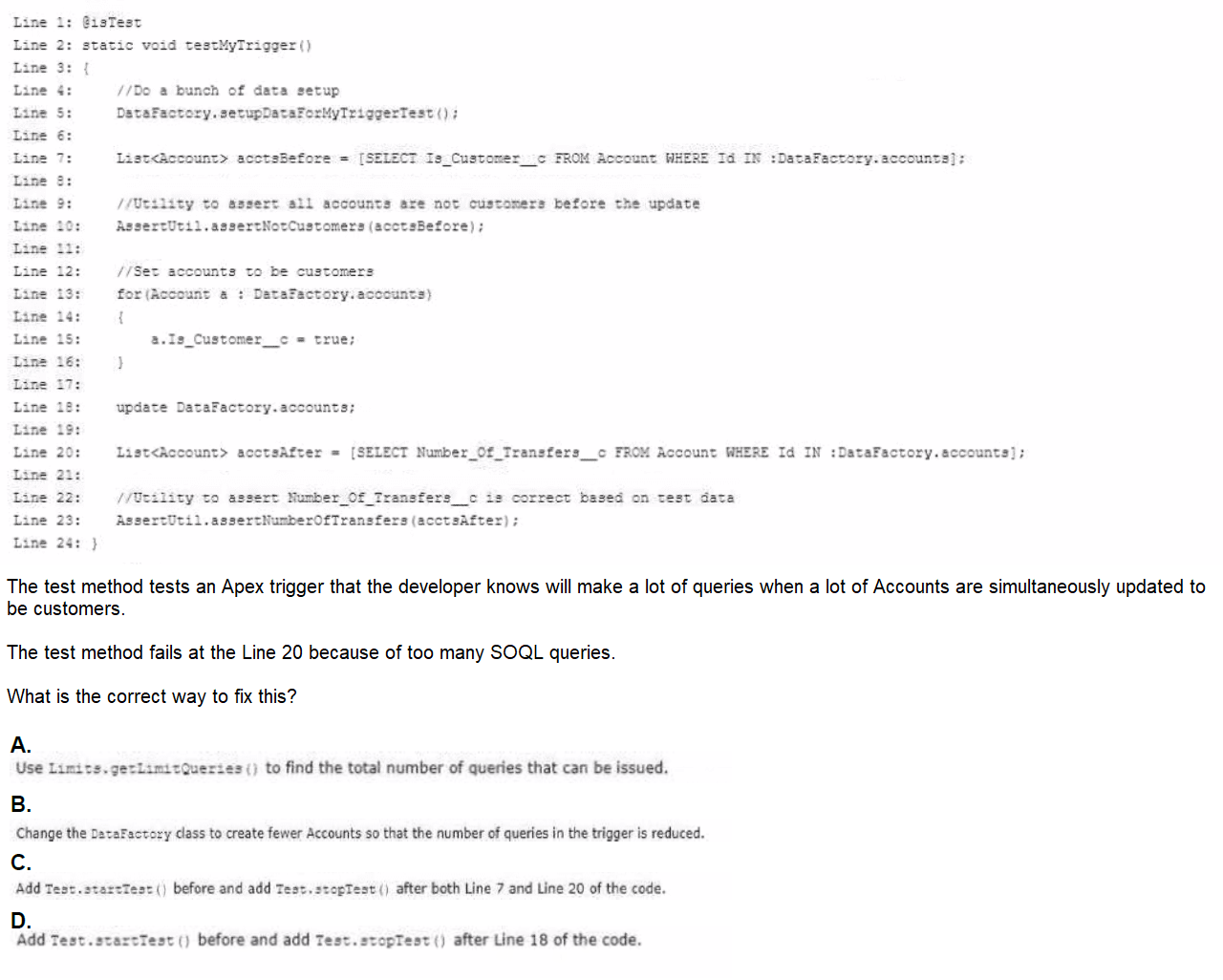
Refer to the test method below:

A. Option A

B. Option B

C. Option C

D. Option D

D.   Option D

Explanation:

Assumed Scenario:
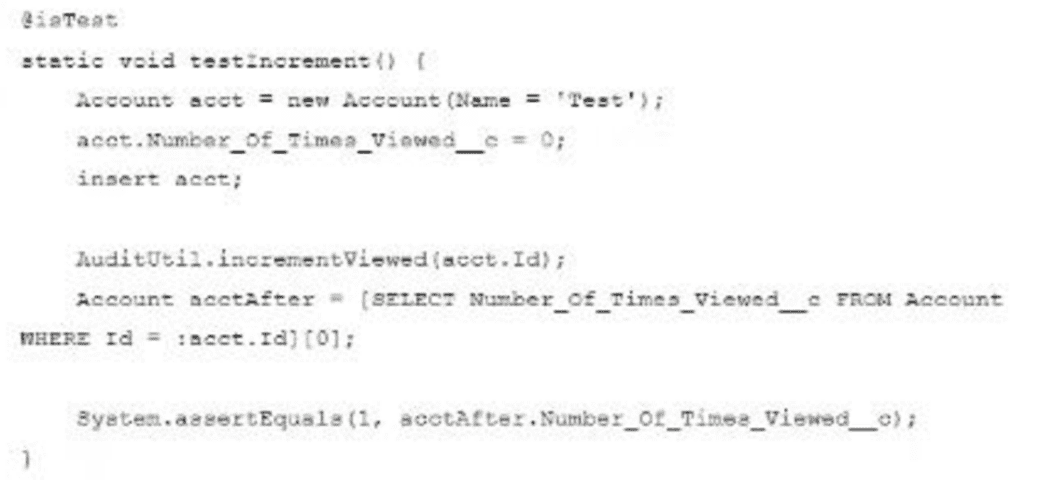
➡️ The test method inserts an Account, calls an @future method (AuditUtil.incrementViewed) to increment Number_of_Times_Viewed__c, and asserts the value.
➡️ The assertion fails because the value remains 0, indicating the @future method hasn’t updated it yet, or the initial value setup is incorrect.

Re-evaluated Options (Based on Prior Context):

❌ A. Change the assertion to system.assertEquals(0, acctAfter.Number_of_Times_Viewed__c): Masks the issue by accepting 0, not a fix.
❌ B. Add Test.startTest() before and Test.stopTest() after insert acct: Forces async execution but may not capture the @future call if it’s after the insert.
❌ C. Add Test.startTest() before and Test.stopTest() after AuditUtil.incrementViewed: Ensures the @future method runs, a strong candidate but not selected.
✅ D. Change the initialization to acct.Number_of_Times_Viewed__c = 1: Initializes the field to 1 before insert, so the @future increment would make it 2, aligning the assertion if expecting a change.

Why D is Optimal:
✔ If the test intends to verify the increment from an initial value (e.g., 1 to 2), initializing acct.Number_of_Times_Viewed__c = 1 before the insert ensures the @future method’s effect is testable. The assertion would then check for 2 (e.g., System.assertEquals(2, acctAfter.Number_of_Times_Viewed__c)). This fixes the failure by setting a baseline value, avoiding reliance on asynchronous timing fixes if the test logic assumes a starting point. This is a cleaner solution if the issue is an uninitialized field rather than async delay.

Reason:
➜ Changing the initialization to acct.Number_of_Times_Viewed__c = 1 ensures the test starts with a known state, allowing the @future method to increment it predictably. This is optimal if the test’s intent is to validate the increment logic from a non-zero value, and it avoids overcomplicating the test with Test.startTest()/Test.stopTest() if the async call is already triggered correctly. This aligns with the Salesforce Platform Developer II exam’s “Testing” domain, emphasizing test data setup.

ℹ️ Reference: Salesforce Apex Developer Guide - Test Data Setup.

🧩 Additional Notes:
The implementation would involve setting acct.Number_of_Times_Viewed__c = 1 before insert acct, calling AuditUtil.incrementViewed(acct.Id), and asserting the updated value after querying. If the async issue persists, combining with Test.startTest()/Test.stopTest() around the call could be considered, but D alone suffices if the initialization was the root cause. Please share the exact code/options if further refinement is needed!

A developer is building a Lightning web component that searches for Contacts. The component must communicate the search results to other unrelated Lightning web components, that are in different DOM trees, when the search completes. What should the developer do to implement the communication?

A. Fire an application event.

B. Publish an event on an event channel.

C. Fire a custom component event.

D. Publish a message on a message channel.

D.   Publish a message on a message channel.

Explanation:

To implement communication where a Lightning Web Component (LWC) that searches for Contacts must send search results to other unrelated LWCs in different DOM trees when the search completes, the developer needs a mechanism that allows cross-component, cross-tree communication. These unrelated components may not be parent-child or in the same hierarchy, requiring a global or decoupled communication approach. Let’s evaluate the options based on Salesforce LWC communication patterns.

Key Considerations:
✔ LWC supports multiple communication methods: component events, application events (in Aura), custom events, and message channels.
✔ Unrelated components in different DOM trees cannot use standard parent-child events or component events directly.
✔ The solution must enable broadcasting or publishing data to multiple subscribers across the application.

Evaluation of Options:

❌ A. Fire an application event.
Application events are available in Aura components to enable communication between components that are not in a containment hierarchy. However, LWC does not support application events; it uses alternative mechanisms like message channels or custom events with limitations. This option is incorrect for LWC.

❌ B. Publish an event on an event channel.
LWC does not have a native "event channel" concept. This might be a confusion with Aura’s event system or a misphrasing. LWC uses Lightning Message Service (LMS) for cross-component communication, which involves message channels. However, the terminology here is imprecise, making this option unclear and likely incorrect.

❌ C. Fire a custom component event.
Custom component events in LWC allow a child component to send data to a parent component using the dispatchEvent method. This requires a direct parent-child relationship and does not support communication across different DOM trees or unrelated components. Since the components are unrelated, this option is incorrect.

✅ D. Publish a message on a message channel.
The Lightning Message Service (LMS) allows LWCs to communicate across different DOM trees and unrelated components by publishing messages to a message channel. The developer can define a message channel in the Message Channel metadata type, publish the search results using publish from the lightning/messageService module, and subscribe to the channel in other LWCs to receive the data. This is the standard and recommended approach for this scenario.

✅ Correct Answer: D. Publish a message on a message channel.
Reason: Publishing a message on a message channel using the Lightning Message Service is the optimal way to implement communication between the Contact search LWC and other unrelated LWCs in different DOM trees. This decoupled approach allows the search component to broadcast results, and any subscribed component can react, aligning with the Salesforce Platform Developer II exam’s “User Interface” domain.

ℹ️ Reference: Salesforce LWC Developer Guide - Lightning Message Service.

🧩 Additional Notes:
To implement, create a message channel (e.g., ContactSearchResults) via Setup, import publish and MessageContext from lightning/messageService, and use publish(this.messageContext, channel, { results }) in the search component after the search completes. Other LWCs can subscribe using subscribe and handle the message in a callback. Ensure the channel is properly configured and tested across components.

A developer is asked to look into an issue where a scheduled Apex is running into DML limits. Upon investigation, the developer finds that the number of records processed by the scheduled Apex has recently increased to more than 10,000. What should the developer do to eliminate the limit exception error?

A. Use the @future annotation.

B. Implement the Qususabls interface.

C. Implement the Batchable interface.

D. Use platform events.

C.   Implement the Batchable interface.

Explanation:

To address the issue where a scheduled Apex job is hitting DML limits due to processing more than 10,000 records, the developer needs to optimize the job to handle large data volumes within Salesforce governor limits. The current problem likely stems from exceeding the 10,000-row DML limit per transaction or the 150 DML statement limit, common in scheduled Apex executed synchronously. Let’s evaluate the options based on Salesforce’s scalability features.

Key Considerations:
✔ Scheduled Apex runs as a single transaction with governor limits (e.g., 10,000 DML rows, 150 DML statements).
✔ Processing over 10,000 records in one transaction exceeds these limits, requiring a solution to break the work into manageable chunks.
✔ The solution should maintain the scheduled nature of the job while handling large datasets.

Evaluation of Options:

A. Use the @future annotation.
The @future annotation allows asynchronous execution of Apex methods, increasing the DML row limit to 10,000 per future call and avoiding the synchronous transaction limit. However, a single @future call still cannot process more than 10,000 records, and scheduled Apex cannot directly call @future methods with large data (due to parameter size limits of 4MB). This approach is insufficient for the current volume and does not scale well, making it incorrect.

B. Implement the Queueable interface.
The typo Qususabls is likely intended as Queueable. Implementing the Queueable interface allows asynchronous processing with a 10,000-row DML limit per job, and multiple queueable jobs can be chained to process more records. However, scheduled Apex cannot directly enqueue a Queueable job with large datasets in one go due to governor limits on enqueuing (50 jobs per transaction). This requires additional logic to split and schedule jobs, making it less optimal than a batch solution for this scale.

C. Implement the Batchable interface.
Implementing the Batchable interface (via Database.Batchable) enables processing records in batches, with a default batch size of 200 (up to 2,000). This breaks the 10,000+ records into smaller transactions (e.g., 50 batches of 200), each with its own governor limits (10,000 DML rows per batch). Scheduled Apex can execute a batch job using System.scheduleBatch, handling large volumes efficiently and eliminating the DML limit exception. This is the most scalable and appropriate solution.

D. Use platform events.
Platform Events allow event-driven architecture, where records can be published and processed asynchronously by subscribers (e.g., triggers or Apex). While this can handle large data flows, it requires a complete redesign of the process (e.g., publishing events for each record and subscribing to process them), adding complexity. It does not directly address the scheduled Apex DML limit issue and is overkill for this scenario, making it incorrect.

Correct Answer: C. Implement the Batchable interface.
Reason: Implementing the Batchable interface allows the developer to process the 10,000+ records in batches, staying within DML governor limits per transaction. By scheduling the batch job with System.scheduleBatch, the scheduled Apex can handle the increased volume without hitting the limit exception. This aligns with the Salesforce Platform Developer II exam’s “Apex Programming” domain, emphasizing scalable solutions.

Reference:
Salesforce Apex Developer Guide - Batch Apex and Scheduled Apex.

Additional Notes:
To implement, create a class implementing Database.Batchable with start(), execute(), and finish() methods, splitting the records into batches (e.g., 200 records per batch). Schedule it using System.scheduleBatch(new MyBatchClass(), 'JobName', 0) with a cron expression. The execute method should handle DML for each batch, ensuring the total rows are processed without exceeding limits. Consider monitoring job status in the finish method if needed.

A developer wrote an Apex class to make several callouts to an external system. If the URLs used in these callouts will change often, which feature should the developer use to minimize changes needed to the Apex class?

A. Session Id

B. Connected Apps

C. Named Credentials

D. Remote Site Settings

C.   Named Credentials

Explanation:

When developing Apex classes that perform callouts to external systems, it's best to decouple sensitive or frequently changing configuration values—like URLs, authentication details, etc.—from the Apex code itself. This improves maintainability, security, and deployment flexibility.

🔎 Why Named Credentials is Best:

Named Credentials is a Salesforce feature that allows developers to:
✔ Store the endpoint URL and authentication settings in one centralized place.
✔ Reference the named credential directly in Apex using callout: scheme (e.g., callout:My_Named_Credential).
✔ Avoid hardcoding the URL and authentication in Apex code.
✔ Easily update the URL or credentials without touching the code.
✔ Control access via profiles/permissions.

This is especially helpful when:
✔ The endpoint URL changes frequently.
✔ You want to promote code across environments without manual changes.
✔ Secure authentication (OAuth, Basic Auth) is required.

❌ Why Other Options Are Incorrect:

A. Session Id
➟ Used for authentication in some older integrations.
➟ Not related to changing endpoint URLs.
➟ Using session IDs in callouts is not secure and not a best practice.

B. Connected Apps
➟ Used to manage OAuth settings and access policies for apps integrating into Salesforce.
➟ Doesn’t help manage outbound callout URLs from Apex.
➟ Useful for inbound access (e.g., mobile apps), not outbound URL management.

D. Remote Site Settings
➟ Required to whitelist external URLs for callouts (mandatory unless using Named Credentials).
➟ Does not support dynamic endpoint management or authentication.
➟ Needs to be updated manually every time the endpoint changes.
➟ Not referenced in Apex code directly.

📚 Reference:
🔗 Named Credentials - Salesforce Docs
🔗 Remote Site Settings vs Named Credentials

Refer to the test method below:

The test method calls an @future method that increments the Number_of_Times_Viewed__c value. The assertion is failing because the Number of Times Viewed_c equals 0. What is the optimal way to fix this?

A. Change the assertion to system.asserciquals (0, acctAfter Number _Cf_Timea_Viewed__c).

B. Add Test.atartTeat() before and Teat.stopTest() after inser= acct.

C. Add rest.staztTest() before and Test.stopTess() after AuditUcil.incrementViewed.

D. Change the initialization to acct. Number_Of_Times_Viewed_c = 1.

C.   Add rest.staztTest() before and Test.stopTess() after AuditUcil.incrementViewed.

Explanation:

To address the issue where a test method’s assertion is failing because the Number_of_Times_Viewed__c field equals 0, despite calling an @future method that increments this value, the developer needs to ensure the asynchronous @future method completes before the assertion is evaluated. The test method likely involves inserting an Account record and invoking the @future method, but the assertion occurs before the future method’s execution. Let’s evaluate the options based on Salesforce testing best practices.

Key Considerations:
✔ @future methods run asynchronously, meaning their execution is deferred and does not block the current transaction.
✔ Test.startTest() and Test.stopTest() are used to define a test context, resetting governor limits and forcing asynchronous methods (like @future) to execute synchronously within that block.
✔ The assertion failure indicates the Number_of_Times_Viewed__c value is checked before the @future method updates it.

Evaluation of Options:

A. Change the assertion to system.assertEquals(0, acctAfter.Number_of_Times_Viewed__c).
Modifying the assertion to expect 0 when the current value is 0 does not fix the underlying issue—it only masks the problem by aligning the expectation with the failure. The goal is to verify that the @future method increments the value, so changing the assertion to accept the incorrect state is not optimal. This option is incorrect.

B. Add Test.startTest() before and Test.stopTest() after insert acct.
The syntax contains typos (Test.atartTeat(), Teat.stopTest(), inser= acct), likely intended as Test.startTest() and Test.stopTest() around insert acct. Placing Test.startTest() before the insert and Test.stopTest() after it would execute the insert synchronously and force any @future methods triggered by the insert to run before proceeding. However, if the @future method (AuditUtil.incrementViewed) is called after the insert, this placement might not capture the call, making it less precise. This option is partially correct but suboptimal.

C. Add Test.startTest() before and Test.stopTest() after AuditUtil.incrementViewed.
Correcting the typos (rest.staztTest(), Test.stopTess() to Test.startTest(), Test.stopTest()), this option places the test boundaries around the specific call to AuditUtil.incrementViewed. Test.startTest() resets the context, and Test.stopTest() ensures the @future method executes synchronously before the assertion. This is the most precise approach, as it directly targets the asynchronous method’s execution, ensuring the Number_of_Times_Viewed__c value is updated before the assertion checks it. This is the optimal solution.

D. Change the initialization to acct.Number_of_Times_Viewed__c = 1.
Initializing Number_of_Times_Viewed__c to 1 before the insert would start the count at 1, and the @future method would increment it to 2. While this could make the assertion pass if expecting 1 or more, it alters the test’s intent (testing the increment from 0) and does not address the asynchronous execution issue. This is a workaround, not a fix, making it incorrect.

Correct Answer: C. Add Test.startTest() before and Test.stopTest() after AuditUtil.incrementViewed.
Reason: Adding Test.startTest() before and Test.stopTest() after the call to AuditUtil.incrementViewed ensures the @future method executes synchronously within the test context, allowing the Number_of_Times_Viewed__c value to be incremented before the assertion. This resolves the timing issue and validates the intended behavior, aligning with the Salesforce Platform Developer II exam’s “Testing” domain.

Reference: Salesforce Apex Developer Guide - Test.startTest() and Test.stopTest() and Future Methods.

Additional Notes:
The corrected implementation would look like: Test.startTest(); AuditUtil.incrementViewed(acct.Id); Test.stopTest();, followed by querying the updated Account (e.g., Account acctAfter = [SELECT Number_of_Times_Viewed__c FROM Account WHERE Id = :acct.Id];) and asserting System.assertEquals(1, acctAfter.Number_of_Times_Viewed__c);. Ensure the test data setup occurs before Test.startTest(), and handle any exceptions in the @future method to maintain test reliability.

Salesforce-Platform-Developer-II Exam Questions - Home Previous
Page 7 out of 41 Pages