Salesforce-MuleSoft-Platform-Integration-Architect Practice Test
Updated On 1-Jan-2026
273 Questions
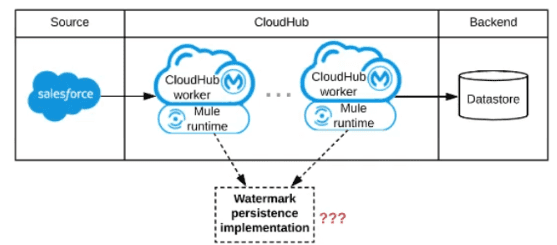
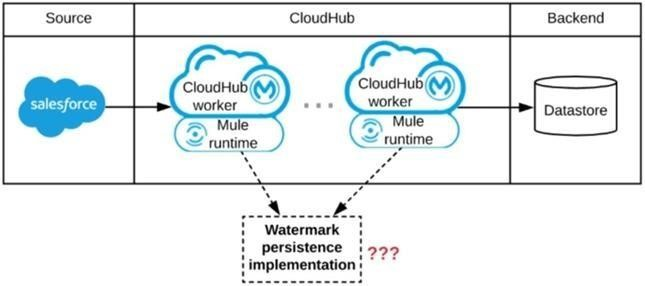
Refer to the exhibit.
A Mule application is being designed to be deployed to several CIoudHub workers. The
Mule application's integration logic is to replicate changed Accounts from Satesforce to a
backend system every 5 minutes.
A watermark will be used to only retrieve those Satesforce Accounts that have been
modified since the last time the integration logic ran.
What is the most appropriate way to implement persistence for the watermark in order to
support the required data replication integration logic?
A. Persistent Anypoint MQ Queue
B. Persistent Object Store
C. Persistent Cache Scope
D. Persistent VM Queue
Explanation
A watermark in this context is a value (typically a timestamp) that is stored after each successful run and read at the beginning of the next run to determine which records to fetch. The key requirements for its persistence mechanism are:
Key-Value Access:
The watermark is a single, uniquely identifiable piece of data (e.g., lastModifiedDate_for_Account).
Durability:
It must survive application restarts, worker failures, and redeployments. If lost, the integration would either miss data (if the watermark is reset) or reprocess large amounts of data.
Cluster-Wide Consistency:
Since the application is deployed to several CloudHub workers, all workers must read from and write to the exact same watermark value. If each worker maintained its own watermark, they would interfere with each other, leading to missed updates or duplicates.
Let's analyze why the Object Store is the ideal choice and why the others are not:
Why B is Correct (Persistent Object Store):
The Object Store is Mule's built-in, purpose-built solution for storing key-value data that needs to be persisted and shared across a cluster.
The Persistent Object Store in CloudHub is backed by a highly available, shared database, ensuring the data is durable.
It provides a simple API (ObjectStore.put(...), ObjectStore.get(...)) that is perfect for storing and retrieving a single value like a watermark.
It is automatically shared across all workers in a CloudHub environment, guaranteeing that every instance of the application uses the same, current watermark.
Why A is Incorrect (Persistent Anypoint MQ Queue):
A queue is designed for messaging – sending discrete, consumable messages from a producer to one or more consumers.
It is not designed for storing a shared state. To use it as a watermark, you would have to consume the message (which removes it), read it, and then put it back, which is prone to race conditions and is not an atomic operation. This is a misuse of a queue's intended purpose.
Why C is Incorrect (Persistent Cache Scope):
The Cache Scope is designed to cache the response of an expensive operation (like an external API call) to improve performance.
While it can be persistent, its primary use case is for read-through caching, not for storing and updating a shared, mutable state like a watermark. Its behavior and lifecycle are not ideal for this stateful coordination pattern.
Why D is Incorrect (Persistent VM Queue):
The VM transport is designed for intra-JVM communication between flows within the same Mule runtime instance.
It is not shared across different workers/nodes in a cluster. Each CloudHub worker would have its own isolated VM queue, leading to each worker having a different watermark and causing chaos in the replication logic.
Key References
MuleSoft Documentation: Object Store
This is the definitive source, explaining its use for persistent, clustered key-value storage.
An organization has deployed runtime fabric on an eight note cluster with performance profile. An API uses and non persistent object store for maintaining some of its state data. What will be the impact to the stale data if server crashes?
A. State data is preserved
B. State data is rolled back to a previously saved version
C. State data is lost
D. State data is preserved as long as more than one more is unaffected by the crash
Explanation
The key detail in the question is the use of a non-persistent object store. Let's break down why this leads to data loss:
Non-Persistent Object Store:
This type of Object Store is stored in-memory (RAM). Its purpose is to provide very fast, transient storage for data that does not need to survive an application or server restart (e.g., short-lived cache entries, rate-limiting counters for a brief window).
Impact of a Server Crash:
When a server crashes, the contents of its RAM are cleared. Since the non-persistent Object Store exists solely in memory, all the state data it contains is immediately and permanently lost.
Irrelevance of Runtime Fabric and Cluster Size:
The fact that the application is deployed on an 8-node Runtime Fabric cluster with a performance profile does not change the outcome. A non-persistent Object Store is local to the individual Mule runtime instance (node). It is not replicated across the cluster. Therefore, the crash of a single node will wipe out the Object Store data that was held by that specific node.
Why the Other Options are Incorrect:
A. State data is preserved:
This is only true for a Persistent Object Store, which writes data to disk. A non-persistent store offers no preservation upon a crash.
B. State data is rolled back to a previously saved version:
Object Stores do not have a built-in versioning or rollback mechanism like a database transaction. When the node crashes, the data is simply gone.
D. State data is preserved as long as more than one node is unaffected by the crash:
This would be true for a Persistent Object Store that is configured to be replicated across the cluster. However, a non-persistent Object Store is, by definition, neither persistent nor replicated. Each node maintains its own independent, in-memory copy.
Key References
MuleSoft Documentation: Object Store
This documentation explicitly distinguishes between persistent and non-persistent object stores.
Link: Object Store Overview
Key Quote: "A non-persistent object store... does not persist its data. If the Mule node that contains the object store is shut down or restarted, the data is lost."
In summary, for any state that must survive a runtime restart or failure, a Persistent Object Store must be used. The use of a Non-Persistent Object Store guarantees that data will be lost upon a server crash, regardless of the underlying deployment platform.
A Mule application is deployed to a cluster of two(2) customer-hosted Mule runtimes.
Currently the node name Alice is the primary node and node named bob is the secondary
node. The mule application has a flow that polls a directory on a file system for new files.
The primary node Alice fails for an hour and then restarted.
After the Alice node completely restarts, from what node are the files polled, and what node
is now the primary node for the cluster?
A. Files are polled from Alice node
Alice is now the primary node
B. Files are polled form Bob node
Alice is now the primary node
C. Files are polled from Alice node
Bob is the now the primary node
D. Files are polled form Bob node
Bob is now the primary node
Explanation
The behavior is determined by two key concepts: Mule Runtime Cluster Leadership and the configuration of the File connector.
Cluster Primary Node (Leadership):
In a Mule runtime cluster, there is always one primary node. The primary is responsible for running cluster-wide singleton services (e.g., the cluster manager itself, certain scheduled tasks).
Leadership is determined by an election process. When a node starts or the current primary fails, the nodes hold an election. The default strategy is often as simple as the node with the oldest start time wins.
In this scenario:
When the primary node (Alice) fails, the secondary node (Bob) becomes the new primary. When Alice restarts an hour later, it joins the cluster as a secondary node. Bob, having been the stable primary, retains the primary role. Leadership does not automatically revert to the original node upon its return.
File Connector Behavior in a Cluster:
The File connector's list operation (used for polling) is configured to be primaryNodeOnly="true" by default.
This means that the polling job is a cluster-wide singleton. Only the current primary node in the cluster will execute the poll.
In this scenario:
While Alice was down, Bob (as the new primary) took over polling the directory. After Alice restarts and joins as a secondary, Bob remains the primary. Therefore, Bob continues to be the only node polling the directory.
Summary of Events:
Initial State: Primary = Alice (polling files). Secondary = Bob.
After Alice Fails: Primary = Bob (now polling files).
After Alice Restarts: Primary = Bob (still polling files). Secondary = Alice.
Key References
MuleSoft Documentation: Mule Runtime Clustering
This explains the concept of the primary node and high availability.
MuleSoft Documentation: File Connector Listener (Poll Scope)
The documentation for the File connector will specify its behavior in a clustered environment, which is to run only on the primary node by default.
Concept: The primaryNodeOnly parameter controls this behavior, and its default is true.
A company is designing an integration Mule application to process orders by submitting
them to a back-end system for offline processing. Each order will be received by the Mule
application through an HTTP5 POST and must be acknowledged immediately.
Once acknowledged the order will be submitted to a back-end system. Orders that cannot
be successfully submitted due to the rejections from the back-end system will need to be
processed manually (outside the banking system).
The mule application will be deployed to a customer hosted runtime and will be able to use
an existing ActiveMQ broker if needed. The ActiveMQ broker is located inside the
organization's firewall. The back-end system has a track record of unreliability due to both
minor network connectivity issues and longer outages.
Which combination of Mule application components and ActiveMQ queues are required to
ensure automatic submission of orders to the back-end system while supporting but
minimizing manual order processing?
A. One or more On Error scopes to assist calling the back-end system An Untill successful scope containing VM components for long retries A persistent dead-letter VM queue configure in Cloud hub
B. An Until Successful scope to call the back-end system One or more ActiveMQ long-retry queues One or more ActiveMQ dead-letter queues for manual processing
C. One or more on-Error scopes to assist calling the back-end system one or more ActiveMQ long-retry queues A persistent dead-letter Object store configuration in the CloudHub object store service
D. A batch job scope to call the back in system An Untill successful scope containing Object Store components for long retries. A dead-letter object store configured in the Mule application
Explanation
The requirements point towards a robust, message-driven architecture that can handle backend unreliability:
Immediate Acknowledgment:
The HTTP listener must return a response immediately, decoupling the request from the actual processing.
Reliable Delivery & Retries:
The system must automatically retry failed submissions due to transient issues (network glitches, short outages).
Handling Permanent Failures:
After exhaustive retries, orders that still cannot be processed must be moved to a separate location for manual intervention.
Let's break down why option B is the correct combination:
An Until Successful Scope:
This scope is the idiomatic Mule component for performing repeated attempts to call an unreliable system. You can configure the number of retries and the time between them. It will keep trying to deliver the message to the backend system until it either succeeds or exhausts its retry configuration.
One or more ActiveMQ Long-Retry Queues:
This is the core of the reliability pattern. Instead of using the VM transport (which is in-memory and not persistent) or an Object Store (which is for key-value storage, not message queuing), you use a persistent JMS queue.
The flow would be:
HTTPS Listener -> JMS Publish (to a "orders.pending" queue) -> JMS Listener (on "orders.pending") -> Until Successful Scope -> Backend System.
The JMS queue provides guaranteed delivery. If the Mule runtime crashes after receiving the HTTP request but before processing is complete, the order message is safely persisted in ActiveMQ and will be processed when the runtime recovers.
The "long-retry" aspect is handled by the combination of the JMS queue's persistence and the Until Successful scope's retry logic.
One or more ActiveMQ Dead-Letter Queues for Manual Processing: This is the standard, idiomatic way to handle messages that cannot be processed after repeated attempts.
When the Until Successful scope exhausts all its retries, it will throw an exception.
The JMS listener for the "orders.pending" queue will be configured with a Redelivery Policy in ActiveMQ. After a maximum number of redelivery attempts from the broker's side, ActiveMQ will automatically move the problematic message to a Dead Letter Queue (DLQ), such as ActiveMQ.DLQ.
This DLQ is a persistent queue where support staff can directly access the failed orders using any JMS client (like the ActiveMQ admin console) for manual analysis and processing, fulfilling the requirement perfectly.
Why the Other Options Are Incorrect
A. VM Queues & CloudHub Reference:
VM queues are in-memory and non-persistent. A runtime restart would cause all in-flight and queued orders to be lost. Furthermore, it incorrectly references "CloudHub," which is not applicable as the runtime is customer-hosted.
C. Object Store for Dead-Letter:
While the Object Store can be used to persist data, it is not a message queue. It lacks the standard tooling, protocols, and FIFO semantics that make a JMS Dead-Letter Queue the ideal place for manual inspection and reprocessing of failed messages. Using an Object Store for this purpose is non-standard and more complex.
D. Batch Job & Object Store:
A batch job is for processing large volumes of data and is not designed for real-time, message-by-message processing triggered by an HTTP request. Using Object Store components for retries is a cumbersome and non-idiomatic approach compared to the purpose-built Until Successful scope and JMS queues.
Key References
Enterprise Integration Pattern - Guaranteed Delivery: Achieved by using a persistent JMS queue.
Enterprise Integration Pattern - Dead Letter Channel: The standard pattern for handling messages that cannot be delivered.
An organization will deploy Mule applications to Cloudhub, Business requirements mandate
that all application logs be stored ONLY in an external splunk consolidated logging service
and NOT in Cloudhub.
In order to most easily store Mule application logs ONLY in Splunk, how must Mule
application logging be configured in Runtime Manager, and where should the log4j2 splunk
appender be defined?
A. Keep the default logging configuration in RuntimeManager
Define the splunk appender in ONE global log4j.xml file that is uploaded once to Runtime
Manager to support at Mule application deployments.
B. Disable Cloudhub logging in Runtime Manager
Define the splunk appender in EACH Mule application’s log4j2.xml file
C. Disable Cloudhub logging in Runtime Manager
Define the splunk appender in ONE global log4j.xml file that is uploaded once to Runtime
Manger to support at Mule application deployments.
D. Keep the default logging configuration in Runtime Manager
Define the Splunk appender in EACH Mule application log4j2.xml file
Define the splunk appender in EACH Mule application’s log4j2.xml file
Explanation
The requirement is strict: logs must be stored ONLY in Splunk and NOT in CloudHub. This requires a two-part configuration.
Part 1: Disable CloudHub Logging in Runtime Manager
Why this is necessary:
By default, CloudHub captures and stores all application logs. To prevent this and fulfill the "NOT in Cloudhub" mandate, you must explicitly disable it. This is done in the Runtime Manager for each application deployment.
How it's done:
When deploying or editing an application in CloudHub, you navigate to the "Logging" tab and set the "Application Logging" option to Off. This stops CloudHub from collecting and persisting the logs in its own storage.
Part 2: Define the Splunk Appender in Each Mule Application's log4j2.xml File
Why in EACH application:
In CloudHub, the logging configuration is application-scoped. Each Mule application uses its own log4j2.xml file, which is packaged within the application JAR. There is no supported concept of a single, global log4j2.xml file that applies to all applications in a CloudHub worker. Therefore, to ensure every application logs to Splunk, each one must have its own log4j2.xml file containing the Splunk appender configuration.
Why log4j2.xml (not log4j.xml):
Mule 4 uses Log4j2 as its logging framework. The configuration file must be named log4j2.xml, not the older log4j.xml used in Mule 3.
Why the Other Options are Incorrect:
A. Keep default logging & global log4j.xml:
This fails on both counts. Keeping the default logging means logs are still stored in CloudHub, violating the requirement. A global log4j.xml file is not a supported configuration mechanism in CloudHub for Mule 4 applications.
C. Disable logging & global log4j.xml:
This correctly disables CloudHub logging but incorrectly relies on a non-existent global log4j.xml configuration. Without the appender in their own log4j2.xml files, the applications would not log anywhere.
D. Keep default logging & appender in each app:
This is the most incorrect option because it explicitly violates the core requirement. Keeping the default logging configuration in Runtime Manager means logs will continue to be stored in CloudHub, even if they are also being sent to Splunk. The requirement is for logs to be stored ONLY in Splunk.
Key References
MuleSoft Documentation: Disable Application Logging in CloudHub
This details how to turn off CloudHub's built-in log aggregation.
| Salesforce-MuleSoft-Platform-Integration-Architect Exam Questions - Home | Previous |
| Page 9 out of 55 Pages |