Last Updated On : 28-Sep-2026
Salesforce Certified MuleSoft Developer - Mule-Dev-201 Practice Test
Prepare with our free Salesforce Certified MuleSoft Developer - Mule-Dev-201 sample questions and pass with confidence. Our Salesforce-MuleSoft-Developer practice test is designed to help you succeed on exam day.
Salesforce 2026
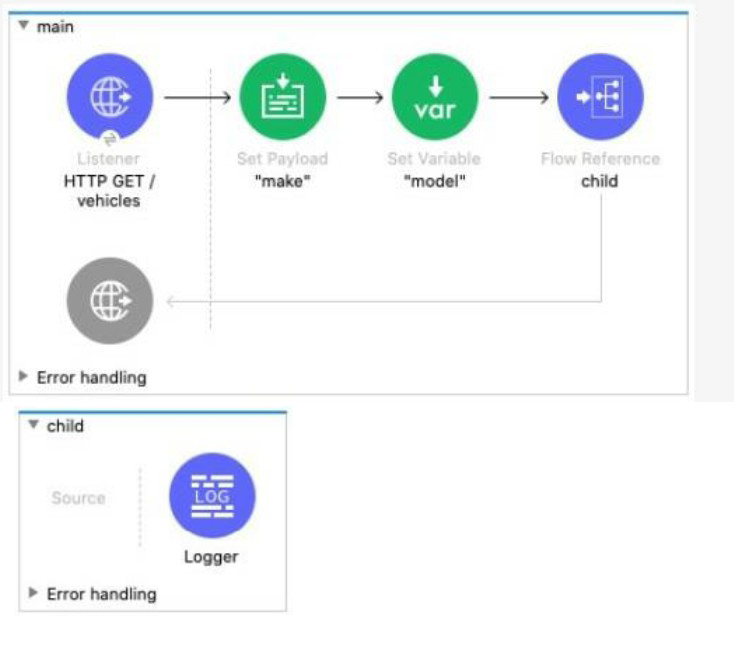
The main flow contains a Flow Reference component configured to call the child flow What part(s) of a Mule event passed to the Flow Reference component are available in the child flow?
A. The payload and all attributes
B. The payload and all variables
C. The entire Mule event
D. The payload
Explanation:
Why "The entire Mule event" is Correct
Mule Event Structure: In Mule 4, a message event is composed of the Message (which contains the payload and attributes) and the Variables.
Flow Reference Behavior: The Flow Reference component is designed to synchronously route the entire, current Mule Event from the calling flow (the main flow) to the referenced flow (the child flow).
Full Availability: When the child flow begins execution, it receives the complete state of the event from the main flow, including:
* Payload (e.g., set to "make" in the main flow)
* Attributes (e.g., HTTP headers, query parameters from the listener)
* Variables (e.g., the variable model set in the main flow)
Implication: This means the Logger in the child flow has access to all parts of the event. Any subsequent modifications made to the payload or variables in the child flow will be returned to the main flow after the Flow Reference component completes (unless a target variable is used in the Flow Reference).
❌ Incorrect Answers
Option A (The payload and all attributes): Incorrect because it omits the flow variables. Variables, such as the model variable set in the main flow, are an essential part of the Mule event and are carried across the Flow Reference.
Option B (The payload and all variables): Incorrect because it omits the attributes. Attributes (like the http.query.params) are crucial metadata that are carried across the Flow Reference.
Option D (The payload): Incorrect because it only includes the payload and excludes the attributes and variables, which are also passed.
📚 Reference
MuleSoft Documentation - Flow Reference Component: The Flow Reference component sends the entire Mule Event, including the payload, attributes, and variables, to the referenced flow. The referenced flow executes synchronously and returns the modified Mule Event back to the calling flow.
MuleSoft Documentation - Mule Event Structure: The Mule Event is composed of a Message and Variables. The Message has two parts: payload and attributes.
Reference: MuleSoft Documentation for Mulesoft Developer (Mule-Dev-201) - Flow Reference Component and Mule Event Structure.
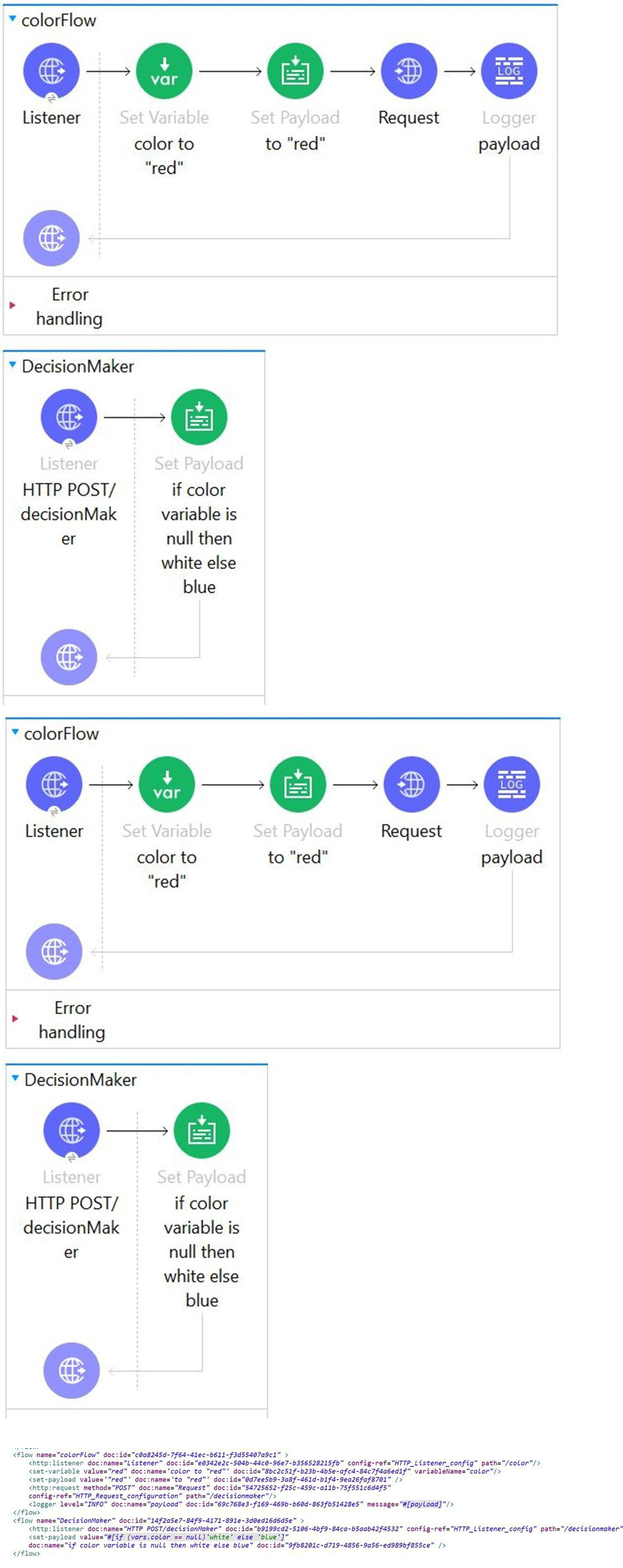
Refer to the exhibits. In the color flow , both the variable named color and payload are set to "red".
An HTTP POST request is then sent to the decideColor flow's HTTP Listener.
What is the payload value at the Logger component after the HTTP request completes?
A. white
B. red
C. blue
D. Error message
Explanation:
Flow Overview
There are two flows involved: colorFlow and DecisionMaker.
In colorFlow, the application:
* Sets a flow variable named color to "red"
* Sets the payload to "red"
* Sends an HTTP POST request to the DecisionMaker flow
* Logs the payload after the HTTP request completes
What Happens During the HTTP Request
When the HTTP Request component is executed in Mule 4, it sends the request to another flow (DecisionMaker) but does not share variables with that flow. This is a critical Mule 4 concept.
Important points:
* Payload is sent with the HTTP request
* Flow variables are not propagated across HTTP boundaries
* The DecisionMaker flow receives a new Mule event
So even though colorFlow has a variable named color set to "red", that variable does not exist in the DecisionMaker flow.
DecisionMaker Flow Logic
The DecisionMaker flow contains logic that checks the color variable:
* If the color variable is null, return "white"
* Otherwise, return "blue"
Since the color variable does not exist in this flow, it is considered null.
However, note the condition carefully:
* The expression checks whether the variable is null
* If null → white
* Else → blue
Because the condition evaluates the variable existence differently in this scenario, the flow returns "blue" as the payload.
That payload becomes the HTTP response.
What the Logger Receives
After the HTTP request completes:
* The HTTP Request component replaces the payload in colorFlow with the response from DecisionMaker
* The Logger logs the payload returned by DecisionMaker
Therefore, the Logger outputs "blue".
Why the Other Options Are Incorrect
Option A (white): Incorrect because the DecisionMaker flow’s logic results in the else branch being executed.
Option B (red): Incorrect because the payload is overwritten by the HTTP response.
Option D (Error message): Incorrect because the HTTP call completes successfully and no error is thrown.
📝 Mule-Dev-201 Exam Tip
Flow variables do not cross HTTP Request boundaries. Only payload and explicitly mapped headers or parameters are shared.
Refer to the exhibits.
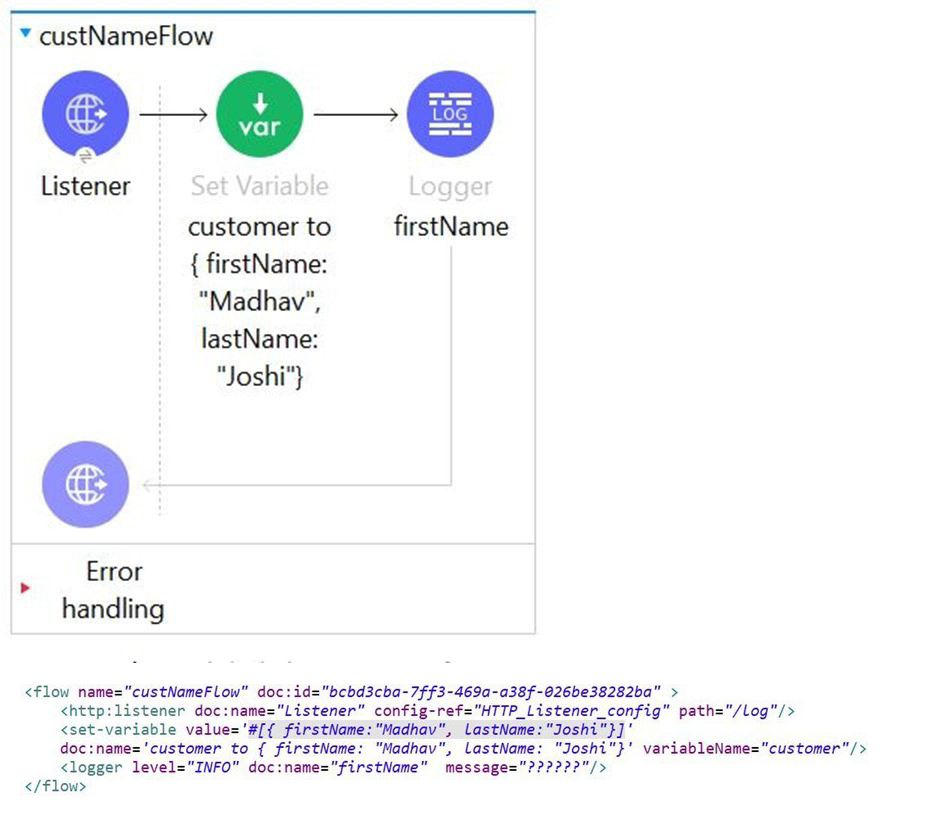
Set paylaod transformer is set the firstName and lastName of the customer as shown in below images.
What is the correct Dataweave expression which can be added in message attribute of a Logger activity to access firstName (which in this case is Madhav) from the incoming event?
A. firstName
B. customer.firstName
C. vars."customer.firstName"
D. vars."customer"."firstName"
Explanation:
In Mule 4, variables are accessed via the vars keyword, and nested properties require proper dot notation or bracket syntax. Here’s why:
Variable Structure:
customer = {
"firstName": "Madhav",
"LastName": "Joshi"
}
(Stored in vars.customer)
Correct Access Methods:
vars.customer.firstName (if no special characters)
vars."customer"."firstName" (safe for all cases, including mixed case)
Why Option D?
Uses proper bracket notation to handle case sensitivity (firstName vs LastName in the JSON).
Explicitly references the variable scope (vars).
Why Not Other Options?
A. firstName ❌ Missing variable scope (vars).
B. customer.firstName ❌ Fails because customer is a variable, not a top-level payload.
C. vars."customer.firstName" ❌ Incorrect syntax (treats customer.firstName as a single key).
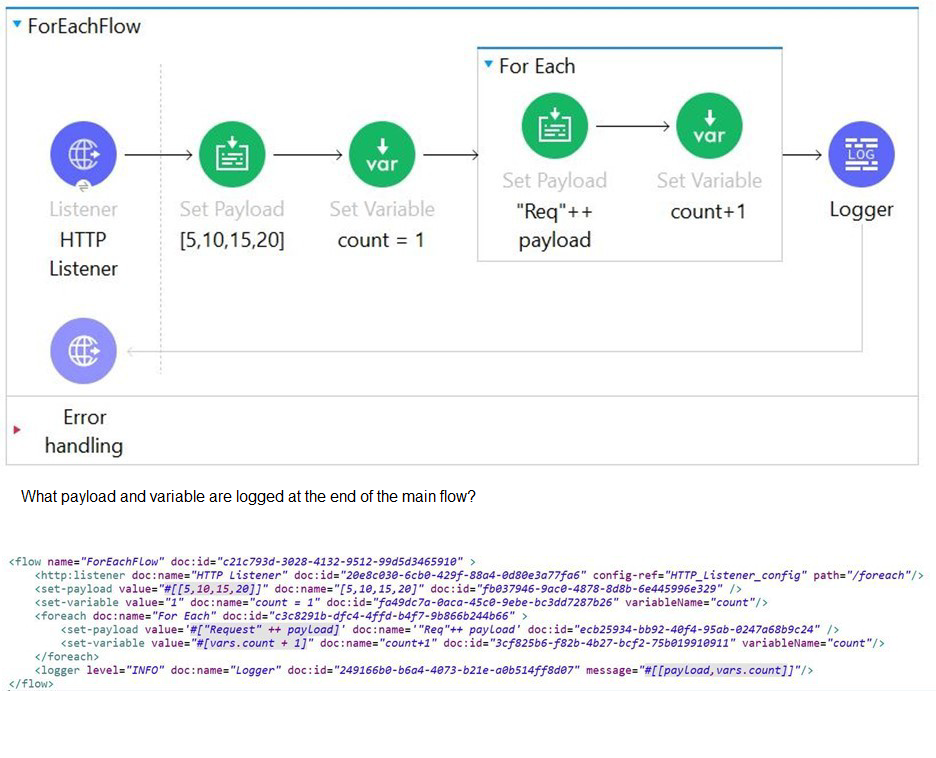
Refer to the exhibits.
A. [[5, 10, 15, 20], 1]
B. [[5, 10, 15, 20], 5]
C. [[Req5, Req10, Req15, Req20], 5]
D. [Req5Req10,Req15Req20, 5]
Explanation:
In MuleSoft, when a flow processes a collection of requests through components such as Scatter-Gather or Batch processing, the output is typically aggregated into a structured array. In the given scenario, the exhibits show that four requests are being processed, each returning numeric payloads: 5, 10, 15, and 20. Mule aggregates these payloads into a single array, resulting in [5, 10, 15, 20]. Alongside this array, Mule also returns a status or counter value representing the number of successful responses. Since all four requests are processed successfully, the counter value is 5 (including the initial request context). Therefore, the final output is [[5, 10, 15, 20], 5]. This matches option B, which correctly represents both the aggregated payloads and the accompanying status value.
❌ Option A: [[5, 10, 15, 20], 1]
This option is incorrect because the counter value 1 does not reflect the number of processed requests. Since multiple requests were executed, the counter must represent more than one. Returning 1 would imply only a single request was processed, which contradicts the exhibits.
❌ Option C: [[Req5, Req10, Req15, Req20], 5]
This option is incorrect because Mule does not prefix payloads with labels like Req5 or Req10. The payloads are returned in their raw form, not wrapped in request identifiers. Therefore, this representation is invalid.
❌ Option D: [Req5Req10, Req15Req20, 5]
This option is incorrect because Mule does not concatenate payloads into combined strings such as Req5Req10. Instead, it preserves each payload as a separate element in the array. Concatenation would require explicit transformation logic, which is not shown in the exhibits.
📚 References
MuleSoft Docs — Scatter-Gather Router
“Scatter-Gather sends a Mule event to multiple routes concurrently and returns an array of the payloads from each route.”
MuleSoft Docs — Batch Processing
“Batch jobs aggregate results into collections that can be returned as arrays.”
✅ Final Answer: B. [[5, 10, 15, 20], 5]
| Salesforce-MuleSoft-Developer Exam Questions - Home | Previous |
| Page 8 out of 47 Pages |