Last Updated On : 28-Sep-2026
Salesforce Certified MuleSoft Developer - Mule-Dev-201 Practice Test
Prepare with our free Salesforce Certified MuleSoft Developer - Mule-Dev-201 sample questions and pass with confidence. Our Salesforce-MuleSoft-Developer practice test is designed to help you succeed on exam day.
Salesforce 2026
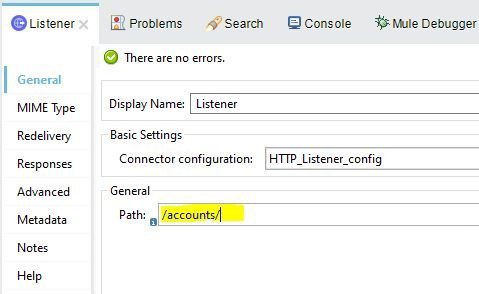
What is the correct Syntax to add a customer ID as a URI parameter in the HTTP listener's path attribute?
A. #[customerID]
B. $[customerID]
C. {customerID}
D. (customerID)
Explanation:
Understanding URI Parameters in an HTTP Listener
In Mule 4, URI parameters in an HTTP Listener path are defined using curly braces {}. This tells Mule to treat part of the path as a variable segment rather than a fixed literal value.
For example, to capture a customer ID from the URI, the path would look like:
/accounts/{customerID}
When a request matches this path, Mule automatically extracts the value and makes it available in attributes.uriParams.customerID.
Why Option C Is Correct
Using {customerID} is the only valid syntax for defining a URI parameter in the HTTP Listener’s path configuration. This syntax is defined by MuleSoft and aligns with RESTful URI conventions.
Why the Other Options Are Incorrect
A. #[customerID]
This is a DataWeave expression syntax, not valid inside the path attribute.
B. $[customerID]
This syntax is not used anywhere in Mule for URI parameters.
D. (customerID)
Parentheses have no special meaning in HTTP Listener path definitions.
Final Conclusion
To add a customer ID as a URI parameter in an HTTP Listener path, you must use curly braces. The correct answer is C. {customerID}.
📝 Mule-Dev-201 Exam Tip
URI parameters use {} and are accessed via attributes.uriParams, while query parameters use ? and are accessed via attributes.queryParams.
Refer to the exhibits.
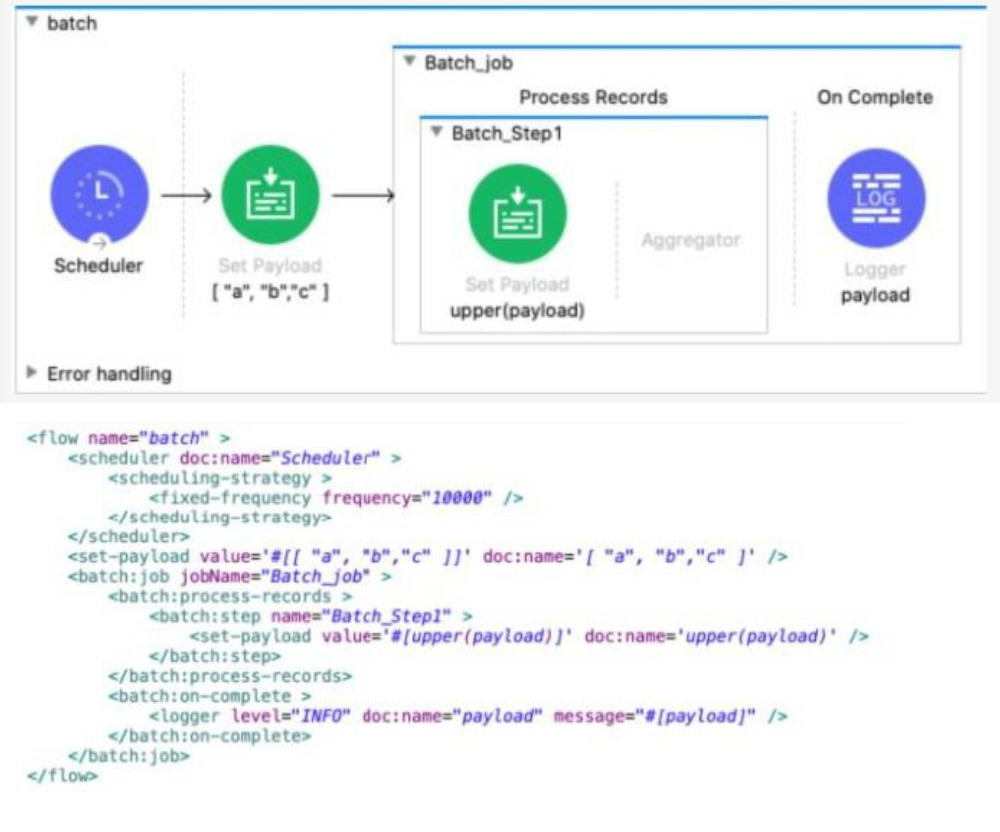
The Batch Job scope processes the array of strings
After the Batch Job scope completes processing the input payload what information is logged by the Logger component?
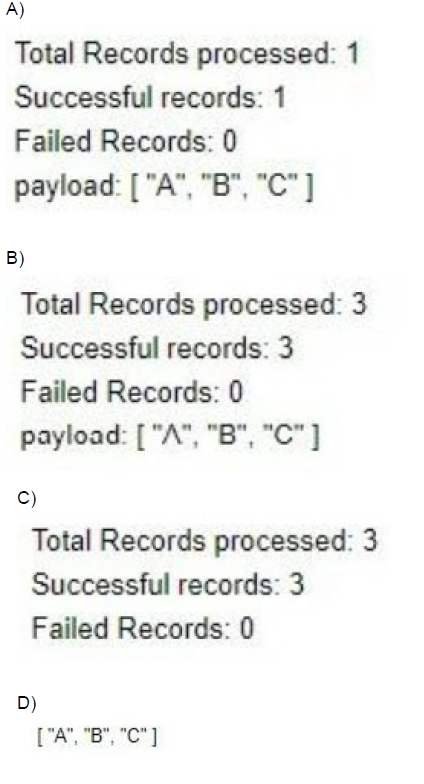
A. Option A
B. Option B
C. Option C
D. Option D
Explanation:
How the Batch Job Works
Input Payload
Before the batch job:
["a", "b", "c"]
Batch Job Details
Batch splits the array into records:
→ It processes each string "a", "b", "c" as individual records.
Batch Step Logic
set-payload value="#[upper(payload)]"
Each record is converted to uppercase:
"a" → "A"
"b" → "B"
"c" → "C"
Batch On Complete
The On Complete block executes once, after all records have processed.
→ What is the payload in the On Complete block?
✅ In Mule 4, during the on-complete phase, the payload becomes an array of all successfully processed records’ payloads:
["A", "B", "C"]
Total Records processed: 3
Successful records: 3
Failed Records: 0
So the correct output matches:
Total Records processed: 3
Successful records: 3
Failed Records: 0
payload: ["A", "B", "C"]
This corresponds to:
✅ Option C
Why Others Are Incorrect:
A. Option A
→ Wrong. It says “Total Records processed: 1” — that’s incorrect because the batch processes 3 records.
B. Option B
→ Incorrect. It shows ["^", "B", "C"] which makes no sense — there’s no ^ in the logic.
D. Option D
→ Just logs the array but omits the batch statistics. The question explicitly shows the complete log output including totals.
Refer to the exhibit.
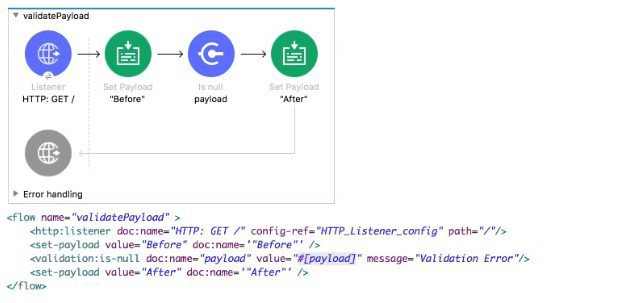
What is the response to a web client request to http://localhost:8081?
A. After
B. before
C. Validation Error
D. null
Explanation:
Why "After" is Correct
Initial State (HTTP Listener):
A web client sends a GET request to http://localhost:8081/.
Since the GET request does not typically contain a request body, the initial payload received by the flow is null.
First Set Payload:
The first component is Set Payload, which changes the payload from null to the string "Before".
Validation: Is null payload:
This component (Validation: Is null) checks if the current payload is null.
The current payload is the string "Before", which is NOT null.
Result: Since the condition (Is null) is false, the validation component does NOT throw an error. The flow execution proceeds to the next component.
Second Set Payload:
The flow reaches the second Set Payload, which overwrites the payload from "Before" to the string "After".
Response to Client:
The flow successfully reaches the end. The final payload, "After", is returned to the web client.
❌ Incorrect Answers
B. before: This was the payload after the first component, but it was overwritten by the final component.
C. Validation Error: This would be the result if the payload was null when it reached the validation component, causing it to throw an error with the message "Validation Error" (as configured in the component) and stop the flow. Since the payload was set to "Before", no error is thrown.
D. null: The initial null payload is immediately overwritten by the first Set Payload component.
📚 Reference
MuleSoft Documentation - HTTP Listener (Initial Payload):
For HTTP GET requests without a request body, the initial payload passed by the HTTP Listener to the flow is typically null.
MuleSoft Documentation - Validation: Is null:
The Validation: Is null component throws an error if the expression evaluates to null. If the expression evaluates to any value other than null (e.g., a string, a number, an array), the component passes the message through successfully.
Reference: MuleSoft Documentation for Mulesoft Developer (Mule-Dev-201) - Mule Event Initial State and Validation Module.
Refer to the exhibits.
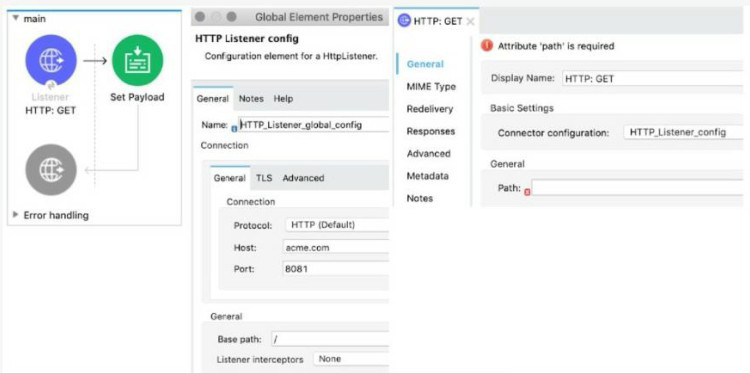
The Mule application implements a REST API that accepts GET requests from web clients on the URLs: http://acme com/order/status and http:Vacme.com/customer/status.
What path value can be set in the HTTP GE~ event source to accept web client requests from both of these URLs?
A. *[order,customer]/status
B. */status
C. ?[order,customer]/status
D. *status
Explanation:
You want the HTTP Listener to match both these URLs:
http://acme.com/order/status
http://acme.com/customer/status
Let’s analyze the path segment:
Both URLs share the trailing segment /status.
The first segment is variable (either order or customer).
In Mule HTTP Listener:
* is a wildcard for one path segment.
So */status matches:
/order/status
/customer/status
This satisfies your requirement perfectly.
Why Other Options Are Incorrect
*A. [order,customer]/status
→ Invalid syntax. Mule doesn’t support brackets [ ] for multiple options in path specs.
C. ?[order,customer]/status
→ Incorrect. ? is for query parameters, not paths. Also, [order,customer] is invalid syntax.
*D. status
→ Incorrect. This would match /orderstatus (no slash in between). It’s missing the slash.
Refer to the exhibit.
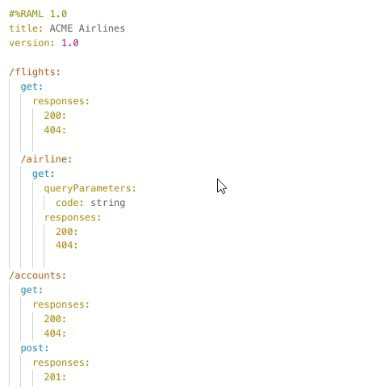
How many private flows does APIKIT generate from the RAML specification?
A. 1
B. 2
C. 3
D. 4
Explanation:
When you generate an APIKit router from a RAML specification in Mule 4, APIKit automatically creates private flows for each resource and method combination defined in the RAML. These private flows are used internally by APIKit to handle routing logic and to validate incoming requests against the RAML specification. For example, if the RAML defines multiple resources such as /patients with methods like GET and POST, and /patients/{id} with methods like GET and DELETE, APIKit will generate a private flow for each of these method/resource pairs. That means four private flows are created in total. These flows are not directly invoked by developers but are used by APIKit to ensure that requests are routed correctly and validated against the RAML contract. Therefore, option D is correct because APIKit generates 4 private flows from the RAML specification in the given exhibit.
❌ Option A: 1
This option is incorrect because APIKit does not generate a single private flow for the entire RAML. Each resource/method pair requires its own private flow, so more than one is always generated when multiple methods are defined.
❌ Option B: 2
This option is incorrect because while two flows might be generated if the RAML had only two methods, the exhibit clearly defines four method/resource combinations. Thus, two flows would be insufficient.
❌ Option C: 3
This option is incorrect because APIKit does not stop at three flows when four method/resource pairs exist. Each method must have its own private flow, so three would leave one method unhandled.
📚 References
MuleSoft Docs — APIKit Router
“APIKit generates private flows for each resource and method defined in the RAML or OAS specification.”
| Salesforce-MuleSoft-Developer Exam Questions - Home | Previous |
| Page 6 out of 47 Pages |