Last Updated On : 28-Sep-2026
Salesforce Certified MuleSoft Developer - Mule-Dev-201 Practice Test
Prepare with our free Salesforce Certified MuleSoft Developer - Mule-Dev-201 sample questions and pass with confidence. Our Salesforce-MuleSoft-Developer practice test is designed to help you succeed on exam day.
Salesforce 2026
Refer to the exhibit.
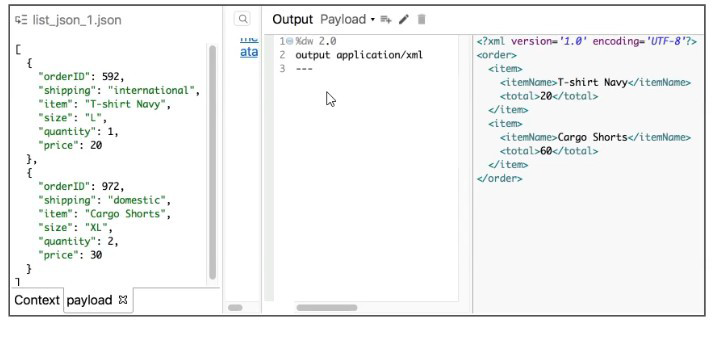
What Database expression transforms the input to the output?

A. Option A
B. Option B
C. Option C
D. Option D
Explanation:
Understanding the Input and Output
Input
The input payload is a JSON array containing multiple order records. Each record has fields like item, price, and quantity.
Output
The output is XML with:
- A single <order> root element
- Multiple <item> child elements
Each <item> contains:
- <itemName> mapped from item
- <total> calculated as price * quantity
So structurally, the desired output is:
- One order
- Inside it, a collection of item elements
Why Option B Is Correct
Option B defines:
- A single order object
- Inside order, it maps over the payload array
- Each iteration produces an item object
Conceptually, it does:
- order: → single root
- payload map (...) → multiple item entries inside that root
This matches the output exactly: one <order> element containing multiple <item> elements.
Why the Other Options Are Incorrect
Option A
This option wraps the entire payload map inside double curly braces at the top level. That results in multiple order objects, not a single order with multiple items. This does not match the output structure.
Option C
This option maps over the payload and creates an order object for each element in the array. That would produce multiple <order> elements, which is not what the output shows.
Option D
This option places the payload map inside extra curly braces within order. That creates an array of objects inside order, adding an extra level of nesting that does not exist in the expected output XML.
Final Conclusion
Only Option B correctly:
- Keeps a single order root
- Iterates over the payload to create multiple item elements
- Produces the exact XML structure shown in the output
📝 Mule-Dev-201 Exam Tip
When transforming a list into XML:
- Use map to create repeating child elements
- Wrap the map inside a single parent object when only one root element is required
Refer to the exhibits.
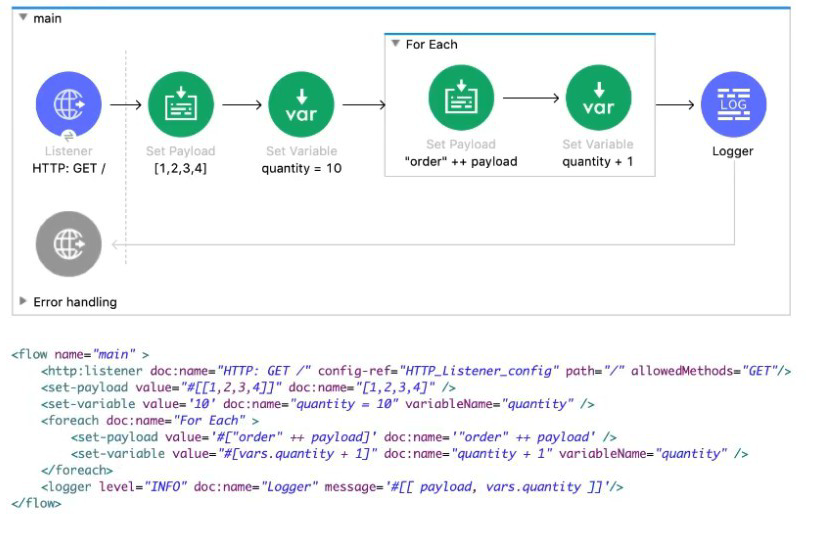
What payload and quantity are logged at the end of the main flow?
A. [[1,2,3,4], 14]
B. [[order1, order2, order3, order4], 14]
C. [[1,2,3,4], 10]
D. [orderlorder2order3order4,14]
Explanation:
Flow Execution
Step 1 – Initial Payload
[1, 2, 3, 4]
Step 2 – Set Variable
vars.quantity = 10
Step 3 – For Each
Iterates over [1, 2, 3, 4]:
1st iteration
payload → 1
set payload → "order" ++ payload → "order1"
vars.quantity = 10 + 1 = 11
2nd iteration
payload → 2
set payload → "order2"
vars.quantity = 11 + 1 = 12
3rd iteration
payload → 3
set payload → "order3"
vars.quantity = 12 + 1 = 13
4th iteration
payload → 4
set payload → "order4"
vars.quantity = 13 + 1 = 14
Step 4 – After For Each
Payload after For Each
For Each does NOT automatically collect the results into an array.
So outside the loop, payload remains the original array:
[1, 2, 3, 4]
vars.quantity → 14
Logger Prints
Logger message:
#[ [payload, vars.quantity] ]
→ Prints:
[[1, 2, 3, 4], 14]
Why Others Are Incorrect
B. [[order1, order2, order3, order4], 14]
→ Incorrect. For Each doesn’t aggregate results unless you explicitly store them.
C. [[1,2,3,4], 10]
→ Incorrect. quantity is incremented to 14.
D. [order1order2order3order4, 14]
→ Incorrect. For Each does not concatenate payloads into one string outside the loop.
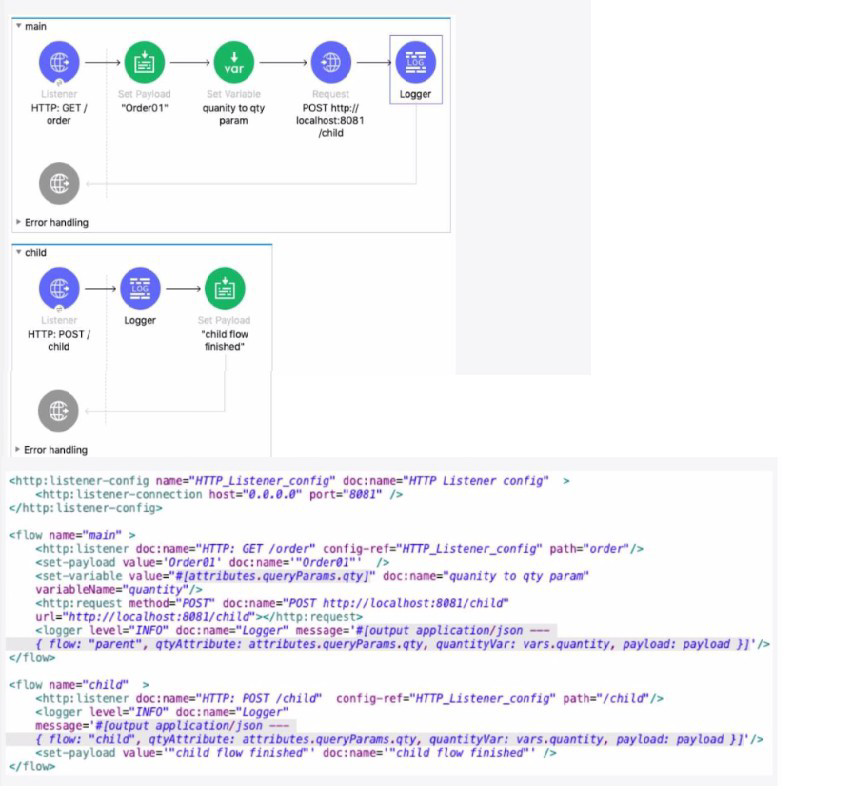
Refer to the exhibits. The main flow contains an HTTP Request operation configured to call the child flow's HTTP Listener.
A web client sends a GET request to the HTTP Listener with the sty query parameter set to 30.
After the HTTP Request operation completes, what parts of the Mule event at the main flow's Logger component are the same as the Mule event that was input to the HTTP Request operation?
A. The payload and all variables
B. All variables
C. The entire Mule event
D. The payload and all attributes
Explanation:
The key concept being tested is how the HTTP Request operation affects the Mule event in the main flow.
1. Initial Mule Event (Before HTTP Request):
Payload: Set to "Order01" by the set-payload component.
Variables: A variable named quantity is created with the value from the query parameter qty (which is 30).
Attributes: Contains the original HTTP request attributes (like query parameters, headers, etc.) from the listener.
2. Behavior of the HTTP Request Operation:
The HTTP Request operation (http:request) is a Message Processor that calls an external resource.
Crucially, when the HTTP Request operation completes, it replaces the entire Mule event in the main flow with the response from the called resource.
This means the original payload, attributes, and variables from before the call are lost and are replaced by the new Mule event from the HTTP response.
3. What Happens in the Child Flow:
The child flow is triggered by the main flow's HTTP Request.
Its initial Mule event is the request from the main flow: payload is "Order01", and it has the quantity variable.
The child flow's logger outputs its own event. It shows that vars.quantity exists (proving variables are passed) and the payload is "Order01".
The child flow's final action is
4. Final Mule Event (After HTTP Request Completes):
The HTTP Request operation in the main flow completes and receives the response from the child flow.
Payload: This is now replaced by the child flow's final payload: "child flow finished". The original payload ("Order01") is gone.
Variables: The original variables (like quantity) are preserved and restored after the HTTP Request operation completes. This is a key feature of Mule 4's non-blocking processing. Variables are safe from being overwritten by external calls.
Attributes: These are replaced by the attributes of the HTTP Response received from the child flow. The original HTTP request attributes (like attributes.queryParams.qty) are lost.
5. Conclusion for the Logger:
After the HTTP Request completes, the main flow's logger will show:
payload: "child flow finished" (changed)
vars.quantity: 30 (same - preserved)
attributes: These are now the HTTP Response attributes, not the original request attributes (changed).
Therefore, the only parts of the original Mule event that are the same (unchanged) after the HTTP Request operation are all variables.
Why the other options are incorrect:
A. The payload and all variables: The payload is changed by the HTTP response.
C. The entire Mule event: The payload and attributes are changed; only the variables remain.
D. The payload and all attributes: Both the payload and attributes are changed by the HTTP response. Variables are the only unchanged part.
Reference:
MuleSoft Documentation: HTTP Request Operation
The documentation explains that the operation returns a response, which becomes the new message payload. It also implicitly covers the scoping behavior where variables are preserved across the request.
Refer to the exhibit.
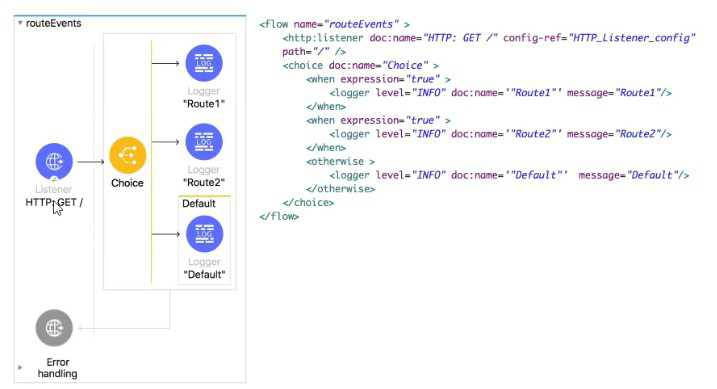
All three of the condition for the Choice router are true. What log messages are written?
A. Route 1
B. Route2
C. Route1, Route2
D. Route1, Route2, Default
Explanation:
How the Choice Router Works
The Choice router in Mule evaluates its conditions from top to bottom. As soon as it finds the first when condition that evaluates to true, it executes that route and stops evaluating the remaining conditions.
Only one route inside a Choice router is ever executed.
Applying This to the Given Flow
In the exhibit:
- The first when condition evaluates to true
- The second when condition also evaluates to true
- The otherwise block exists as a fallback
Even though all conditions are true, Mule follows this rule:
The Choice router executes only the first matching when block.
So:
- Route1 logger is executed
- Route2 is skipped
- Default is skipped
Why the Other Options Are Incorrect
B. Route2
This would only be logged if the first when condition was false and the second when condition was true. In a Choice router, Mule evaluates conditions in order. Since the first condition is true, Mule immediately executes Route1 and exits the Choice router. That means Mule never even evaluates the second when, so Route2 cannot be logged in this scenario.
C. Route1, Route2
This option assumes the Choice router behaves like multiple independent “if” statements where every true condition runs. That is not how Choice works. Choice behaves like an “if / else-if / else” chain: it executes only one branch, the first matching when. Once Route1 is selected, there is no “fall-through” or continued routing to Route2, so both cannot be logged from a single Choice execution.
D. Route1, Route2, Default
This option is incorrect for two separate reasons:
- Default (otherwise) never runs when any when is true.
- The otherwise branch is only executed when all when conditions evaluate to false. Since at least one condition is true (in fact all are true), otherwise is skipped.
Choice cannot execute multiple branches. Even if otherwise were eligible (it isn’t here), Choice still executes only one route per message. So you cannot get Route1, Route2, and Default all logged from one pass through the Choice router.
📝 Mule-Dev-201 Exam Tip
Always remember this rule for Choice routers:
First true condition wins. No fall-through.
| Salesforce-MuleSoft-Developer Exam Questions - Home | Previous |
| Page 5 out of 47 Pages |