Salesforce-MuleSoft-Developer Practice Test
Updated On 1-Jan-2026
234 Questions
Refer to the exhibits.

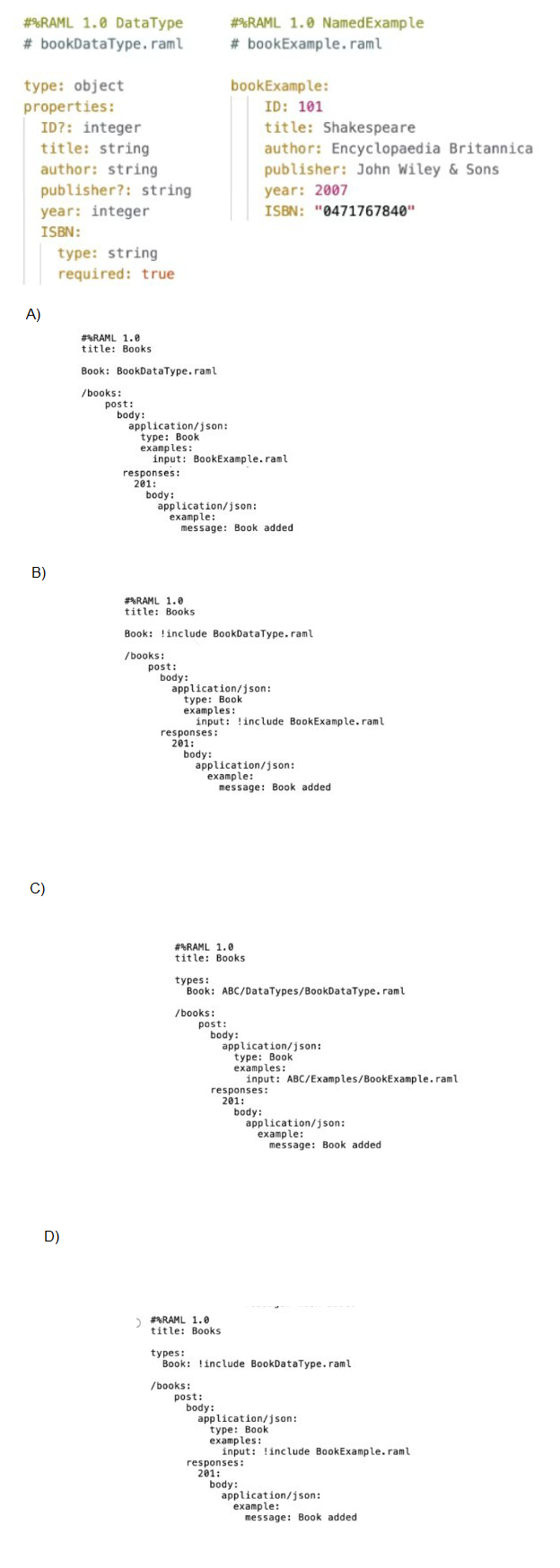
A company has defined this Book data type and Book example to be used in APIs. What is valid RAML for an API that uses this Book data type and Book example?
A. Option A
B. Option B
C. Option C
D. Option D
Explanation:
Understanding the Requirement
The company has already defined:
- A Book data type in a separate RAML file (BookDataType.raml)
- A Book example in a separate RAML example file (BookExample.raml)
The question asks which RAML snippet correctly uses both the data type and the example in an API definition.
In RAML 1.0, when you reuse external files:
- Data types must be imported using !include
- Examples must also be referenced using !include
- The data type should be declared under the types section
Why Option D Is Correct
Option D correctly follows RAML 1.0 syntax and best practices:
- The Book type is defined under the types section using !include BookDataType.raml
- The POST /books request body uses type: Book
- The request example correctly references the external example file using !include BookExample.raml
- The structure is valid, clean, and reusable
- This is exactly how RAML is intended to reference shared data types and named examples.
Why the Other Options Are Incorrect
❌ Option A
- References BookDataType.raml without using !include
- RAML does not automatically load external files unless explicitly included
❌ Option B
- Uses !include correctly, but defines Book outside the types section
- This makes the RAML invalid according to RAML 1.0 structure rules
❌ Option C
- References external files using paths but omits !include
- RAML requires !include to import external data types and examples
Final Conclusion
Only Option D correctly:
- Includes the external data type
- Includes the external example
- Uses proper RAML 1.0 syntax and structure
✅ Correct answer: D. Option D
📝 Mule-Dev-201 Exam Tip
For RAML reuse questions, remember this rule:
- External files → always use !include (for types, examples, traits, and libraries).
There are three routes configured for Scatter-Gather and incoming event has a payload is an Array of three objects. How routing will take place in this scenario?
A. Incoming array objects would be split into three and each part would be sent to one route each in sequential manner
B. Incoming array objects would be split into three and each part would be sent to one route each in parallel
C. Entire event would be sent to each route sequentially
D. Entire event would be sent to each route in parallel
Explanation
Why "Entire event would be sent to each route in parallel" is Correct
Parallel Execution (Scatter): The primary purpose of the Scatter-Gather component is to enable concurrent processing. When the event reaches the component, it immediately initiates a separate, independent thread for each configured route (in this case, all three routes).
Entire Event Transmission: The Scatter-Gather component sends a reference/copy of the entire, original Mule event (including the payload, attributes, and all variables) to every single route.
Payload Type is Irrelevant: The fact that the incoming payload is an array of three objects does not matter to the Scatter-Gather component. It does NOT split the array; it sends the full array payload to Route 1, the full array payload to Route 2, and the full array payload to Route 3.
Aggregation (Gather): After all routes complete their execution, the Scatter-Gather component collects the resulting Mule events from each route and aggregates them into a new Mule Event. The new payload is a special object that contains the output of each route, which then needs to be transformed (often using DataWeave's flatten function).
❌ Incorrect Answers
A. Incoming array objects would be split into three and each part would be sent to one route each in sequential manner
Incorrect: Scatter-Gather does not split the payload. Also, it executes in parallel, not sequentially. (Splitting and sequential execution is the behavior of the default For Each scope).
B. Incoming array objects would be split into three and each part would be sent to one route each in parallel
Incorrect: Scatter-Gather does not split the payload. This would be the behavior of a specialized, manually implemented Parallel For Each pattern.
C. Entire event would be sent to each route sequentially
Incorrect: Scatter-Gather is designed for parallel execution to save time over sequential processing.
A flow has a JMS Publish consume operation followed by a JMS Publish operation. Both of these operations have the default configurations. Which operation is asynchronous and which one is synchronous?
A. Publish consume: Synchronous. Publish: Asynchronous.
B. Publish consume: Asynchronous. Publish: Synchronous
C. Publish consume: Asynchronous. Publish: Asynchronous
D. Publish consume: Synchronous. Publish: Synchronous
Explanation:
In Mule 4, the JMS Publish consume operation is designed to send a message to a JMS destination and then wait for a correlated reply message. Because it waits for a response before continuing, this operation is synchronous by default. The flow execution is blocked until the reply is received or a timeout occurs.
On the other hand, the JMS Publish operation simply sends a message to a JMS destination and immediately returns control to the flow without waiting for any response. This makes it asynchronous by default. The flow continues execution right after publishing, and the message delivery is handled by the JMS broker independently.
This distinction is critical in integration design:
- Use Publish consume when you need request‑reply semantics (e.g., send a message and wait for a response).
- Use Publish when you only need fire‑and‑forget semantics (e.g., send a message to a queue or topic and continue processing).
Therefore, option A correctly identifies the synchronous/asynchronous nature of these operations under default configurations.
❌ Option B: Publish consume: Asynchronous. Publish: Synchronous
This is incorrect because Publish consume is explicitly synchronous — it waits for a reply. Publish is asynchronous, not synchronous.
❌ Option C: Publish consume: Asynchronous. Publish: Asynchronous
This is incorrect because Publish consume is not asynchronous; it blocks until a response is received.
❌ Option D: Publish consume: Synchronous. Publish: Synchronous
This is incorrect because Publish does not wait for a response. It is asynchronous by design.
📚 References
MuleSoft Docs — JMS Connector
“Publish consume sends a message and waits for a correlated reply message (synchronous). Publish sends a message and returns immediately (asynchronous).”
Refer to the exhibits.

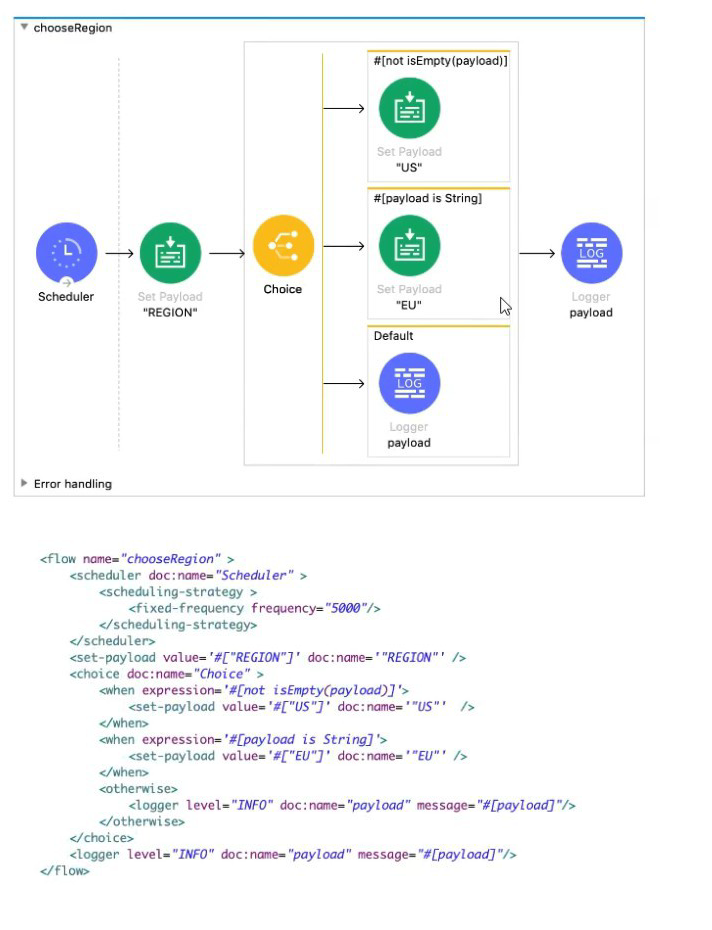
A Mule application contains a Choice router. What is logged when the flow completes?
A. EU
B. US
C. "REGION"
D. ["US", "EU"]
Explanation:
This question tests understanding of Choice router evaluation order, DataWeave expression evaluation, and the isEmpty() function behavior in Mule 4. The key insight is understanding which condition evaluates to true first and how that determines the execution path.
Step-by-Step Execution Analysis:
Initialization (Schedule Trigger):
- Flow starts via Scheduler every 5 seconds
- No incoming payload from scheduler (typically null or empty)
First Component Execution:
- Set Payload "REGION" → payload = "REGION" (a non-empty string)
Choice Router Evaluation (Order Matters!):
- First Condition: #[not isEmpty(payload)]
- payload = "REGION"
- isEmpty("REGION") returns false (string is not empty)
- not false = true
- CRITICAL: First condition evaluates to true → Choice router selects this route
First Route Execution:
- Set Payload "US" → payload = "US"
- Route completes
Choice Router Behavior:
- First-match-wins principle applies
- Second condition is NOT evaluated (short-circuit evaluation)
- otherwise route is NOT executed
Final Logger (Outside Choice Router):
- Executes after Choice router completes
- Logs current payload: "US"
Why "US" is Logged, Not "EU":
- Both conditions are technically true for payload "REGION":
- not isEmpty("REGION") = true
- "REGION" is String = true
- But order matters: Choice router executes only the first matching route
- Once first route is selected, all other routes are skipped
Why Other Options Are Incorrect:
A. EU ✗
- Would require first condition to be false and second true
- Or reverse order of conditions in Choice router
C. "REGION" ✗
- Would require both conditions to be false, triggering otherwise
- Or Choice router to not modify payload at all
D. ["US", "EU"] ✗
- Would require parallel execution (Scatter-Gather)
- Or sequential execution of both routes (not Choice router behavior)
Important DataWeave Function Details:
- isEmpty() returns true for: null, "" (empty string), [] (empty array), {} (empty object)
- isEmpty("REGION") = false because string has content
- is String type check returns true for any string value
Common Misconception:
- Many developers think "both conditions are true, so maybe both execute" or "the more specific condition should win." But Choice router is deterministic: first true condition wins, period.
Reference:
- MuleSoft Documentation - Choice Router: "Executes the first route whose condition evaluates to true"
- DataWeave Documentation - isEmpty(): Returns true for empty/null values
- Exam Domain: Processing (Understanding routing logic and expression evaluation)
- Key Concept: Choice router uses short-circuit evaluation with first-match-wins
How to import Core (dw::Core) module into your DataWeave scripts?
A. #include dw::core
B. Not needed
C. import core
D. import dw::core
Explanation:
In Mule 4’s DataWeave language, the Core module (dw::Core) is automatically imported into every DataWeave script. This means you do not need to explicitly import it to use its functions. The Core module provides fundamental functions such as sizeOf(), upper(), lower(), round(), and many others that are essential for everyday transformations. Because it is always available by default, developers can directly call these functions without writing an import statement. This design simplifies development and ensures that the most commonly used functions are readily accessible. Therefore, option B is correct: importing the Core module is not needed.
❌ Option A: #include dw::core
This option is incorrect because #include is not valid DataWeave syntax. DataWeave uses import statements for optional modules, but the Core module does not require explicit inclusion.
❌ Option C: import core
This option is incorrect because the syntax is incomplete and invalid. DataWeave requires the full module path (e.g., dw::util::Math) when importing optional modules. Simply writing import core would not work.
❌ Option D: import dw::core
This option is incorrect because although it looks closer to valid syntax, it is unnecessary. The Core module is already imported by default, so explicitly importing dw::core is redundant and not required in practice.
📚 References
MuleSoft Docs — DataWeave Core Module
“The Core module is automatically imported into every DataWeave script. You do not need to import it explicitly.”
MuleSoft Docs — DataWeave Modules
“Modules provide functions for specific tasks. Some modules, such as Core, are always available.”
| Salesforce-MuleSoft-Developer Exam Questions - Home | Previous |
| Page 4 out of 47 Pages |