Last Updated On : 28-Sep-2026
Salesforce Certified MuleSoft Developer - Mule-Dev-201 Practice Test
Prepare with our free Salesforce Certified MuleSoft Developer - Mule-Dev-201 sample questions and pass with confidence. Our Salesforce-MuleSoft-Developer practice test is designed to help you succeed on exam day.
Salesforce 2026
Refer to the exhibit.
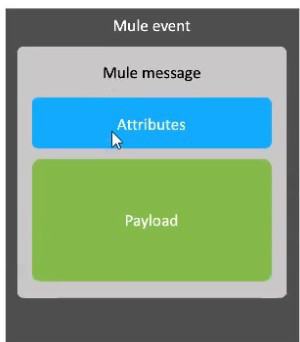
A Mule event is composed of a hierarchy of objects. Where in the hierarchy are variables stored?
A. Mule event
B. Mule message payload
C. Mule message
D. Mule message attributes
Explanation:
Mule Event Hierarchy
A Mule event is the top-level container that flows through a Mule application. It includes two major parts:
The Mule message (which contains payload and attributes)
The variables (metadata you create and manage during processing)
So variables are not inside the Mule message. They live alongside the Mule message at the Mule event level.
Why the Other Options Are Incorrect
B. Mule message payload
The payload contains the main data being processed (e.g., JSON/XML/body). Variables are not stored inside payload.
C. Mule message
The Mule message holds only payload and attributes. Variables are separate from the Mule message.
D. Mule message attributes
Attributes contain metadata from connectors (HTTP headers, query params, file properties, etc.). Variables are not part of attributes.
Mule-Dev-201 Exam Tip
Remember the structure:
Event = Message (payload + attributes) + Variables
Refer to the exhibits.

This main mule application calls a separate flow called as ShippingAddress which returns the address corresponding to the name of the user sent to it as input. Output of this ShippingAddress is stored in a target variable named address.
Next set of requirement is to have a setPayload transformer which will set below two values
1) orderkey which needs to set to be equal to the order element received in the original request payload.
2) addressKey which needs to be set to be equal to the address received in response of ShippingAddress flow
What is the straightforward way to properly configure the Set Payload transformer with the required data?
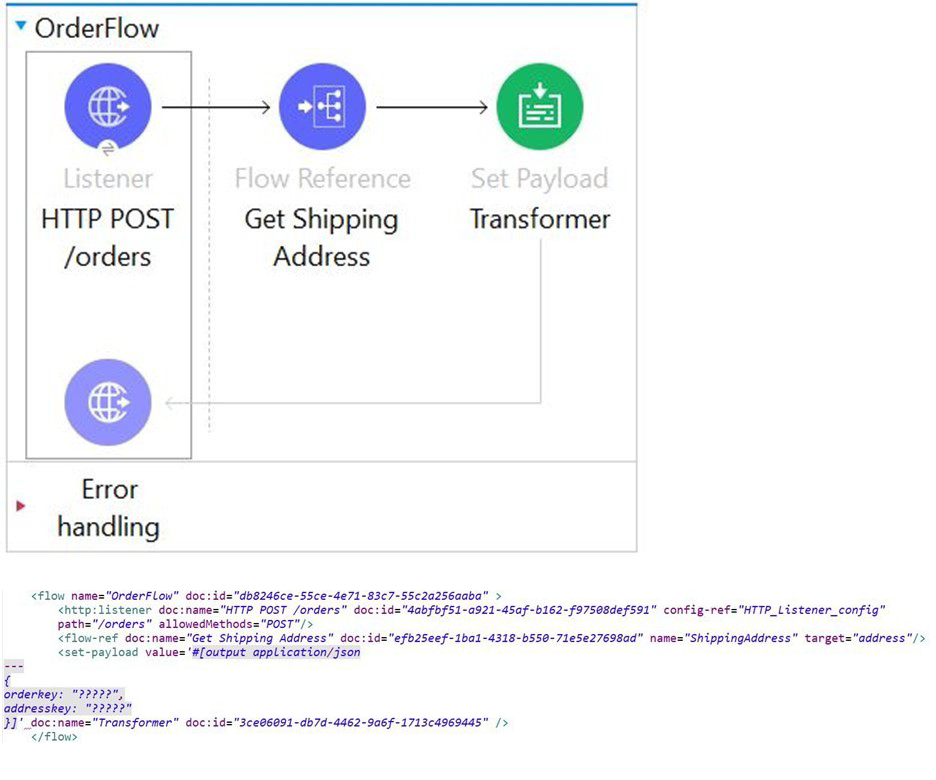
A mule application is being developed which will process POST requests coming from clients containing the name and order information. Sample request is as below
A. 1. 1. {
2. 2. orderkey: "payload.order",
3. 3. addresskey: "vars.address"
4. 4. }
B. 1. 1. {
2. 2. orderkey: "attributes.shippingaddress.order",
3. 3. addresskey: "payload"
4. }
C. 1. 1. {
2. 2. orderkey: "payload.order",
3. 3. addresskey: "address"
4. }
D. 1. 1. {
2. 2. orderkey: "attributes.order",
3. 3. addresskey: "vars.address"
4. }
2. 2. orderkey: "payload.order",
3. 3. addresskey: "vars.address"
4. 4. }
Explanation:
Why this is correct
In Mule 4, the original request payload is accessed using the payload keyword. Since the incoming request contains an element named order, the correct way to reference it is payload.order.
The output of the ShippingAddress flow is stored in a target variable named address. In Mule 4, variables are accessed using the vars scope. Therefore, the correct reference is vars.address.
Combining these, the Set Payload transformer must set orderkey equal to payload.order and addresskey equal to vars.address.
This matches option A, making it the straightforward and valid configuration.
❌ Option B
This is incorrect because:
attributes.shippingaddress.order is not a valid reference. Attributes are used for metadata (like HTTP headers, query params), not for request body elements.
payload here would incorrectly assign the entire payload instead of the specific vars.address value.
❌ Option C
This is incorrect because address alone is not valid syntax in Mule 4. Variables must be accessed using the vars prefix, i.e., vars.address.
❌ Option D
This is incorrect because attributes.order is not valid. The order element comes from the request payload, not from attributes.
📚 References
MuleSoft Docs — Variables in Mule 4
“Variables are accessed using the vars keyword.”
MuleSoft Docs — Payload and Attributes
“The Mule message consists of a payload and attributes. Payload contains the main data, attributes contain metadata.”
Refer to the exhibit.

What can be added to the flow to persist data across different flow executions?
A. Key/value pairs in the ObjectStore
B. Properties of the Mule runtime flow object
C. properties of the Mule runtime app object
D. session variables
Explanation:
This is a question about data persistence across different flow executions in Mule 4. Each option represents a different scope of data storage, but only one persists beyond a single request/flow execution.
Let's analyze the scope of each option:
A) Key/value pairs in the ObjectStore: CORRECT. The ObjectStore is Mule's persistent key-value storage mechanism that survives across different flow executions, application restarts, and even across nodes in a cluster. This is precisely designed for scenarios like caching, storing state, or persisting data between independent HTTP requests.
B) Properties of the Mule runtime flow object: INCORRECT. The flow object (typically accessed via flow in DataWeave) is scoped to a single flow execution. It's used to share data between components within the same flow execution but is cleared once that execution completes.
C) Properties of the Mule runtime app object: INCORRECT. While the app object (accessed via app in DataWeave) persists for the lifetime of the application and can be shared across flows and executions, it is not designed for arbitrary data storage. It's primarily for accessing application configuration and metadata. Using it for general data persistence is an anti-pattern and not thread-safe.
D) Session variables: INCORRECT. Session variables (sessionVars) are designed for stateful interactions within a single session (e.g., across multiple requests from the same user in a web app). They do not reliably persist across different, unrelated flow executions and are tied to the session lifecycle, not general persistence.
Key Concepts:
Object Store V2: The recommended component for persistent storage across flow executions. Accessed via the Object Store module operations (ObjectStore::store, ObjectStore::retrieve).
Mule Variable Scopes: Understanding the hierarchy and lifetime is crucial:
vars (Variables): Flow execution scope (lost after execution).
sessionVars: Session scope (for stateful web interactions).
app: Application scope (for configuration, not general data).
flow: Flow execution scope (for inter-component communication).
Exam Objective: Tests knowledge of data persistence strategies and the appropriate use of Mule 4's scoped variables and services like the ObjectStore.
Refer to the exhibit.
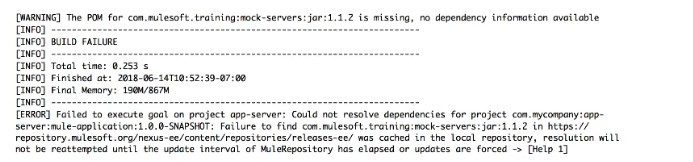
The error occurs when a project is run in Anypoint Studio. The project, which has a dependency that is not in the MuleSoft Maven repository, was created and successfully run on a different computer.
What is the next step to fix the error to get the project to run successfully?
A. Edit the dependency in the Mule project's pom.xml file
B. Install the dependency to the computer's local Maven repository
C. Deploy the dependency to MuleSoft's Maven repository
D. Add the dependency to the MULE_HOME/bin folder
Explanation
Why "Install the dependency to the computer's local Maven repository" is Correct
Dependency Resolution Hierarchy: When Anypoint Studio (which uses Maven) tries to build a Mule project, it looks for dependencies in a specific order:
- Local Repository: The user's local Maven repository (the .m2/repository folder).
- Remote Repositories: Remote repositories defined in the project's pom.xml and the user's settings.xml (like MuleSoft's repositories, Maven Central, or corporate repositories).
The Problem: The dependency is not in the MuleSoft Maven repository (implying it's a custom or third-party dependency). It worked on the first computer because it was available in that computer's local repository. On the new computer, Maven checks the local repository, doesn't find it, and fails to find it in any public remote repository, causing the error.
The Solution: To fix this locally, you must manually install the custom JAR file into the new computer's local Maven repository (.m2/repository). This is done using the Maven command mvn install:install-file. Once the JAR is in the local repository, Maven can successfully resolve the dependency and the project will run.
Steps for Manual Installation:
The fix requires running a command in the terminal (Command Prompt/PowerShell/Bash):
mvn install:install-file -Dfile=
❌ Incorrect Answers
A. Edit the dependency in the Mule project's pom.xml file: The dependency is already correctly defined in the pom.xml (it worked on the other computer). Editing it won't magically make the file appear in any accessible repository.
C. Deploy the dependency to MuleSoft's Maven repository: While deploying it to a corporate or shared remote repository (like Nexus or Artifactory) would be the long-term, best practice fix for all developers, deploying it to MuleSoft's public Maven repository is not possible for custom dependencies. Moreover, the quickest local fix is to use the local repository.
D. Add the dependency to the MULE_HOME/bin folder: This is incorrect. Mule dependencies must be resolved through the Maven system and placed in the .m2/repository folder, not directly in the Mule runtime's binary folder.
| Salesforce-MuleSoft-Developer Exam Questions - Home | Previous |
| Page 3 out of 47 Pages |