Salesforce-Marketing-Cloud-Engagement-Developer Practice Test

Salesforce Spring 25 Release -
Updated On 1-Jan-2026

196 Questions

Fromwhich business unit could the Contact Delete feature be used within an Enterprise 2.0 account?

A. Any business unit

B. The Parent account

C. Only in Agency accounts

D. The business unit where the contactwas introduced

C.   Only in Agency accounts

Explanation:

A. Any business unit
This is incorrect. While users might assume that any business unit (BU) can manage contact deletion due to their access to contact data, the Contact Delete feature is not universally available across all BUs. This feature requires elevated permissions and centralized control, which not every BU typically has. Therefore, using Contact Delete from any BU could risk accidental deletions or data inconsistency across the Enterprise 2.0 structure, which is why this option is not valid.

B. The Parent account
Incorrect. Although the Parent account (top-level business unit) does have greater administrative rights than its children, it is not the designated location for using the Contact Delete feature. Contact Delete is primarily a feature of a specific account configuration, not automatically granted based on hierarchy alone. While the Parent account can manage data and structure broadly, only specific accounts, such as Agency accounts, are provisioned with Contact Delete functionality by default.

C. Only in Agency accounts ✅ (Correct Answer)
Correct. The Contact Delete feature in Enterprise 2.0 accounts is specifically enabled within Agency accounts, which are typically used by marketing agencies to manage multiple client accounts under one master. These accounts are designed to have more centralized control, including the ability to delete contact records permanently. This setup helps prevent data retention issues and provides better compliance with data privacy standards across multiple sub-accounts or clients.

D. The business unit where the contact was introduced
Incorrect. Even though it might seem logical to delete a contact from the business unit where they were introduced or originally added, Marketing Cloud doesn’t limit deletions this way. Contacts are managed at the enterprise level, and deletion is not bound to their origin BU. Moreover, unless that BU is an Agency account or has Contact Delete permissions, it cannot delete the contact, regardless of where it was added.

A developer wants to create an HTML table where rows will alternate background colors between white and red. The developer does not know how many rows will be sent within each email, and decides to use a loop and assigns the RowCount() of the table rows to the variable@numerator. What is the recommended AMPscript logic to determine the background color of each table row within the loop?

A. %%[IF DIVIDE(@numerator,2) =1 THEN SET @color = 'Red' ELSE SET @color = 'White' ENDIF]%%

B. %%[IF SUBSTRING(DIVIDE(@numerator,2),1) = 1 THEN SET @color = 'Red' ELSE SET @color = 'White' ENDIF]%%

C. %%[IF @numerator/2 = 1 THENSET @color = 'Red' ELSE SET @color = 'White' ENDIF]%%

D. %%[IF MOD(@numerator,2) = 1 THEN SET @color = 'Red' ELSE SET @color = 'White' ENDIF]%%

D.   %%[IF MOD(@numerator,2) = 1 THEN SET @color = 'Red' ELSE SET @color = 'White' ENDIF]%%

Explanation:

✅ D. %%[IF MOD(@numerator,2) = 1 THEN SET @color = 'Red' ELSE SET @color = 'White' ENDIF]%%
This is the correct solution because the MOD() function is specifically designed to return the remainder of a division operation. When alternating colors, you typically want to check whether a row index is odd or even. MOD(@numerator,2) returns 1 for odd numbers and 0 for even. This logic effectively lets you alternate between two color values (e.g., red for odd rows, white for even). It’s the most efficient and readable approach for row-based color alternation in dynamic HTML tables using AMPscript.

❌ A. %%[IF DIVIDE(@numerator,2) = 1 THEN SET @color = 'Red' ELSE SET @color = 'White' ENDIF]%%
The DIVIDE() function performs floating-point division, and checking if the result equals 1 doesn’t reliably identify odd or even numbers. This condition would only be true for a very specific input (@numerator = 2) and fail for all others. Therefore, this logic doesn’t properly support alternating row colors based on odd/even patterns, making it unreliable and inappropriate for this use case.

❌ B. %%[IF SUBSTRING(DIVIDE(@numerator,2),1) = 1 THEN SET @color = 'Red' ELSE SET @color = 'White' ENDIF]%%
This is an unnecessarily complex and ineffective approach. First, it divides the row number, then extracts the first character of the result as a string. This is not a reliable method to determine if a number is odd or even and can result in unpredictable behavior, especially with floating-point values like 1.5 or 3.0. Additionally, mixing string functions with numerical logic makes the code harder to read and maintain.

❌ C. %%[IF @numerator/2 = 1 THEN SET @color = 'Red' ELSE SET @color = 'White' ENDIF]%%
This syntax performs a raw division operation and checks if the result is 1. However, this condition is only true when @numerator equals 2, which does not help with row alternation logic. You want to alternate styles for every other row, and simply dividing by 2 and checking for a specific result will not produce the correct alternating pattern across a loop with many rows.

What is thepurpose of the IF statement below?
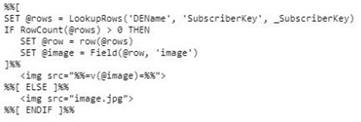


A. To handle when no row is returned by the LookupRows function

B. To handle when the subscriber is in a held status

C. To handle when images are broken

D. To handle when there are multiple records in the data extensionfor the subscriber

A.   To handle when no row is returned by the LookupRows function

Explanation:

✅ A. To handle when no row is returned by the LookupRows function
This IF statement checks whether the RowCount() of the @rows variable is equal to 0, which indicates that the AMPscript function LookupRows did not return any results. This condition is critical when developing dynamic content based on data retrieved from a data extension. If the script does not handle a “no match found” scenario, the email could break or show blank values. Using RowCount() ensures that the fallback logic (e.g., default values or error handling) is executed when no matching rows exist in the targeted data extension, thus improving script robustness.

❌ B. To handle when the subscriber is in a held status
A “held” subscriber is someone whose email address has bounced multiple times and has been flagged by Marketing Cloud. However, the RowCount() function and LookupRows logic are not connected to the subscriber's send status. This IF statement does not determine whether a subscriber is on hold—it only evaluates whether data was returned from a lookup. Managing held status would involve checking bounce metrics or send classification settings.

❌ C. To handle when images are broken
Broken images in emails are typically caused by incorrect image URLs or unavailable image hosting, not by AMPscript logic. This IF statement has nothing to do with image rendering. AMPscript does not check for broken image links, and the email rendering engine will not evaluate image validity using AMPscript. Instead, broken image handling is a design-level concern managed through proper testing and hosting.

❌ D. To handle when there are multiple records in the data extension for the subscriber
RowCount() can be used to determine the number of records returned, but this specific IF statement only checks for zero results, not multiple. To handle multiple records, the logic would likely include loops or conditional logic based on values greater than 1. In this case, the focus is on ensuring there is at least one result—not handling multiple results specifically.

NTO wants use Personally Identifiable Information (PII) data to personalize email communications, but does not want to store PII data in Marketing Cloud. Which feature could they use to personalize emails from an external data source?

A. External Objects

B. Tokenized Sending

C. Salesforce Shield

D. Single Sign-On

B.   Tokenized Sending

Explanation:

✅ B. Tokenized Sending
Tokenized Sending allows Marketing Cloud to send personalized emails without storing PII data within the platform. Instead of loading personal data into Marketing Cloud data extensions, token placeholders (such as [FirstName] or [AccountNumber]) are used and resolved at the time of send using an external secure data source. This is ideal for organizations that have strict compliance or data protection requirements (e.g., healthcare or finance industries), as it significantly reduces the exposure and storage of sensitive customer data. It enables personalization while maintaining data security and regulatory compliance.

❌ A. External Objects
External Objects are part of Salesforce's platform, not Marketing Cloud, and are used to connect external databases or systems so data can be referenced in Salesforce. While this may sound similar, External Objects are not designed for Marketing Cloud email personalization or tokenized messaging. They are more relevant for CRM record viewing or reporting use cases. Marketing Cloud does not natively support personalization from External Objects unless the data is first imported or integrated via APIs.

❌ C. Salesforce Shield
Salesforce Shield is a security suite that provides features such as field-level encryption, event monitoring, and audit trails within the Salesforce platform. However, it does not apply directly to Marketing Cloud. Even if Shield were in place, storing PII in Marketing Cloud would still mean the data exists in the system, which NTO wants to avoid. Shield helps protect stored data, but it does not eliminate the need to store data in the first place.

❌ D. Single Sign-On
Single Sign-On (SSO) enables users to log in to Marketing Cloud using their company credentials via identity providers like Okta or Azure AD. While it enhances login security and simplifies access, it is not related to email personalization or data handling. SSO does not provide a mechanism for sending personalized messages using external PII data. It is focused on user access, not subscriber data usage.

NTO uses an external CRM which only exports encrypted files. NTO's marketing manager team wants to use some of the subscriber data found in the CRM for future marketing sends. Which three actions should be included in an automation given these requirements? (Choose 3)

A. Import definition to the necessary data extension

B. File transfer activity to the Import directory for decryption

C. File drop to the SFTP Root directory

D. File drop to the SFTP Import directory

E. File transfer activity to the Safehouse for decryption

A.   Import definition to the necessary data extension
D.   File drop to the SFTP Import directory
E.   File transfer activity to the Safehouse for decryption

Explanation:

✅ A. Import definition to the necessary data extension
An Import Definition in Automation Studio is essential when you need to map incoming data from a file (CSV, TXT, etc.) into a Data Extension in Marketing Cloud. Once the encrypted file has been decrypted, this step enables you to bring subscriber data into a structured format that can be used for segmentation and sending emails. It supports scheduling and automation, so the import can occur daily or based on a trigger. Without this step, the decrypted file would not be usable within the platform for marketing purposes.

✅ D. File drop to the SFTP Import directory
The SFTP Import directory is configured to trigger an automation once a file is placed there. This is where the decrypted or decryption-ready file is dropped, and the automation can then pick it up for further processing. It allows seamless integration of the external CRM data into the Marketing Cloud environment. If a File Drop automation is used, this directory ensures that the process kicks off automatically when a new file arrives.

✅ E. File transfer activity to the Safehouse for decryption
The Safehouse is the only supported directory for decrypting files within Marketing Cloud. If the CRM exports encrypted files, they need to be placed into the Safehouse using a File Transfer Activity with a decryption step. This ensures the sensitive data is securely handled and becomes usable by Marketing Cloud. Skipping this step would either leave the data encrypted and unreadable or violate secure processing protocols.

❌ B. File transfer activity to the Import directory for decryption
This is incorrect because encrypted files must first be moved to the Safehouse, not the Import directory, for decryption. The Import directory is used for files that are already decrypted and ready to be ingested into the system. Decrypting a file in the wrong directory will either fail or violate the expected security process within Marketing Cloud. The Safehouse is specifically designed for secure handling of sensitive files like encrypted exports.

❌ C. File drop to the SFTP Root directory
This is also not a valid step. The Root directory is a general-purpose folder and is not configured for triggering automations or secure handling of file transfers. To automatically trigger an automation when a file is dropped, it must be placed in the Import directory. For decryption and secure processing, the file must go to the Safehouse. Using the Root directory bypasses these specialized handling features and can result in automation failure.

Salesforce-Marketing-Cloud-Engagement-Developer Exam Questions - Home Previous
Page 6 out of 40 Pages