Salesforce-Marketing-Cloud-Engagement-Developer Practice Test

Salesforce Spring 25 Release -
Updated On 1-Jan-2026

196 Questions

A customer wants to export send data to their SFTP. Which two automations would accomplish this? (Choose 2)

A. Tracking Extract

B. Tracking Extract > File Transfer

C. Query (Data Views) > Data Extension Extract > File Transfer

D. Query (Data Views) > File Transfer

B.   Tracking Extract > File Transfer
C.   Query (Data Views) > Data Extension Extract > File Transfer

Explanation:

❌ A. Tracking Extract
Tracking Extract alone is not a complete automation to move data to an SFTP location. While it is used to retrieve email send tracking data (like opens, clicks, bounces, etc.), it only creates a file in the Safehouse. The Safehouse is a temporary encrypted storage area within Marketing Cloud. You still need a File Transfer activity afterward to actually move that file to the SFTP location. Therefore, this option only represents half of the process and is insufficient by itself.

✅ B. Tracking Extract > File Transfer
This is a complete and correct automation setup. The Tracking Extract activity pulls tracking data (opens, clicks, etc.) and saves the file in the Safehouse. The File Transfer activity then moves that file from the Safehouse to the customer’s SFTP location. This approach ensures the automation exports the required data and delivers it to the external system without manual intervention. This combination is efficient and scalable for daily or weekly reporting on email performance.

✅ C. Query (Data Views) > Data Extension Extract > File Transfer
This is another correct and complete sequence. First, a Query Activity is used to retrieve tracking data from Data Views (system tables like _Open, _Click, etc.) and stores the result in a Data Extension. Next, a Data Extension Extract converts that data extension into a flat file in the Safehouse. Finally, a File Transfer activity moves the file from the Safehouse to the SFTP location. This setup is often used when you want to customize the data being extracted.

❌ D. Query (Data Views) > File Transfer
This setup is incomplete. A Query Activity retrieves and stores data into a Data Extension, but a File Transfer activity alone cannot extract data from that Data Extension directly. There is a missing step: you need a Data Extension Extract activity to create a downloadable file in the Safehouse before the File Transfer can move it to the SFTP. Without that, the File Transfer has nothing to move, and the automation will fail to achieve its goal.

How can subscriber, system, and sendable Data Extension attributes be referenced for content personalization using SSJS?
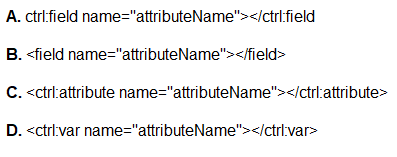
A. Option A

B. Option B

C. Option C

D. Option D

A.   Option A

Explanation:

Option A ✅ (Correct Answer)
✅ This is the correct syntax for referencing subscriber, system, and sendable attribute values within Server-Side JavaScript (SSJS) in Salesforce Marketing Cloud. The tag allows the developer to dynamically insert personalization strings in SSJS and HTML content blocks. When rendered, this control tag pulls the corresponding attribute value for the current subscriber. It is especially useful in email templates or CloudPages when personalization must occur using values from data extensions or system variables like EmailAddress, FirstName, etc.

Option B ❌
❌ This syntax is not valid in SSJS or AMPscript environments within Salesforce Marketing Cloud. While the tag structure might appear similar, the correct tag must include the ctrl: namespace to be interpreted correctly by the system. Without this, Marketing Cloud won’t recognize the tag as a directive to insert a value, and it would be treated as plain text, potentially causing rendering issues or a broken message layout. It is important to follow exact syntax conventions in dynamic content tags.

Option C ❌
❌ This tag may seem reasonable based on its naming convention, but it is not a supported or recognized control tag in Salesforce Marketing Cloud for retrieving personalization attributes. There is no tag available in either AMPscript, SSJS, or standard HTML content blocks. Using unsupported tags may not generate errors during send time, but it will fail silently and simply display nothing or incorrect content to the subscriber. Always refer to the official documentation for supported tags.

Option D ❌
❌ This option is also incorrect because is not a recognized or supported control tag in Marketing Cloud. While the intent may have been to retrieve a variable, the correct and supported method to insert subscriber and system variables for personalization is via . Using invalid tags like may result in broken emails or unexpected content delivery, especially when attempting to send dynamic messages at scale. Such issues can negatively impact campaign performance or deliverability.

NTO wants to exclude sending an email at send time to those with a record on the 'Exclude'Data Extension. The primary key on this data extension is Subscriber Key. How would a developer write the Exclusion Script?

A. Lookup ('Exclude','EmailAddress','SubscriberKey',SubscriberKey)

B. Lookup ('Exclude','SubscriberKey', 'EmailAddress', emailddr_)

C. Rowcount (LookupRows('Exclude',SubsciberKey,_SubscriberKey) >0

D. Rowcount (LookupRows('Exclude','SubscriberKey,_SubscriberKey) >1

C.   Rowcount (LookupRows('Exclude',SubsciberKey,_SubscriberKey) >0

Explanation:

A. Lookup ('Exclude','EmailAddress','SubscriberKey',SubscriberKey) ❌
❌ This option incorrectly assumes that the field to retrieve is EmailAddress, and that it should be used as a condition to determine exclusion. However, for exclusion purposes, you're not interested in retrieving a value—you want to check if a record exists. Additionally, the parameters are out of order for an effective lookup (it uses field-to-return first, then lookup field and value). This script might retrieve a value, but it doesn't effectively determine if the subscriber should be excluded.

B. Lookup ('Exclude','SubscriberKey', 'EmailAddress', emailddr_) ❌
❌ This script attempts to look up a SubscriberKey by matching the EmailAddress, which is not aligned with the defined primary key of the data extension (SubscriberKey). Furthermore, the use of the variable emailddr_ may not match any defined AMPscript variable, and the logic is flawed for exclusion. The function is not being used as a conditional check and does not return a true/false value that would help exclude the subscriber from the send.

C. Rowcount (LookupRows('Exclude','SubscriberKey',_SubscriberKey)) > 0 ✅ (Correct Answer)
✅ This is the correct exclusion script. It uses LookupRows to search for records in the 'Exclude' data extension where the SubscriberKey matches the current subscriber’s key. RowCount is then used to check how many matching rows were returned. If the count is greater than 0, the subscriber should be excluded from the send. This script effectively checks the presence of the subscriber in the exclusion list and works well with send-time AMPscript exclusion logic.

D. Rowcount (LookupRows('Exclude','SubscriberKey',_SubscriberKey)) > 1 ❌
❌ This script is similar to the correct one but incorrectly checks if the row count is greater than 1. This would exclude only those subscribers who appear more than once in the exclusion data extension. Since SubscriberKey is the primary key, it should be unique in the data extension, and a match would result in only one row. Thus, checking for > 1 would fail to exclude valid subscribers and result in incorrect exclusions or no exclusions at all.

A developer receives a request to integrate Marketing Cloud with a lead capture tool. The lead capture tool will call the Marketing Cloud API to create a data extension every time a new lead form is published. The created data extension's name should match the name of the form exactly. Which API feature could the developer use to dynamically create these data extensions?

A. SOAP API using Create Method and the DataExtension Object

B. REST API using POST on the /interaction/v1/EventDefinitions endpoint with Schema populated

C. REST API using POST on the /data/v1/customobjectdata/ endpoint

D. Creating the data extension using API is not possible

A.   SOAP API using Create Method and the DataExtension Object

Explanation:

A. SOAP API using Create Method and the DataExtension Object ✅ (Correct Answer)
✅ The SOAP API's Create method along with the DataExtension object is specifically designed to dynamically create new data extensions in Marketing Cloud. This method allows developers to define the schema (field names, data types, lengths, etc.) and specify the name and properties of the data extension. In this use case, where new lead forms trigger the creation of uniquely named data extensions, this is the best solution because it allows flexibility and automation. It's a standard approach when needing to programmatically manage custom tables (data extensions) in Marketing Cloud.

B. REST API using POST on the /interaction/v1/EventDefinitions endpoint with Schema populated ❌
❌ This REST API endpoint is used to create or manage Event Definitions for Journey Builder. It is not meant for creating data extensions. While the EventDefinitions endpoint can define events that start journeys, it does not directly support dynamic creation of data extensions based on user input or form names. Using this method would be incorrect for the described scenario, as the purpose here is to create standalone data extensions for each new form.

C. REST API using POST on the /data/v1/customobjectdata/ endpoint ❌
❌ The /data/v1/customobjectdata/ endpoint is designed for inserting or retrieving records from existing data extensions. It does not support the creation of new data extensions. This endpoint requires that the data extension already exists in Marketing Cloud. Attempting to use it to dynamically create new data extensions would result in an error or unsupported request. It is useful for working with existing data structures but not for defining or provisioning new ones.

D. Creating the data extension using API is not possible ❌
❌ This is incorrect because Marketing Cloud's SOAP API fully supports the creation of data extensions. Developers can use the DataExtension object with the Create method to programmatically create new data extensions. This is a well-documented and commonly used feature in Marketing Cloud development. Saying that API creation is not possible shows a misunderstanding of the platform’s capabilities and would mislead developers from an otherwise viable and supported solution.

Certification Aid wants to add records to a Data Extension using the SOAP API. Which object can be used for this?

A. DataExtensionObject object

B. Subscriber object

C. Attribute object

D. DataExtension object

A.   DataExtensionObject object

Explanation:

A. DataExtensionObject object ✅ (Correct Answer)
✅ The DataExtensionObject is the correct object to use when interacting with rows inside a data extension using the SOAP API. This object allows developers to insert, update, or retrieve individual records (rows) in a specific data extension by specifying the customer key or name of the data extension. It encapsulates both the data extension's identity and the values to insert. When using the SOAP Create method, each DataExtensionObject represents a row and allows setting the column values using Name/Value pairs.

B. Subscriber object ❌
❌ The Subscriber object in the SOAP API is used specifically to manage subscriber records in lists, including subscription status, email addresses, and preferences. It is not designed to insert or manage data within generic or custom data extensions. Using this object would not allow the developer to insert records into a marketing data extension that stores campaign-specific or custom subscriber data not associated with list subscriptions. Therefore, it is not applicable for inserting rows into a Data Extension.

C. Attribute object ❌
❌ The Attribute object in SOAP API is used to define or reference metadata associated with subscribers or data extensions, but it is not used for managing data row content. It is typically used when describing the structure of subscriber attributes, not inserting values into a Data Extension. If the goal is to insert data (records), this object doesn't provide the methods or structure to achieve that functionality. It's more suited to managing the schema, not the data.

D. DataExtension object ❌
❌ The DataExtension object is used to define or retrieve metadata about the data extension itself, such as its structure, fields, and properties. It is not used to insert or manage the actual row data inside the data extension. If a developer were to use the DataExtension object with the Create call, it would create a new data extension—not a new row inside an existing one. Hence, it’s the wrong choice for inserting data into an already existing data extension.

Salesforce-Marketing-Cloud-Engagement-Developer Exam Questions - Home Previous
Page 4 out of 40 Pages