
The Salesforce Platform Data Architect exam rewards architectural judgment: the ability to read a complex scenario and identify the design that holds up at scale, respects security requirements, and avoids failures that only surface when data volumes reach the millions. Three domains drive over half the exam’s weight: Data Modeling and Database Design, Salesforce Data Management, and Large Data Volumes. This guide covers all three with the precision you need on exam day.
Domain 1: Data Modeling and Database Design
Know Your Object Types
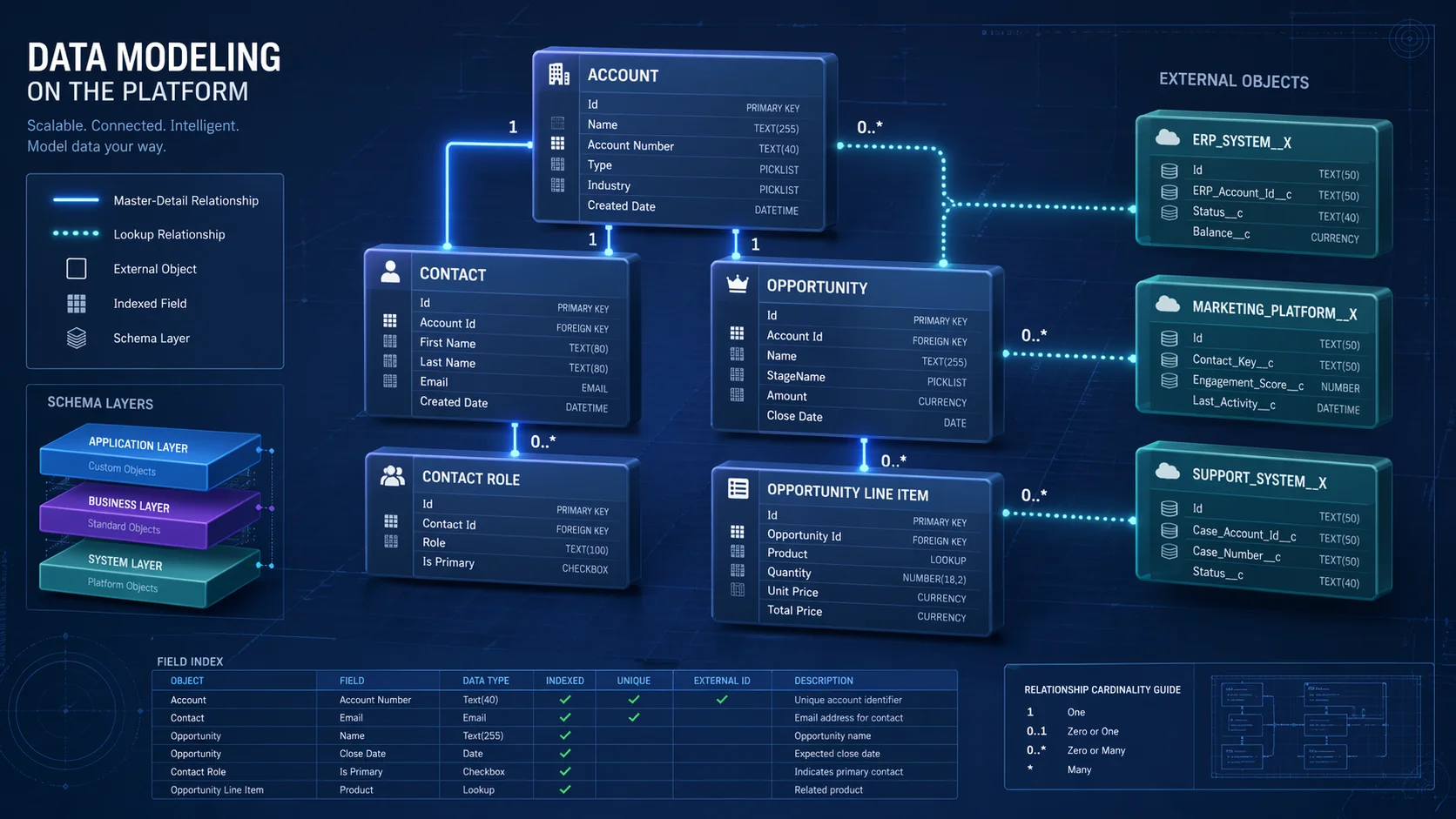
Salesforce supports five object types, and the exam tests your ability to choose the right one per scenario.
- Standard objects (Account, Contact, Opportunity) are pre-built and cannot be deleted, only extended.
- Custom objects support all automation including triggers and validation rules.
- External objects surface data from outside Salesforce in real time via Salesforce Connect, with no data import required.
- Big Objects store massive volumes of archival data without consuming standard storage, but carry significant constraints: no triggers, no automation, no standard list views, and indexed fields that cannot be modified after deployment
- Platform Events handle event-driven messaging and are not a storage mechanism.
Exam signal: When a scenario involves hundreds of millions of rarely-accessed historical records, the answer is Big Objects. When automation must fire on insert, Big Objects are disqualified.
Relationship Types: The Exam’s Core Topic
Lookup relationships are loosely coupled. The child record survives parent deletion, retains its own sharing settings, and does not support roll-up summary fields.
Master-detail relationships are tightly coupled. Deleting the parent cascades to all child records. The child’s OWD locks to “Controlled by Parent,” simplifying sharing at the cost of flexibility. Roll-up summary fields (SUM, COUNT, MIN, MAX) are only available through master-detail. The most common exam trap: candidates choose master-detail for roll-up capability, but the scenario requires reassigning child records to different parents or granting the child independent security settings, both of which disqualify master-detail. Child records in a master-detail relationship cannot be reparented.
For external objects, three relationship types apply: a standard lookup (uses the 18-character Salesforce record ID), an external lookup (parent is an external object), and an indirect lookup (parent is a standard or custom Salesforce object, matched via a custom external ID field used when external data lacks Salesforce record IDs).
Big Object indexed fields are defined at creation and form a fixed composite index. Queries must filter on indexed fields in exact left-to-right order with no gaps, a structure that cannot change post-deployment.
Domain 2: Salesforce Sharing Architecture
The Additive Layering Principle
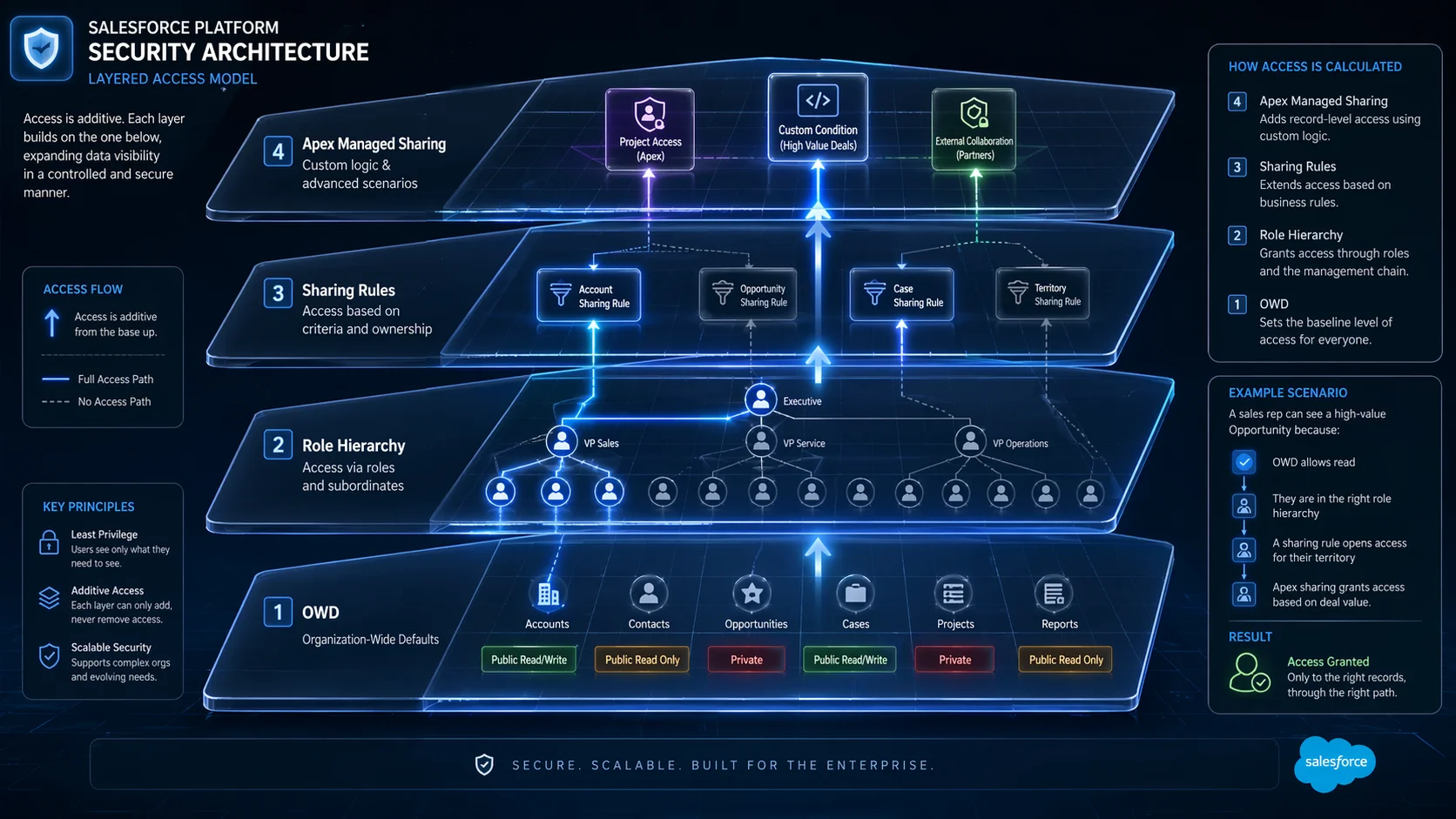
Each layer of the sharing model can only open access further; it can never restrict it. The stack runs from OWD at the base through role hierarchy, sharing rules, manual sharing, and Apex managed sharing. If the OWD is Public Read/Write, no configuration above it can hide specific records. Restriction requires changing the OWD itself.
Organization-Wide Defaults
OWD settings define baseline access for every user who does not own a given record.
| Setting | Read Access | Edit Access |
| Private | Owner + hierarchy superiors | Owner + hierarchy superiors |
| Public Read Only | All users | Owner + hierarchy superiors |
| Public Read/Write | All users | All users |
| Controlled by Parent | Inherited from master record | Inherited from master record |
Start with the most restrictive OWD your requirements support, then open access using the layers above it.
Role Hierarchy
The role hierarchy propagates record access upward automatically; managers inherit access to all records owned by subordinate users without additional configuration. Critically, roles control what you can see; profiles control what you can do, and both must be satisfied for meaningful record access.
For custom objects, the “Grant Access Using Hierarchies” setting can be disabled, severing automatic upward propagation entirely. When a scenario states that managers should not automatically inherit records on a custom object, this is the correct lever.
Sharing Rules and Their Limits
Sharing rules extend access horizontally to users outside the record owner’s role chain. Owner-based rules trigger on record ownership. Criteria-based rules trigger on field values regardless of ownership. Both require the OWD to be Private or Public Read Only, as they serve no purpose when the OWD is already Public Read/Write.
Key limits: 300 total sharing rules per object, 50 criteria-based rules per object.
When declarative rules cannot express complex, dynamic business logic, Apex Managed Sharing is the answer: developers programmatically insert rows into the object’s share table based on conditions no declarative tool can evaluate.
Domain 3: Large Data Volumes
The 10,000 Rule and Data Skew
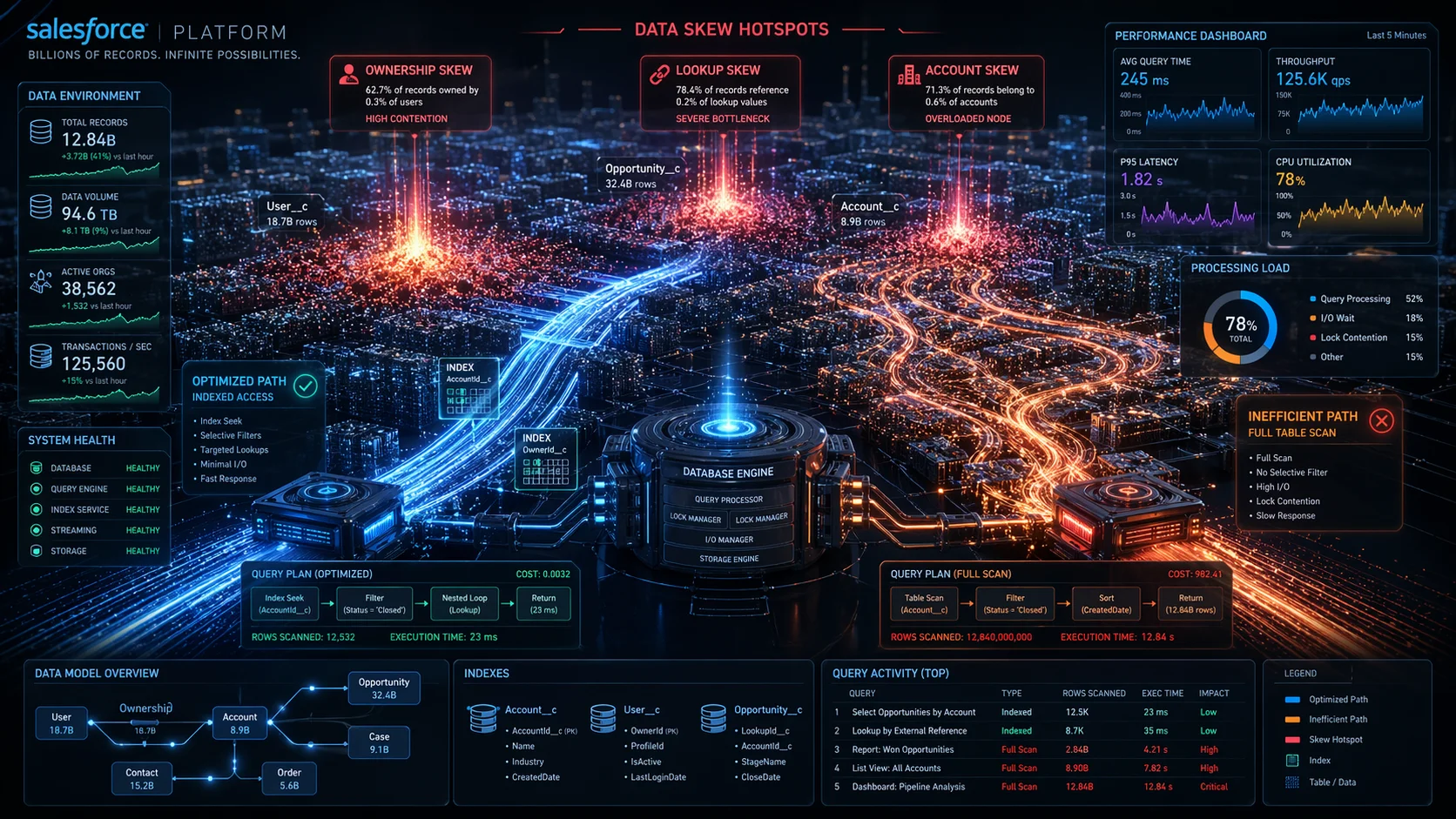
All three types of data skew share the same trigger: concentration of more than 10,000 records at a single point in the data model.
- Account data skew occurs when more than 10,000 child records links to a single Account. Updates lock the parent momentarily — at scale, locks collide and cause failures.
- Lookup skew is the same lock contention problem on any object with a lookup field — not just Accounts. When 10,000+ records point to the same lookup target, concurrent updates cause failures across any object type.
- Ownership skew occurs when a single user or queue owns more than 10,000 records. When that user’s role changes, Salesforce re-evaluates sharing rules for every owned record simultaneously — an operation that can run for hours.
Indexing and Query Selectivity
A query is selective when its filters match a small enough percentage of total records for the optimizer to use an index rather than scan the full table.
| Records in Object | Selectivity Threshold |
| First 1,000,000 | ≤ 30% |
| Beyond 1,000,000 | ≤ 15% |
| Custom index target | ≤ 10% / max 333,333 records |
Operators that break selectivity (!=, NOT IN, LIKE ‘%text’, CONTAINS) force full table scans on large objects and should be avoided in WHERE clauses. Note that LastModifiedDate is not automatically indexed; SystemModstamp is.
Skinny Tables
Skinny tables are database-level optimizations requested from Salesforce Support. Salesforce stores standard and custom fields in separate tables internally. When a query retrieves both, a join runs for every row. Skinny tables pre-join a specific field set into a narrower table, reducing fetch cost on high-volume objects. They are capped at 100 columns, exclude soft-deleted records, and copy automatically to Full sandboxes only.
Skinny tables do not resolve sharing evaluation overhead, data skew, or non-selective queries; they are a last-resort optimization applied after those issues have already been addressed.
Recommended Study Approach
- Start with the official Trailhead Exam Guide: Use it as your master checklist. Every objective listed there is fair game. Work through the objectives systematically rather than jumping between topics.
- Build hands-on experience in a Developer Edition org: Create objects, set up sharing rules, load data, run SOQL queries in the Query Editor, and observe the results. Conceptual knowledge alone is not sufficient for scenario-based questions.
- Study the official LDV best practices documentation: Salesforce publishes a dedicated PDF titled “Best Practices for Deployments with Large Data Volumes.” It is dense but authoritative.
- Practice with timed mock exams: SalesforceKing offers Data Architect practice exam questions that are structured closely to the real exam format, including scenario based multiple select questions with explanations.
- Do not wait until you are fully ready to schedule: Book the exam once you are consistently scoring above 65% on practice tests. Having a scheduled date creates productive urgency.
Quick Reference: All Key Thresholds
| Concept | Threshold / Limit |
| Data skew trigger (child records per parent) | > 10,000 |
| Ownership skew trigger (records per user/queue) | > 10,000 |
| Standard index selectivity – first 1M records | ≤ 30% |
| Standard index selectivity – beyond 1M records | ≤ 15% |
| Custom index selectivity | ≤ 10% / max 333,333 records |
| Skinny table maximum columns | 100 |
| Standard API → Bulk API recommended threshold | > 2,000 records |
| PK Chunking recommended threshold (export) | > 10 million records |
| Search indexing latency after data update | ~15 minutes |
| Max total sharing rules per object | 300 |
| Max criteria-based sharing rules per object | 50 |
| Max lookup relationship fields per object | 40 |
| Max master-detail relationship fields per object | 2 |
| Exam questions | 60 scored + 5 unscored |
| Time allotted | 105 minutes |
| Passing score | 58% |
Last reviewed against the official Salesforce Certified Platform Data Architect Exam Guide. Always cross-reference with the current Trailhead exam guide before your exam date, as Salesforce updates certification objectives with each major platform release.
Also Read:
Data Architects Guide to Designing for Scale, Security, and Navigating Salesforce Governor Limits
Beginner’s Guide to Salesforce Certification Tracks
Your Day-of-Exam Checklist: What to Do Before and During Your Salesforce Test