
Earning a Salesforce certification is a big step forward in your career. It shows you have the skills to work with one of the top CRM tools. But getting certified is just the start. You need to show it off on your resume and LinkedIn to catch the eye of hiring managers. This guide will help you do that. We will cover simple ways to list your certifications, use keywords, and make your profiles stand out. By the end, you will know how to turn your cert into job offers.
Why Highlight Your Salesforce Certification?
Salesforce skills are in high demand. Companies want people who can handle their CRM systems well. Listing your certification on your resume and LinkedIn can help you get noticed. For example, many job postings look for at least three Salesforce certifications. This proves you know the platform inside out. It also helps your resume pass applicant tracking systems (ATS) that scan for specific terms like “Salesforce Certified Administrator.”
If you are still thinking about getting certified, check out Why Get Salesforce Certified in 2025? It explains the benefits beyond just pay.
Optimizing Your Resume for Salesforce Roles
Your resume is your first chance to impress. Start with a dedicated section for certifications. Place it right after your professional summary. Use bullet points for easy reading. List the exact title, like “Salesforce Certified Platform Developer I,” and add the date you got it. For example:
- Salesforce Certified Administrator – Issued: June 2023
- Salesforce Certified Sales Cloud Consultant – Issued: March 2024
This setup makes it clear and helps with ATS. Include keywords like “Salesforce skills for resume” such as Lightning, Apex, and Visualforce. These are common in job descriptions. Tie your certs to your work experience. Say something like, “Used Salesforce Certified Administrator skills to boost system efficiency by 20%.” This shows real impact.
Keep your resume to one page if possible. Focus on relevant certs for the job. If you have many, pick the top three to five. Update it often with new ones. For Salesforce developer roles, highlight skills like integrations and custom apps. This way, your resume tells a story of your expertise. And if you are eyeing a specific one, read Is the Sales Cloud Consultant Certification Worth It? An Honest Review for real insights.
Enhancing Your LinkedIn Profile
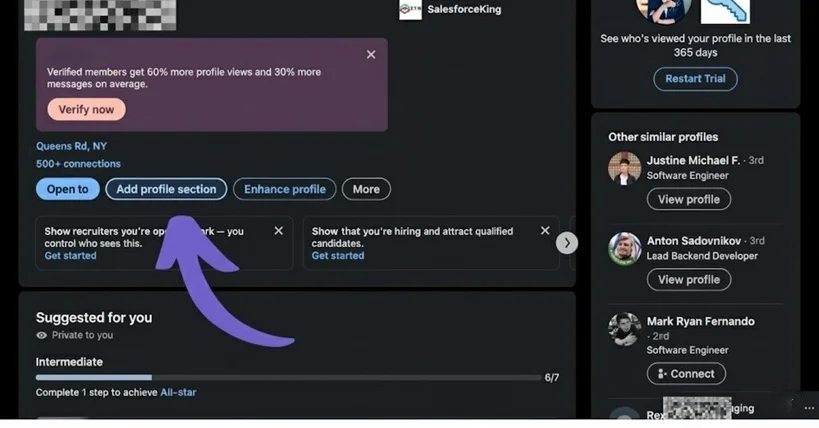
LinkedIn is where recruiters hunt for talent. Make your profile shine with your Salesforce certification. First, add it to the “Licenses & Certifications” section. Go to your profile, click the plus sign, and fill in the details. Use the exact name and add the issue date. You can get a direct URL from Trailhead’s verification page to link it.
Craft a strong headline. Instead of just “Salesforce Admin,” try “Certified Salesforce Administrator | Expert in Sales Cloud and Apex | Boosted Efficiency by 30%.” This includes keywords like “Salesforce certification LinkedIn” and grabs attention. Add Trailhead badges too. They show ongoing learning.
In your summary, mention how your certs helped in past roles. For example, “As a Salesforce Certified Marketing Cloud Specialist, I improved campaign results by 25%.” Join Salesforce groups and share posts about your skills. This builds your network. Recruiters often search for terms like “Salesforce resume examples,” so optimize with them.
Additional Tips to Stand Out
Use numbers to show results. Instead of saying you know Salesforce, say you “managed a system for 500 users, cutting costs by 15%.” This makes your cert more powerful. Tailor your resume and profile for each job. Research the company and match their needs.
Network on LinkedIn by connecting with Salesforce pros. Ask for endorsements on your skills. This adds trust. Also, consider adding a banner with your certs to your profile. Keep learning new skills to add more certs over time.

FAQs
How do I add my Salesforce certification to LinkedIn?
Log in to LinkedIn, go to your profile, and select “Add profile section.” Choose “Licenses & Certifications,” then enter the cert name, issuing organization (Salesforce), issue date, and URL if available.
What are the best Salesforce certifications to list on my resume?
It depends on the role. For admins, list Certified Administrator and Advanced Administrator. Developers should include Platform Developer I and II. Aim for at least three relevant ones.
How can I make my resume pass ATS for Salesforce jobs?
Use standard fonts and formats. Include keywords from the job description, like “Salesforce Lightning” or “CRM customization.” Avoid graphics that ATS can’t read.
Conclusion
Leveraging your Salesforce certification on your resume and LinkedIn can open doors to new jobs. Follow these steps to highlight your skills and stand out. Stay active in the community and keep updating your profiles. With the right approach, you can go from certified to hired in no time.